n8n Airtable Brevo Marketing Automation Email Tracking

Automate marketing campaigns with Airtable CRM & Brevo email tracking

Connect your CRM data with email campaigns for automated segmentation, personalized messaging, and engagement tracking

Download Template JSON · n8n compatible · Free
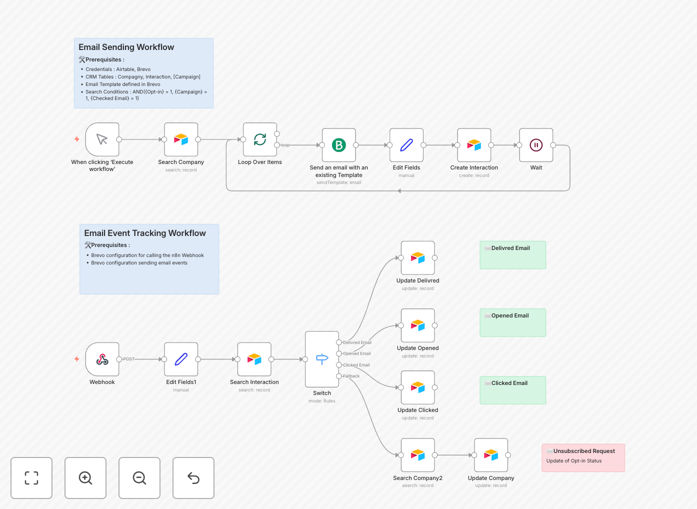
Airtable CRM and Brevo email tracking automation workflow

What This Workflow Does

This automation bridges the gap between your Airtable CRM and Brevo email marketing platform, creating a seamless marketing campaign management system. It eliminates manual data transfers between systems while providing real-time insights into campaign performance.

The workflow automatically segments contacts based on CRM data, triggers personalized email sequences, tracks recipient engagement, and updates customer records—all without manual intervention. This transforms static contact lists into dynamic, behavior-driven marketing campaigns.

How It Works

1. CRM Data Synchronization

The workflow continuously monitors your Airtable CRM for new or updated contacts. When changes are detected, it processes the data to determine appropriate marketing actions based on your predefined rules and segmentation logic.

2. Automated Email Triggering

Based on CRM data (like lead status, purchase history, or engagement level), the system triggers targeted email sequences through Brevo. Each email can be dynamically personalized using fields from the contact's CRM record.

3. Engagement Tracking

Brevo tracks all email opens, clicks, and other interactions. This engagement data flows back into Airtable, updating contact records with timestamped activity logs that inform future marketing decisions.

4. Lead Scoring & Follow-ups

The system automatically scores leads based on their engagement patterns and triggers follow-up actions—whether it's moving hot leads to sales or sending reminder emails to inactive contacts.

Who This Is For

This workflow benefits marketing teams, small business owners, and agencies managing multiple campaigns. It's ideal for:

  • E-commerce businesses running promotional campaigns
  • B2B companies nurturing leads through email sequences
  • Nonprofits managing donor communications
  • Agencies handling client marketing automation

What You'll Need

  1. An Airtable base configured as your CRM
  2. Brevo account with API access
  3. n8n instance (self-hosted or cloud)
  4. Basic understanding of Airtable fields and Brevo templates

Quick Setup Guide

  1. Download and import the JSON template into your n8n instance
  2. Connect your Airtable and Brevo accounts in the credentials section
  3. Map your Airtable fields to corresponding Brevo contact properties
  4. Configure your email templates and segmentation rules in Brevo
  5. Test with a small contact segment before full deployment

Key Benefits

Save 10+ hours weekly by eliminating manual data transfers between your CRM and email platform.

Improve campaign response rates with behavior-triggered emails that feel personal and timely.

Maintain accurate customer records with automatic engagement data updates in your CRM.

Scale your marketing efforts without proportional increases in administrative work.

Gain actionable insights from centralized campaign data across both platforms.

Pro tip: Start with simple automation rules (like welcome emails) before implementing complex multi-step sequences. This lets you validate the workflow before scaling up.

Frequently Asked Questions

Common questions about marketing automation with Airtable and Brevo

Airtable and Brevo integrate seamlessly for marketing automation. Airtable serves as your CRM database to store customer information and campaign details, while Brevo handles email delivery and tracking. When combined through automation, you can trigger personalized email sequences based on CRM data, track engagement, and update customer records automatically.

For example, when a new lead enters your Airtable CRM with "prospect" status, the workflow can immediately send a tailored introduction email through Brevo. As the lead interacts with your emails, those engagement signals flow back into Airtable to inform next steps.

This workflow can automate various campaign types including lead nurturing sequences, promotional offers, event invitations, and customer onboarding flows. You can segment audiences based on Airtable data fields, schedule automated follow-ups, and track email performance metrics—all without manual intervention.

Common automated campaigns include abandoned cart sequences for e-commerce, post-purchase follow-ups, content drip campaigns for education businesses, and renewal reminders for subscription services. The flexibility of Airtable allows custom campaign types matching your specific business model.

Email tracking provides valuable insights into recipient behavior. You can see who opened emails, clicked links, and engaged with content. This data helps refine targeting, improve messaging, and identify hot leads for follow-up. Automated tracking eliminates manual reporting while ensuring your CRM always has the latest engagement data.

For instance, if certain subject lines consistently get higher open rates, you can optimize future campaigns. Similarly, tracking click patterns reveals which content resonates most with different audience segments—information that directly informs content strategy and campaign timing.

Airtable offers flexible CRM capabilities with customizable fields, views, and collaboration features. Unlike rigid CRM systems, it adapts to your workflow. Marketers appreciate the visual interface for managing campaigns, tagging leads, and tracking customer journeys. When integrated with Brevo, it becomes a powerful automation hub for your marketing efforts.

The platform's flexibility shines when managing diverse campaigns—you might have one view for event marketing contacts, another for product launch sequences, and a third for customer retention efforts—all pulling from the same centralized data but organized for specific team needs.

Automation eliminates repetitive tasks like list segmentation, email scheduling, and data entry. Instead of manually exporting/importing data between systems, the workflow handles transfers automatically. This reduces human error while freeing up hours each week—time better spent on strategy and creative campaign development.

Consider the time saved by not having to: manually tag contacts who opened emails, update lead statuses based on engagement, or pull reports to analyze campaign performance. These tasks happen automatically while providing more accurate, real-time data than manual processes could achieve.

Absolutely. The workflow pulls customer-specific data from Airtable (like name, company, past purchases) to dynamically personalize Brevo emails. You can create conditional logic to tailor content based on lead status, demographics, or engagement history—making automated emails feel handcrafted for each recipient.

Advanced personalization might include: including product recommendations based on purchase history, referencing geographic location for local offers, or adjusting messaging tone based on customer type (B2B vs B2C). The depth of personalization depends only on the data you collect in your CRM.

Yes! GrowwStacks specializes in building tailored marketing automation systems. Our team can design workflows matching your specific CRM structure, email sequences, and reporting needs. We handle everything from initial consultation to implementation and ongoing optimization—helping you automate marketing processes perfectly aligned with your business goals.

Custom solutions might include: integrating additional data sources, creating complex lead scoring models, building multi-channel campaigns (SMS + email), or developing custom dashboards. We start by understanding your unique customer journey before designing automation that enhances rather than disrupts your marketing operations.

Need a Custom Marketing Automation?

This free template is a starting point. Our team builds fully tailored automation systems for your specific needs.