GoCardless Maybe Finance Banking Financial Automation n8n

Automate Multi-Bank Transaction Sync & Reporting with GoCardless & Maybe Finance

Sync transactions from multiple banks automatically to Maybe Finance for unified budgeting—no manual CSV exports or copy-paste.

Download Template JSON · n8n compatible · Free
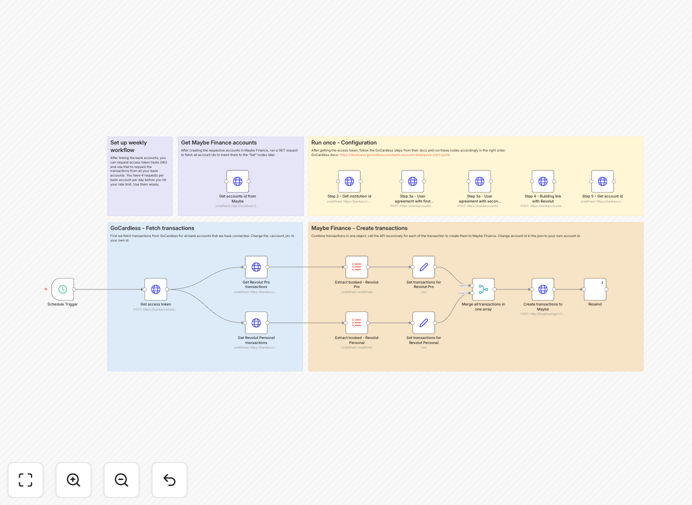
Visual diagram of multi-bank transaction sync automation workflow connecting GoCardless and Maybe Finance

What This Workflow Does

Managing money across multiple bank accounts—business, personal, side hustle—creates a fragmented financial picture. You end up downloading CSV files, copying numbers, and manually updating your budget app every week. This workflow solves that by automatically syncing transactions from GoCardless-supported banks (like Revolut, ABN AMRO) directly into Maybe Finance.

The automation runs on a schedule, fetches fresh transaction data, filters settled items, maps them to Maybe Finance's schema, and posts them via API. Your budget dashboard stays updated without any manual work, and you receive a weekly overview email. It turns multi‑account financial management from a chore into an automated insight system.

How It Works

Step 1: Scheduled Trigger

A cron schedule (default: weekly) initiates the workflow. You can adjust this to daily or monthly based on your budgeting frequency.

Step 2: Authentication & Data Fetch

The workflow obtains a fresh GoCardless access token, then queries transaction endpoints for each connected bank account. It retrieves raw transaction data including dates, amounts, descriptions, and status.

Step 3: Data Processing

An Item Lists node filters only "booked" (settled) transactions, excluding pending items. Each transaction is then mapped via Set nodes to match Maybe Finance's required fields—account ID, date, amount, category, description.

Step 4: Integration & Notification

A Merge node combines all processed transactions into a single payload. The workflow POSTs each transaction to Maybe Finance's API, updating your budget. Finally, a Resend node sends you a weekly summary email.

Who This Is For

This template is ideal for freelancers who receive payments into different accounts, founders managing business and personal finances separately, households with joint and individual accounts, and side‑hustlers tracking income across platforms. If you use multiple banks but want one consolidated budget view, this automation eliminates the manual bridge.

What You'll Need

  1. A n8n instance (cloud or self‑hosted) version 1.33+.
  2. GoCardless account with secret ID and key (sandbox or live).
  3. Maybe Finance account with API key.
  4. Bank accounts connected via GoCardless requisitions.
  5. Optional: Resend account for email notifications.

Pro tip: Start with GoCardless sandbox mode to test the workflow without real financial data. Once the sync works perfectly, switch to live credentials.

Quick Setup Guide

  1. Import the downloaded JSON template into your n8n workspace.
  2. Create credentials for GoCardless and Maybe Finance in n8n's credential store.
  3. Run the one‑time GoCardless configuration blocks to obtain institution IDs, create agreements, and complete bank login consent.
  4. Create corresponding accounts in Maybe Finance and note their account IDs.
  5. Paste the Maybe Finance account IDs into each "Set transactions" node.
  6. Adjust the schedule trigger to your preferred frequency.
  7. Activate the workflow and test with a manual trigger.

Key Benefits

Save 2‑4 hours monthly on financial admin. No manual CSV exports, data reformatting, or copy‑paste between apps. The automation handles everything on schedule.

Real‑time budget accuracy across all accounts. Your Maybe Finance dashboard reflects actual balances and transactions immediately, giving you reliable financial visibility.

Spot spending patterns instantly. Unified data lets you analyze trends, categorize expenses, and identify opportunities for savings across your entire financial ecosystem.

Extensible to additional banks and services. The workflow structure allows easy duplication—add nodes for extra banks, credit cards, or connect to other apps like Google Sheets or Slack.

Secure, controlled data flow. Transactions move through encrypted APIs you control, without exposing sensitive data to third‑party middleware.

Frequently Asked Questions

Common questions about financial automation and multi‑bank integration

Automating bank transaction sync eliminates manual data entry, reduces errors, and provides real‑time financial visibility. It saves hours each week, ensures budget accuracy, and helps you spot spending patterns instantly across multiple accounts.

For example, a freelancer with business and personal accounts no longer needs to download statements, reformat data, and manually update their budget app—the automation does it reliably every Monday.

GoCardless provides a secure API to access transaction data from multiple banks. This data can be automatically formatted and sent to budgeting apps like Maybe Finance, creating a unified financial dashboard without manual CSV exports.

The integration acts as a bridge: GoCardless fetches raw transactions, the workflow maps fields (date, amount, description), and the budgeting app receives clean, categorized data ready for analysis.

Yes, when using reputable services like GoCardless and Maybe Finance with proper API authentication. Automation workflows run on your own n8n instance, keeping data flows encrypted and controlled.

Always use official API keys, enable token rotation, and avoid storing sensitive credentials in plain text. The template follows secure practices—each run fetches a fresh GoCardless token valid for only 24 hours.

Freelancers, small business owners, households with multiple accounts, and side‑hustlers benefit most. Anyone managing money across different banks but wanting a single budget view saves significant time and gains better financial control.

Businesses with separate accounts for operations, taxes, and payroll can automate consolidation for accurate cash‑flow reporting without manual reconciliation.

Yes, with custom HTTP requests or by connecting other bank APIs through n8n. The workflow template is extensible—you can add nodes for additional banks, credit cards, or financial services by following the same data mapping pattern.

If your bank provides an API (or you use a service like Plaid), duplicate the transaction‑fetching path, adjust the request parameters, and connect its output to the Merge node.

Weekly syncs are ideal for personal budgeting. Businesses might prefer daily updates. The template uses a schedule trigger you can adjust—daily, weekly, or monthly—based on your need for financial freshness without overwhelming your budget app.

Consider your reporting needs: weekly for personal review, daily for cash‑flow monitoring, or monthly for tax preparation. The workflow can be scheduled accordingly.

You can connect to Google Sheets for custom reports, Notion for financial tracking, Slack for spending alerts, or accounting software like QuickBooks. n8n supports hundreds of integrations, letting you build a complete financial automation ecosystem.

After the Merge node, branch the workflow to send data to multiple destinations—budget app, spreadsheet, notification channel—for comprehensive financial management.

Yes, GrowwStacks builds tailored financial automation systems for your specific bank accounts, reporting needs, and integration requirements. We handle secure API connections, custom data mapping, and ongoing maintenance so you get a perfect‑fit solution.

Our team can extend this template to include custom banks, add advanced categorization logic, generate PDF reports, or integrate with your existing accounting software. Book a free consultation to discuss your requirements.

Need a Custom Multi‑Bank Automation?

This free template is a starting point. Our team builds fully tailored automation systems for your specific business needs.