What This Workflow Does
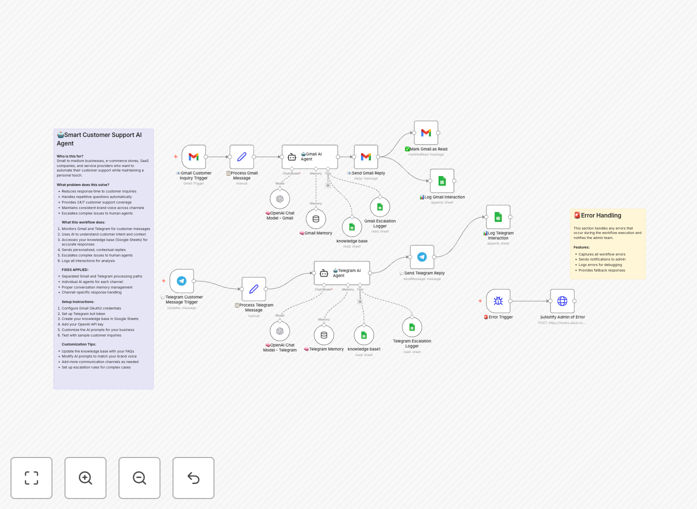
Manual customer support is a major drain on business resources. Slow responses frustrate customers, repetitive questions consume staff time, and maintaining 24/7 coverage is expensive. This automation solves these problems by deploying an intelligent AI agent that works across Gmail and Telegram simultaneously.
The workflow monitors incoming customer inquiries from both channels, uses GPT AI to understand intent and context, retrieves accurate answers from your knowledge base, and delivers personalized, brand-appropriate responses within seconds. It maintains conversation history, logs all interactions for analytics, and automatically escalates complex or sensitive issues to human agents based on predefined rules.
How It Works
Step 1: Multi-Channel Trigger
The workflow simultaneously watches a dedicated Gmail inbox and a Telegram bot for new messages. When a customer inquiry arrives via either channel, it captures the message content, sender details, and conversation context.
Step 2: AI Processing & Knowledge Retrieval
The customer message is sent to the OpenAI GPT model with custom instructions about your company's tone, policies, and escalation criteria. The AI analyzes the query, searches your connected knowledge base (like Google Sheets or a database) for relevant information, and formulates a helpful response.
Step 3: Smart Response & Escalation Logic
The AI determines if the query can be resolved automatically or requires human intervention. For routine FAQs, it sends the crafted response back through the original channel (Gmail reply or Telegram message). For complex issues, it triggers an escalation—logging the case to a tracker and notifying your support team.
Step 4: Logging & Follow-up
Every interaction—customer message, AI response, escalation decision—is logged to a Google Sheet for performance analysis. The workflow also marks processed emails as read and can trigger follow-up actions like satisfaction surveys or CRM updates.
Who This Is For
This template is ideal for small to medium businesses, e-commerce stores, SaaS companies, and service providers who receive consistent customer inquiries and want to improve support efficiency. It's perfect for teams with limited support staff looking to offer 24/7 service, startups aiming to scale support without proportional hiring, and any business seeking to reduce response times and increase customer satisfaction through automation.
What You'll Need
- A Gmail or Google Workspace account for email monitoring.
- A Telegram account to create and configure a bot.
- An OpenAI API key (GPT-4o-mini or similar model).
- Access to Google Sheets or another database for your knowledge base and logs.
- An n8n instance (cloud or self-hosted) to run the workflow.
Pro tip: Start by populating your knowledge base with the 20 most common customer questions and their approved answers. This gives the AI a strong foundation and immediately handles the bulk of your support volume.
Quick Setup Guide
- Download & Import: Click the download button above to get the JSON file. In your n8n dashboard, go to Workflows → Import from file and select the downloaded template.
- Configure Credentials: Set up credentials in n8n for Gmail (OAuth2), Telegram (bot token), OpenAI (API key), and Google Sheets.
- Customize Your Knowledge Base: Connect the Google Sheets nodes to your own spreadsheet. Structure columns for Question, Answer, Category, and Keywords.
- Adjust AI Instructions: Edit the "Customer Support AI Agent" node to include your company name, brand voice, specific policies, and escalation criteria.
- Test & Activate: Send a test email to your Gmail and a message to your Telegram bot. Verify responses are correct and the logging works. Then activate the workflow.
Key Benefits
Instant 24/7 Responses: Customers get answers within seconds, any time of day or night, dramatically improving satisfaction and reducing churn.
Massive Time Savings: Automate 60–80% of routine inquiries, freeing your team to focus on complex, high-value support tasks and strategic work.
Consistent Brand Communication: Every customer receives accurate, on-brand information, eliminating inconsistencies that can occur with multiple human agents.
Scalable Support Operations: Handle increasing customer inquiry volumes without proportionally increasing support staff, enabling business growth without ballooning costs.
Valuable Interaction Insights: Comprehensive logs provide data on common issues, peak times, and resolution rates, informing product improvements and training materials.