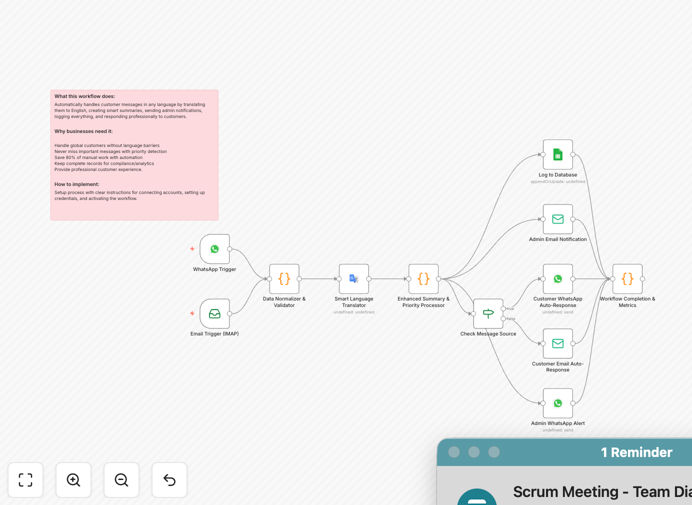
What This Workflow Does
Manual multilingual customer support is overwhelming, inefficient, and limits your business growth. This automation solves that by creating a 24/7 intelligent support system that handles customer inquiries across WhatsApp and email in any language. It automatically translates messages, classifies urgency, generates summaries for your team, sends professional responses, and logs everything for tracking.
The workflow breaks global language barriers while ensuring urgent cases get immediate attention. Think of it as your always-on multilingual support team that never sleeps, reduces manual work by 80%, and delivers consistent, professional customer experiences regardless of time zone or language.
How It Works
The automation follows a sophisticated eight-step process that transforms raw customer messages into organized, actionable support tickets with appropriate responses.
Step 1: Multi-Channel Message Capture
The system monitors both WhatsApp Business API (via webhook) and your customer support email (via IMAP). Messages from either channel feed into the same processing pipeline, ensuring consistent handling regardless of how customers reach you.
Step 2: Data Normalization & Validation
A data normalizer standardizes the message format, extracting key information like sender details, message content, timestamp, and channel source. It validates data integrity and handles malformed inputs gracefully to prevent workflow failures.
Step 3: Smart Language Translation
An AI-powered translator automatically detects the source language and translates messages to English for your support team. It preserves original context and cultural nuances while storing both original and translated versions for reference.
Step 4: Enhanced Summary & Priority Processing
AI analyzes the translated content to generate concise summaries highlighting key customer concerns. It automatically tags messages with priority levels: 🔴 High (urgent issues), 🟡 Medium (product inquiries), or 🟢 Low (general feedback).
Step 5: Message Source Intelligence
The system determines the optimal response channel, routing WhatsApp messages back to WhatsApp and emails back to email. This maintains conversation context and proper threading for ongoing dialogues.
Step 6: Automated Customer Response
Professional acknowledgment messages are sent via the customer's original channel. Responses include confirmation of receipt, estimated response time based on priority, a reference number for tracking, and immediate solutions for common issues.
Step 7: Database Logging & Analytics
Complete interaction history is stored in your database, including original messages, translations, priority classifications, responses sent, timestamps, and customer metadata. This enables analytics, reporting, and quality assurance.
Step 8: Admin Notifications & Alerts
Immediate email and WhatsApp alerts are sent to your admin team for high-priority cases, ensuring urgent issues receive human attention while the automation handles routine inquiries.
Who This Is For
This workflow is ideal for businesses with international customers, e-commerce stores receiving support inquiries, SaaS companies with global user bases, agencies managing client communications, and any organization struggling with multilingual support overhead. It's particularly valuable for teams with limited multilingual staff but growing international demand.
Pro tip: Start by automating your most common support inquiries (password resets, order status, business hours) while keeping complex issues for human agents. This balances efficiency with personalized service.
What You'll Need
- WhatsApp Business API access or approval for business messaging
- Email server credentials (IMAP for receiving, SMTP for sending)
- Translation API key (Google Translate, Azure Translator, or AWS Translate)
- Database connection (PostgreSQL, MySQL, or similar for logging)
- n8n instance (cloud or self-hosted) to run the workflow
- Admin contact information for high-priority alerts
Quick Setup Guide
Follow these steps to implement this automation in your business:
- Download the template using the button above and import it into your n8n instance via Import from Clipboard or Import from File.
- Configure WhatsApp integration by adding your Business API credentials to the WhatsApp Trigger node and setting up the webhook URL in your WhatsApp Business account.
- Set up email connections by entering your IMAP credentials in the Email Trigger node and SMTP settings in the Send Email nodes for both customer and admin responses.
- Add translation services by connecting your preferred translation API (Google Translate recommended) to the Smart Language Translator node.
- Connect your database and create the customer_interactions table using the SQL schema provided in the workflow documentation.
- Customize response templates to match your brand voice and common support scenarios, adjusting for different priority levels.
- Test thoroughly by sending sample messages in different languages through both channels and verifying the end-to-end flow works correctly.
Key Benefits
Break language barriers instantly: Support customers in their native language without hiring multilingual staff, expanding your market reach globally while improving customer satisfaction scores.
Never miss urgent messages: Priority detection ensures complaints, billing issues, and time-sensitive problems get immediate attention, reducing escalation rates and preventing customer churn.
Reduce support costs by 60-80%: Automation handles routine inquiries 24/7, allowing your human team to focus on complex, high-value interactions that require empathy and judgment.
Complete audit trail for compliance: Every interaction is logged with timestamps, translations, priorities, and responses, providing valuable data for training, quality assurance, and regulatory compliance.
Scalable without proportional staff increase: Handle growing customer volumes across time zones and languages without linearly increasing support headcount, improving your operational leverage.