What This Workflow Does
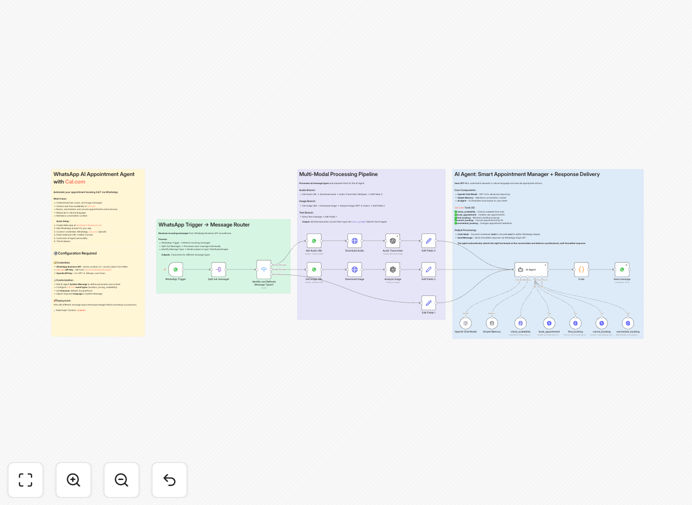
This automation transforms WhatsApp into a powerful 24/7 booking assistant for service businesses. It handles the entire appointment scheduling process automatically - from initial inquiry to calendar synchronization and confirmation messages. The system uses GPT-4 to understand natural language requests, checks real-time availability in Cal.com, and manages the entire conversation flow without human intervention.
For businesses drowning in scheduling back-and-forth, this solution eliminates 80% of manual work while providing clients with instant, personalized responses. The AI understands complex requests like "reschedule my coaching session to next Thursday afternoon" or "book me with Dr. Smith for a 30-minute consultation," automatically checking availability and confirming appointments.
How It Works
1. WhatsApp message received
When a client messages your WhatsApp business account, the automation immediately analyzes the content using GPT-4. The AI determines if it's a booking request, rescheduling inquiry, or general question about services.
2. Intent classification
The system categorizes the message type and extracts key details like requested service, preferred time/date, and any special requirements. GPT-4 handles complex phrasing and follow-up questions naturally.
3. Calendar availability check
The workflow queries your Cal.com account to check real-time availability based on your booking rules and existing appointments. It considers buffer times, minimum notice periods, and staff availability.
4. Appointment confirmation
Once an available slot is identified, the system sends a confirmation message through WhatsApp with all appointment details. It includes calendar invites, cancellation policies, and pre-appointment instructions automatically.
5. Multi-channel notifications
The workflow triggers reminders via WhatsApp, email, and SMS at configured intervals before the appointment. It can also handle rescheduling requests and cancellations through natural conversation.
Who This Is For
This automation is ideal for healthcare providers, consultants, coaches, salons, and any service business that handles appointments through WhatsApp. It's particularly valuable for:
- Practices with high appointment volumes that struggle with scheduling bottlenecks
- Businesses serving international clients across multiple timezones
- Teams that want to offer 24/7 booking availability without staff working around the clock
- Providers who want to reduce no-shows with automated reminders and follow-ups
Pro tip: Configure your WhatsApp automated messages to match your brand voice for a seamless client experience. The AI can adapt its tone from professional to friendly based on your preferences.
What You'll Need
- A WhatsApp Business API account (or access through a provider like Twilio)
- Cal.com account with your availability settings configured
- n8n instance (cloud or self-hosted)
- OpenAI API key for GPT-4 access
- Email/SMS service for multi-channel notifications (optional)
Quick Setup Guide
- Download the template JSON file
- Import into your n8n instance
- Connect your WhatsApp, Cal.com, and OpenAI accounts
- Configure your services, availability rules, and messaging templates
- Test with sample conversations to refine the AI responses
- Go live and monitor the workflow dashboard for insights
Key Benefits
Reduce scheduling admin by 70%: Automate the entire booking process from initial inquiry to confirmation and reminders, freeing your team to focus on delivering services rather than managing calendars.
24/7 booking availability: Clients can schedule appointments anytime, even outside business hours, without waiting for email responses or phone call returns.
40-60% reduction in no-shows: Automated reminders via WhatsApp, email, and SMS significantly improve attendance rates with customizable timing and message content.
Multilingual support: GPT-4 can handle booking conversations in multiple languages, making your services accessible to international clients without additional staff.
Seamless calendar sync: All appointments automatically appear in your Cal.com calendar with proper timezone conversion and buffer times respected.