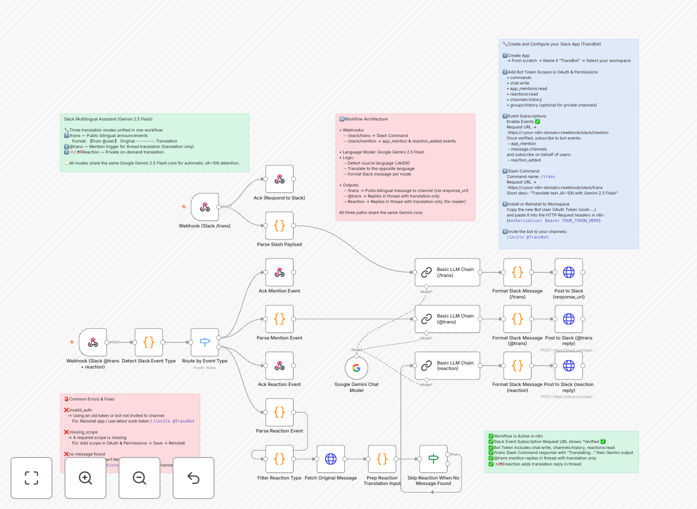
What This Workflow Does
This automation solves a critical problem for global teams: language barriers in daily communication. When your team includes both Japanese and English speakers, important messages can get lost in translation, slowing down projects and creating frustration.
The workflow automatically detects whether a Slack message is in Japanese or English, translates it to the opposite language using Google's Gemini 2.5 Flash AI, and posts the translation back in the same thread. This happens in real-time through three convenient methods: slash commands (/trans), mentions (@trans), or simple flag emoji reactions.
Instead of team members constantly asking "Can someone translate this?" or copying text into external translation tools, everyone can communicate naturally in their preferred language. The automation handles the rest, keeping conversations flowing smoothly and ensuring no one feels excluded from important discussions.
How It Works
The workflow uses n8n's powerful automation platform to create a seamless translation layer within your Slack workspace.
1. Trigger Detection
The system monitors Slack for three types of triggers: slash commands typed by users, direct mentions of the translation bot, or specific flag emoji reactions added to messages. Each trigger initiates the translation process while maintaining the context of the original conversation thread.
2. Language Analysis
When a message is detected, the workflow first analyzes the text to determine whether it's in Japanese or English. This automatic detection ensures the correct translation direction without requiring users to specify the source language manually.
3. AI Translation
The text is sent to Google's Gemini 2.5 Flash model, which provides high-quality, context-aware translation. Gemini understands business terminology, technical jargon, and conversational nuances, producing translations that sound natural rather than robotic.
4. Thread Management
The translated message is posted as a reply in the same Slack thread, maintaining conversation continuity. The workflow includes proper attribution so team members know which message was translated and can reference the original if needed.
5. Response Optimization
To comply with Slack's response timeout requirements, the workflow sends an immediate acknowledgment, then processes the translation in the background. This ensures users get instant feedback while maintaining reliable translation quality.
Who This Is For
This automation is ideal for any organization with multilingual teams. Specifically, it benefits:
Global companies with offices in Japan and English-speaking countries where daily coordination requires constant cross-language communication. Startups collaborating across Southeast Asia and Western markets where team members have different native languages. Development teams working with international clients who need to share technical updates across language barriers.
It's also perfect for HR departments managing multicultural teams, project managers coordinating international initiatives, and customer support teams handling inquiries in multiple languages. Essentially, any business where clear communication across languages impacts productivity and collaboration will benefit from this automation.
What You'll Need
- A Slack workspace with permission to install apps and configure slash commands
- n8n instance (cloud or self-hosted) with webhook capabilities
- Google Cloud API key with access to the Gemini 2.5 Flash model
- Slack app credentials including Bot User OAuth Token with appropriate scopes
- Basic understanding of n8n workflow import or willingness to follow our setup guide
Pro tip: Before deploying to your entire organization, test the workflow in a dedicated Slack channel with a small group of users. This allows you to refine the translation quality for your specific industry terminology and communication style.
Quick Setup Guide
Getting this automation running in your Slack workspace takes about 15-20 minutes if you have the prerequisites ready.
- Download the template using the button above and import it into your n8n instance
- Configure your Slack credentials in the Slack trigger nodes, ensuring you have the required scopes:
app_mentions:read,chat:write,reactions:read,channels:history, andgroups:history - Add your Google Gemini API key to the LLM Chain node, selecting the Gemini 2.5 Flash model
- Test the webhook URL by activating the workflow and checking that n8n generates a valid endpoint
- Configure your Slack app to use the webhook URL for slash commands and event subscriptions
- Install the Slack app to your workspace and grant necessary permissions
- Test with a simple message in a Slack channel using
/trans Hello team
Key Benefits
Eliminate daily translation overhead: Team members no longer waste time copying messages between translation tools. What used to take minutes per message now happens automatically, saving hours per week across your organization.
Improve cross-cultural collaboration: When language barriers disappear, team members participate more fully in discussions, share ideas more freely, and build stronger working relationships across geographical boundaries.
Reduce communication errors: Automated translation provides consistent terminology and reduces the misunderstandings that occur when team members attempt to translate complex concepts manually.
Scale without additional resources: As your team grows or adds new language requirements, the same automation handles increased volume without needing to hire dedicated translators or language specialists.
Maintain conversation context: By keeping translations within the original Slack threads, everyone can follow the complete discussion flow rather than seeing disconnected translated fragments.