n8n AI Automation News Monitoring Notion Slack

Automate News Intelligence with Gemini AI for RSS Feeds to Notion and Slack

Free n8n workflow to automatically monitor RSS feeds, summarize with AI, tag, and send prioritized briefings to Notion and Slack. Save hours on market research.

Download Template JSON · n8n compatible · Free
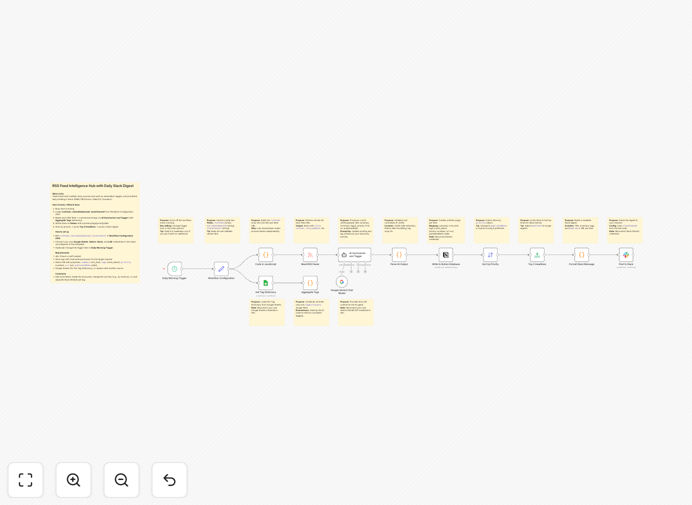
n8n workflow automation diagram showing RSS feeds connected to AI summarization, then to Notion and Slack

What This Workflow Does

Staying on top of industry news, competitor moves, and market trends is essential for business growth, but manually scanning dozens of sources consumes valuable time and leads to missed information. This automation solves that problem by creating a fully automated intelligence pipeline.

The workflow reads your configured RSS feeds each morning, uses Google's Gemini AI to summarize articles and assign relevant tags based on your business priorities, saves structured records to a Notion database for permanent reference, and delivers a concise Slack digest highlighting the top items your team needs to know. It transforms overwhelming information streams into actionable business intelligence.

How It Works

1. Daily Trigger & Configuration

A schedule trigger runs the workflow each morning (configurable to weekdays only). The workflow begins by loading your configuration: RSS feed URLs, Notion database ID, Slack channel, and tag dictionary.

2. RSS Feed Processing

The workflow fetches all new articles from your configured RSS feeds. It extracts the title, content, publication date, and source URL for each item, preparing them for AI analysis.

3. AI Summarization & Tagging

Each article is sent to Google's Gemini AI with custom instructions to generate a concise summary and assign relevant tags from your dictionary. The AI identifies key points, extracts mentions of competitors or products, and categorizes the content by relevance to your business.

4. Data Structuring & Prioritization

The AI output is parsed into structured data. Articles receive priority scores based on relevance, recency, and source importance. The workflow sorts items to highlight the most important information for your team's attention.

5. Notion Database Update

Each processed article creates a new entry in your Notion database with the summary, tags, priority score, original URL, and publication date. This builds a searchable knowledge base of industry intelligence that your entire team can reference.

6. Slack Digest Delivery

The top 3-5 prioritized items are formatted into a clean Slack message with summaries, tags, and direct links. The message is posted to your designated channel, giving your team a quick morning briefing without needing to leave their communication platform.

Who This Is For

This automation is ideal for product marketing managers tracking competitor feature launches, PR and communications teams monitoring brand mentions, sales teams staying informed about prospect industries, founders keeping pulse on funding and market trends, and research operations teams building institutional knowledge bases. Any business that needs to transform information overload into structured intelligence will benefit.

What You'll Need

  1. n8n instance (cloud or self-hosted) with execution capabilities
  2. Google Gemini API access for AI summarization and tagging
  3. Notion account with a database created using the template structure
  4. Slack workspace with app installation permissions for your channel
  5. RSS feed URLs for the news sources you want to monitor
  6. Optional: Google Sheet for maintaining your custom tag dictionary

Pro tip: Start with 3-5 high-quality RSS feeds rather than dozens of sources. Better coverage of key publications delivers more value than superficial scanning of many low-relevance sources.

Quick Setup Guide

  1. Download and import the JSON template into your n8n instance
  2. Configure the "Workflow Configuration" node with your RSS feed URLs, Notion database ID, and Slack channel
  3. Set up credentials in n8n for Notion, Slack, and Google Gemini AI
  4. Adjust the schedule trigger to run at your preferred morning time (e.g., 9 AM weekdays)
  5. Test with a manual execution to verify all connections work properly
  6. Activate the workflow and let it run automatically each day

Key Benefits

Save 5-10 hours weekly per team member previously spent manually scanning news sources. This time can be redirected to strategic work rather than information gathering.

Never miss important developments because the automation consistently monitors all configured sources regardless of holidays, meetings, or busy periods that might distract human readers.

Build institutional knowledge through the searchable Notion database that accumulates intelligence over time, making new employee onboarding faster and ensuring knowledge isn't lost when team members leave.

Improve decision quality with AI-powered analysis that identifies trends and connections across multiple sources that human readers might miss when reviewing articles in isolation.

Reduce context switching by delivering one prioritized briefing instead of team members checking multiple sources throughout the day, helping maintain focus on core responsibilities.

Frequently Asked Questions

Common questions about news intelligence automation and integration

The most effective way is to combine RSS feeds with AI summarization and structured storage. This workflow automatically pulls articles from your chosen sources, uses Gemini AI to extract key points and assign relevant tags, then saves the structured data to Notion and sends a digest to Slack. This eliminates manual scanning while ensuring your team gets actionable intelligence.

Traditional approaches like manual website checking or basic RSS readers lack the analysis and organization components. The AI layer transforms raw articles into categorized intelligence, while the Notion integration creates a permanent knowledge base rather than a transient feed.

AI dramatically improves market research by processing volumes of information humans can't manually review. It can summarize long articles, identify trends across multiple sources, and categorize content by relevance to your business. This workflow uses AI to tag articles by topic, competitor mentions, or product categories, turning raw news into organized intelligence that informs strategy.

Beyond basic summarization, AI can detect sentiment shifts, identify emerging terminology, and connect seemingly unrelated developments. This gives businesses early warning of market changes and helps anticipate competitor moves rather than simply reacting to them.

Integrating RSS feeds with Notion creates a searchable, permanent knowledge base of industry news. Instead of articles disappearing in a feed reader, they become structured database entries with summaries, tags, and priority scores. Your team can filter by topic, date, or relevance, build reports from the data, and maintain institutional knowledge that new hires can access immediately.

The Notion database becomes a living competitive intelligence system. You can create relations to company initiatives, add internal commentary, and build dashboards that visualize coverage across different topics or competitors over time.

Teams typically save 5-10 hours per week per person who previously manually monitored news. A marketing manager spending an hour daily scanning industry sites can reclaim that time while getting more comprehensive coverage. The automation also reduces context switching—instead of checking multiple sources throughout the day, you get one prioritized briefing when you start work.

The time savings compound when you consider the entire team. If five team members each save five hours weekly, that's 25 hours of recovered productivity every week, or over 1,200 hours annually that can be redirected to revenue-generating activities.

This automation benefits any business where staying informed about market changes is crucial: SaaS companies tracking competitors and feature launches, agencies monitoring client industries, investors following portfolio companies, PR firms tracking brand mentions, and founders staying on top of funding rounds and trends. It's particularly valuable for distributed teams needing shared situational awareness.

Businesses in fast-moving industries like technology, finance, and healthcare see especially high returns. The system helps them spot regulatory changes, technological breakthroughs, and market shifts before they become widely known, creating competitive advantages.

Yes, the AI prompts in this workflow are fully customizable. You can modify the instructions to look for specific industry jargon, competitor names, product categories, or regulatory changes relevant to your business. The workflow includes a tag dictionary you can expand with your own terminology, ensuring the AI categorizes articles according to your business priorities.

For example, a healthcare company can train the system to recognize drug names and clinical trial phases, while a fintech can focus on regulatory announcements and banking partnerships. The more specific your prompts, the more relevant the intelligence output becomes.

RSS automation is more reliable than manual monitoring because it never misses an update due to human error or distraction. It checks all configured feeds on a consistent schedule, processes every article, and delivers results regardless of holidays or busy periods. The AI component also provides more consistent analysis than human readers who might interpret articles differently.

The system's reliability comes from its consistency and comprehensiveness. While humans might skip an article that looks uninteresting at first glance, the AI processes everything, sometimes uncovering important information in seemingly mundane updates that human readers would overlook.

Yes, GrowwStacks specializes in building custom news intelligence automations tailored to specific business needs. We can integrate additional data sources beyond RSS, create specialized AI classification models, build custom dashboards, and connect to your existing CRM or project management tools. Our team will design a system that fits your workflow and delivers exactly the intelligence you need.

Custom solutions might include sentiment analysis for brand monitoring, competitive pricing intelligence, regulatory change alerts, or integration with your product roadmap. We work with you to identify the most valuable intelligence for your business and build a system that delivers it automatically.

  • Multi-source integration beyond RSS feeds
  • Custom AI models trained on your industry data
  • Integration with your existing business systems
  • Priority alerting for critical developments

Need a Custom News Intelligence Automation?

This free template is a starting point. Our team builds fully tailored automation systems for your specific business needs.