What This Workflow Does
Manual hiring processes create bottlenecks. HR teams waste hours tracking document submissions, drafting repetitive offer letters, and chasing stakeholders for approvals. This leads to delayed start dates, frustrated candidates, and operational inefficiency.
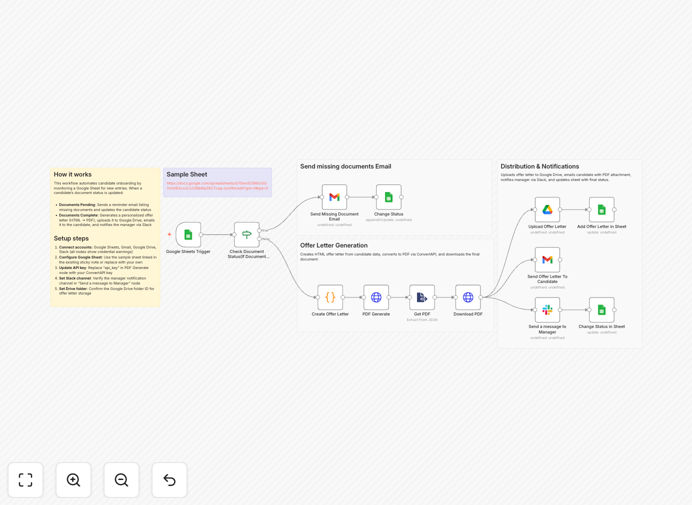
This automated workflow transforms your hiring from chaotic to seamless. It monitors a central Google Sheet for new candidates, checks for required documents, sends personalized reminders for missing items, generates professional offer letters as PDFs, emails them automatically, notifies hiring managers on Slack, and stores everything securely in Google Drive—all without manual intervention.
By connecting your existing tools, you create a cohesive onboarding system that works while your team sleeps. Candidates receive timely, professional communication, hiring managers stay informed, and your HR team gains back hours each week to focus on human connections rather than administrative tasks.
How It Works
The automation follows a logical, step-by-step process triggered by new entries in your hiring tracker.
1. Candidate Data Trigger
The workflow watches a specific Google Sheet for new rows. Each row represents a candidate and contains essential details: name, email, position, salary, and document submission status. When a new candidate is added, the automation immediately begins processing.
2. Document Status Check
The system reads the "Documents Submitted" column. If documents are marked as pending, it triggers a reminder sequence. A personalized email is sent to the candidate listing exactly which documents are still needed, with clear instructions and deadlines.
Pro tip: Structure your Google Sheet with clear status columns (like "Documents_Pending", "Documents_Complete") to make automation logic straightforward.
3. Dynamic Offer Letter Creation
Once documents are confirmed as received, the workflow generates a custom offer letter. Using HTML templates, it inserts candidate-specific details (name, position, salary, start date) to create a professionally formatted document, then converts it to PDF for official distribution.
4. Distribution & Notification
The PDF offer letter is automatically attached to a personalized email and sent to the candidate. Simultaneously, a Slack notification is posted to your hiring channel or direct-messaged to the hiring manager, confirming the offer has been dispatched and providing a quick link to the candidate's record.
5. Audit Trail & Storage
Every generated offer letter is saved to a designated Google Drive folder with a consistent naming convention. The Google Sheet is updated with the offer letter link and the candidate's status is changed to "Offer_Sent," creating a complete, searchable audit trail for compliance and reporting.
Who This Is For
This template delivers immediate value for teams drowning in hiring paperwork:
- HR Departments & Recruiters: Automate the bulk of your administrative onboarding tasks, from document chasing to offer generation.
- Startups & Scaling Companies: Implement professional, scalable hiring processes without adding HR headcount.
- Recruitment Agencies: Manage multiple clients and candidates with consistent, error-free communication.
- Operations & People Teams: Ensure a smooth, positive candidate experience that strengthens your employer brand.
- Managers Hiring Their Own Teams: Get automated support without needing deep HRIS knowledge or constant HR follow-ups.
If your hiring process involves more than 5 manual touchpoints per candidate, this automation will save you significant time and reduce errors.
What You'll Need
- A Google Sheets spreadsheet tracking candidates with columns for name, email, position, salary, and document status.
- Google Workspace account with access to Gmail and Google Drive for sending emails and storing documents.
- A Slack workspace and a channel/webhook for receiving hiring notifications.
- n8n instance (cloud or self-hosted) to run the workflow.
- A ConvertAPI account (free tier available) or similar service for HTML-to-PDF conversion.
- Basic offer letter HTML template that can be customized with merge fields.
Pro tip: Start with a simple Google Sheet structure. You can always add more columns (like "Manager," "Location," "Bonus") later as your automation matures.
Quick Setup Guide
Get this workflow running in your environment in under 30 minutes:
- Download the template using the button above and import it into your n8n instance.
- Connect your Google Sheets account in n8n and point the trigger node to your hiring tracker spreadsheet.
- Set up your Gmail and Slack credentials in their respective nodes within the workflow.
- Configure the ConvertAPI node with your API key (sign up for a free account if needed).
- Customize the HTML offer letter template in the "HTML" node to match your company's branding.
- Test with a dummy candidate row in your sheet to ensure emails send, PDFs generate, and Slack notifications work.
- Activate the workflow and let it monitor your sheet automatically.
Key Benefits
Eliminate manual follow-ups: Automated reminders ensure no candidate is forgotten, improving completion rates and speeding up time-to-hire.
Ensure brand consistency: Every offer letter uses the same professional template, removing formatting errors and maintaining your company's image.
Create a searchable audit trail: All documents are stored in Google Drive with clear naming, making compliance and reporting straightforward.
Improve team visibility: Real-time Slack notifications keep hiring managers in the loop without requiring status meetings or email threads.
Scale your hiring efficiently: Process 5 or 50 candidates with the same effort, allowing your team to manage increased hiring volume without proportional overhead.