Zoom Stripe Gmail Google Sheets n8n

Automate paid Zoom meetings with Stripe, Gmail & Google Sheets tracking

Streamline your paid meeting workflow from payment to participation. This n8n template automatically creates Zoom meetings when payments are received, sends confirmation emails, and tracks everything in Google Sheets - eliminating manual work and reducing no-shows.

Download Template JSON · n8n compatible · Free
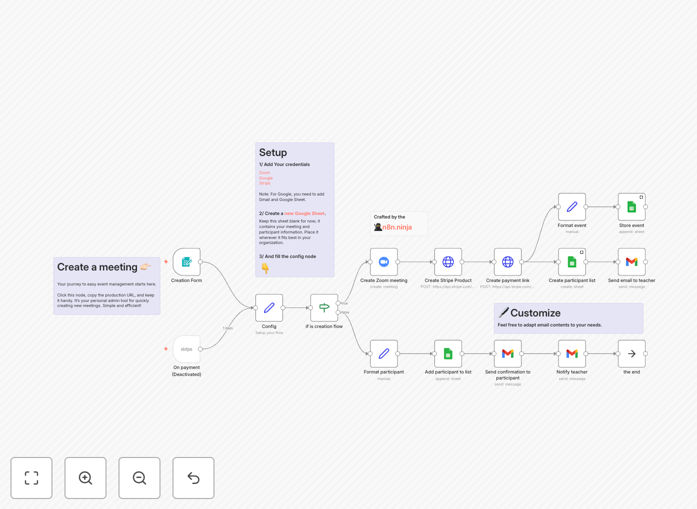
Automated paid Zoom meetings workflow diagram showing Stripe, Gmail and Google Sheets integration

What This Workflow Does

This automation solves the administrative headache of managing paid Zoom meetings by connecting your payment processor, video conferencing platform, and communication tools. When a customer purchases access to your meeting through Stripe, the system automatically creates the Zoom session, sends a confirmation email with joining instructions via Gmail, and logs all transaction details in Google Sheets for record-keeping.

The workflow eliminates manual data entry, reduces payment processing errors, and ensures attendees receive timely meeting information. Business owners and coaches can focus on delivering value in their sessions rather than managing logistics, while maintaining professional, automated communication with participants.

How It Works

1. Payment Processing with Stripe

When a customer completes payment for a Zoom meeting through your Stripe checkout, the workflow triggers automatically. It captures the payment details, customer email, and any custom fields you've configured (like attendee name or special requests).

2. Zoom Meeting Creation

The system uses the Zoom API to create a new meeting with your predefined settings (duration, waiting room, recording preferences etc.). It generates a unique join link that will only be shared with paying attendees.

3. Email Confirmation via Gmail

A personalized confirmation email is automatically sent to the attendee containing the meeting details, calendar invite, and payment receipt. The email template can include your branding, preparation instructions, and follow-up information.

4. Google Sheets Tracking

All transaction details are logged in a Google Sheet including payment timestamp, amount, customer email, meeting time, and Zoom join link. This creates an auditable record for accounting and provides data for attendance analysis.

Pro tip: Add a second automation to send reminder emails 24 hours before the meeting, reducing no-show rates by up to 40%.

Who This Is For

This automation is ideal for coaches, consultants, trainers, and educators who host paid sessions via Zoom. It's particularly valuable for:

  • Business coaches offering paid strategy sessions
  • Yoga/wellness instructors with paid classes
  • Tutors and educators with scheduled lessons
  • Professionals selling consultation services
  • Workshop hosts managing paid group sessions

What You'll Need

  1. A Stripe account to process payments
  2. A Zoom Pro account or higher with API access
  3. A Gmail/Google Workspace account
  4. A Google Sheet for tracking
  5. An n8n instance (cloud or self-hosted)

Quick Setup Guide

  1. Download the JSON template file
  2. Import it into your n8n instance
  3. Connect your Stripe, Zoom, Gmail, and Google Sheets accounts
  4. Configure your meeting settings and email templates
  5. Test with a small payment to verify the workflow
  6. Deploy and share your payment link with customers

Key Benefits

Save 5+ hours per week by eliminating manual meeting setup, payment tracking, and attendee communication.

Reduce missed payments with automatic meeting creation only after successful Stripe transactions.

Improve customer experience with instant, professional confirmation emails containing all meeting details.

Maintain accurate records with automated Google Sheets tracking of all transactions and attendance.

Scale your services without increasing administrative overhead as your meeting volume grows.

Frequently Asked Questions

Common questions about paid Zoom meeting automation

Automating paid Zoom meetings eliminates manual payment processing, meeting scheduling, and attendee communication. When a customer pays via Stripe, the system automatically creates the Zoom meeting, sends confirmation emails, and tracks attendance in Google Sheets. This reduces administrative work by 80% while ensuring no payments or meetings fall through the cracks.

For example, a business coach hosting 20 paid sessions per week would normally spend 10+ hours managing these logistics manually. With automation, they regain that time for client work or business development while maintaining professional, timely communication with all attendees.

Stripe supports all major credit cards, Apple Pay, Google Pay, and international payment methods. The automation can be configured to accept one-time payments for individual meetings or recurring payments for membership-based meeting programs. Payment processing happens securely without requiring manual intervention from your team.

This flexibility allows businesses to cater to global clients while maintaining PCI compliance. You can even set up multiple payment options (like different pricing tiers for 30-minute vs 60-minute sessions) that automatically create the appropriate Zoom meeting type.

The Google Sheets integration automatically logs each paid meeting with timestamps, payment amounts, attendee details, and meeting status. This creates a centralized record for accounting, customer service, and analytics. Businesses can track revenue per meeting, attendance rates, and customer participation patterns without manual data entry.

These automated records help with tax preparation, client follow-up, and identifying your most popular meeting times or topics. You can even connect the sheet to data visualization tools for deeper business insights.

Yes, the workflow can be configured to process refunds through Stripe while automatically canceling the Zoom meeting and notifying the attendee via Gmail. The Google Sheets record updates to reflect the cancellation status. This maintains accurate financial records while reducing customer service inquiries about refund status.

For businesses with cancellation policies, you can set rules to automatically issue partial refunds based on how far in advance the cancellation occurs, with corresponding updates to all connected systems.

The system uses Stripe's PCI-compliant payment processing, Zoom's encrypted meeting links, and Google's secure infrastructure. Payment details are never stored in your systems. Meeting links are only sent to verified paying customers, and access can be restricted to registered attendees only.

Additional security options include requiring Zoom waiting room approval, setting meeting passwords, and enabling two-factor authentication for all connected accounts. The automation maintains security while reducing the risk of human error in manual processes.

The Gmail integration allows full customization of confirmation emails with your branding, meeting details, preparation instructions, and follow-up information. Templates can include dynamic fields that automatically insert the meeting time, Zoom link, and payment receipt details for each attendee.

Businesses often add personalized welcome messages, pre-meeting questionnaires, or links to supplemental materials. The automation ensures every attendee receives consistent, professional communication while saving you the time of composing individual emails.

Yes, GrowwStacks specializes in building tailored automation solutions for paid meetings and events. Our team can create custom workflows that integrate with your specific payment processors, CRM systems, and business rules. We handle everything from initial consultation to implementation and ongoing support.

Whether you need advanced features like group discounts, waitlists, or integration with your existing tools, we can develop a solution that fits your exact requirements and scales with your business.

Need a Custom Paid Meetings Integration?

This free template is a starting point. Our team builds fully tailored automation systems for your specific needs.