What This Workflow Does
This automation solves a common pain point for educators using Canvas LMS: manually tracking and reminding students about pending assignments. Instructors often spend hours each week checking submission statuses and sending individual reminders—time that could be better spent on teaching and student support.
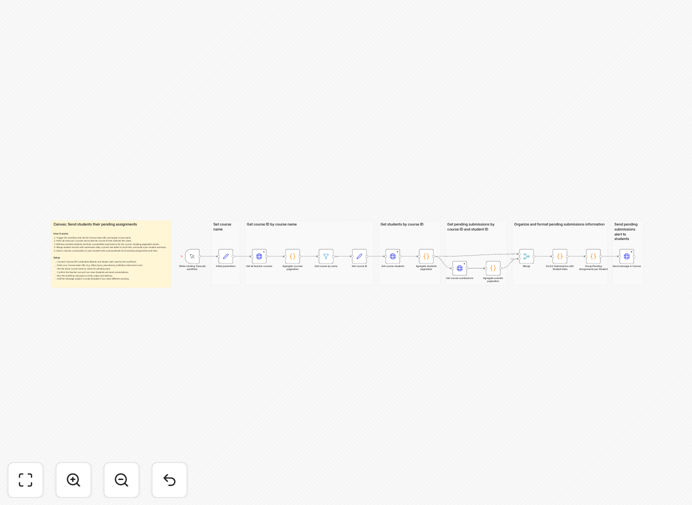
The workflow automatically identifies students with unsubmitted assignments in a specific Canvas course, compiles personalized reminder messages with direct links to each assignment, and sends them via Canvas conversations. It handles paginated API responses, merges student and submission data, converts due dates to local time zones, and creates actionable summaries that help students stay on track.
Beyond saving administrative time, this automation improves educational outcomes by providing consistent, timely communication that reduces missed deadlines and keeps students engaged with course material throughout the semester.
How It Works
The workflow follows a logical sequence to gather data, process it, and deliver personalized communications.
1. Course Identification
The workflow starts by fetching all courses where the authenticated instructor teaches, then filters to find the specific course by name. This ensures you're targeting the right Canvas course even if you teach multiple sections or subjects.
2. Student Data Collection
Once the course is identified, the system retrieves all enrolled students and their unsubmitted assignments. It handles Canvas's paginated API responses automatically, gathering complete data regardless of class size.
3. Data Processing & Personalization
The workflow merges student records with assignment data, converts due dates to local time zones, and builds individualized summaries. Each student receives a message listing only their specific pending work with direct links for quick submission.
4. Automated Delivery
Finally, personalized Canvas conversations are sent to each student with their assignment list. The system includes error handling and can be scheduled to run daily, weekly, or at any frequency that matches your teaching style.
Who This Is For
This template is ideal for educators, course administrators, and educational institutions using Canvas LMS who want to improve student engagement while reducing administrative overhead.
University Professors teaching large courses can ensure no student misses assignment deadlines without manual tracking. Online Course Instructors can maintain consistent communication in digital learning environments. Teaching Assistants can support multiple courses efficiently. Corporate Trainers using Canvas for professional development can keep participants on schedule. Educational Administrators can implement institution-wide reminder systems.
Any educator who values student success but lacks the time for individual follow-ups will benefit from this automation.
What You'll Need
- Canvas API Access: Instructor credentials with permissions to view courses, students, submissions, and send conversations.
- Canvas Base URL: Your institution's Canvas instance URL (e.g., https://yourinstitution.instructure.com).
- Course Name: Exact name of the Canvas course you want to monitor.
- n8n Instance: Either n8n.cloud account or self-hosted n8n installation.
- Basic Understanding: Familiarity with Canvas interface and assignment structure.
Pro tip: Test the workflow with a small pilot course first to verify the message format and timing work for your students before scaling to larger classes.
Quick Setup Guide
Follow these steps to implement this automation in your educational environment:
- Download and Import: Download the JSON template and import it into your n8n instance via the workflow import feature.
- Configure Canvas Credentials: Set up Canvas API authentication using your instructor access token in the HTTP Request nodes.
- Set Course Parameters: Enter your Canvas base URL and the exact name of the target course in the workflow variables.
- Test with Sample Data: Run the workflow manually with a small test course to verify it correctly identifies students and pending assignments.
- Customize Messages: Adjust the conversation subject and body templates to match your institution's communication style.
- Schedule Automation: Set the workflow to trigger automatically (daily or weekly) based on your course schedule.
- Monitor and Refine: Review initial student responses and adjust timing or messaging as needed for optimal engagement.
Key Benefits
Save 5-10 hours weekly on manual student follow-ups and assignment tracking. What used to require scrolling through gradebooks and sending individual emails now happens automatically.
Improve submission rates by 15-25% through consistent, timely reminders. Students are more likely to complete work when they receive personalized notifications with direct links to assignments.
Scale personalized communication to classes of any size. Whether you have 20 students or 200, each receives individualized attention without additional instructor effort.
Reduce administrative cognitive load so you can focus on teaching. Automation handles the repetitive tracking while you concentrate on content delivery and student support.
Enhance student-instructor relationships through proactive, supportive communication. Regular reminders demonstrate your commitment to student success without appearing nagging.