What This Workflow Does
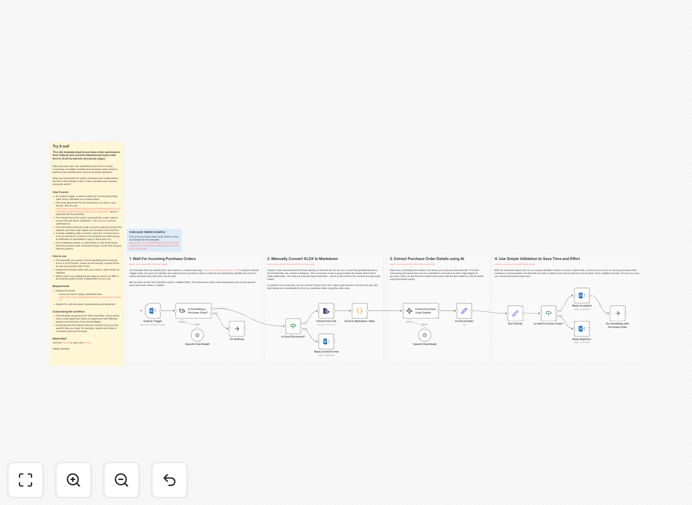
This n8n automation solves the tedious manual process of handling purchase order submissions received via email. Many businesses receive purchase requests as Excel attachments in Outlook, requiring staff to manually download, review, and re-enter data into procurement systems - a time-consuming and error-prone process.
The workflow automatically monitors your Outlook inbox for new purchase order emails, extracts the attached Excel files, converts the data into structured format using AI-powered parsing, and submits it to your procurement system or database. This eliminates manual data entry while ensuring accuracy and providing an audit trail.
How It Works
1. Outlook Email Monitoring
The workflow continuously checks your Outlook inbox for new emails containing purchase order attachments. It filters for specific senders or subject lines to ensure only relevant purchase requests are processed.
2. Attachment Processing
When a qualifying email is detected, the system automatically downloads the Excel attachment and verifies it contains valid purchase order data in the expected format.
3. AI-Powered Data Extraction
Using AI document processing, the workflow intelligently extracts key fields from the Excel file (vendor details, line items, quantities, pricing) even if the file format varies slightly between suppliers.
4. Data Validation & Enrichment
The system cross-checks extracted data against your product database, validates pricing against contracts, and enriches the order with additional metadata before submission.
5. System Integration
Finally, the structured purchase order data is automatically submitted to your ERP, procurement system, or accounting software via API integration.
Who This Is For
This automation is ideal for procurement teams, purchasing departments, and accounts payable staff in businesses that:
- Receive purchase orders via email from multiple vendors
- Manually process Excel-based purchase requests
- Want to reduce data entry errors in their procurement process
- Need to accelerate purchase order processing times
- Want to integrate Outlook with their ERP or accounting system
Pro tip: This workflow can be extended to automatically send confirmation emails to vendors and generate PDF copies for your records.
What You'll Need
- An n8n instance (cloud or self-hosted)
- Microsoft Outlook account with purchase order emails
- Excel-based purchase order templates from your vendors
- Access to your procurement system/ERP API (optional but recommended)
- Basic understanding of n8n workflows (or our setup guide)
Quick Setup Guide
- Download the JSON template file
- Import into your n8n instance
- Configure Outlook credentials and email filters
- Map your Excel purchase order fields to the workflow
- Connect to your destination system (ERP, database, etc.)
- Test with sample purchase order emails
- Activate the workflow for production use
Key Benefits
Eliminate 90% of manual data entry by automatically processing purchase orders from Outlook attachments, freeing your team for higher-value work.
Reduce processing time from hours to minutes with instant Excel-to-system data transfer, accelerating your procurement cycle.
Minimize human errors in purchase order transcription through automated data extraction and validation.
Improve vendor relationships with faster order confirmations and fewer processing mistakes.
Gain real-time visibility into incoming purchase requests with automated logging and tracking.