Google Sheets QuickBooks Accounting Sales Automation n8n

Automate QuickBooks Customers & Sales Receipts from Google Sheets

Automatically create QuickBooks customers and generate sales receipts from Google Sheets entries. Eliminate manual data entry and streamline your accounting workflow.

Download Template JSON · n8n compatible · Free
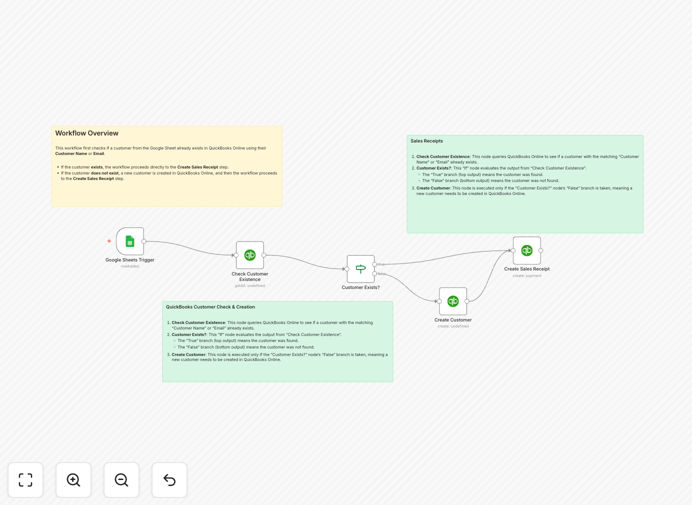
Automated workflow connecting Google Sheets to QuickBooks for customer and sales receipt creation

What This Workflow Does

Manual data entry between spreadsheets and accounting software is a common bottleneck for growing businesses. Sales teams log transactions in Google Sheets, but finance teams must manually recreate customers and receipts in QuickBooks—a process that's slow, error-prone, and creates reconciliation headaches.

This n8n automation template solves that problem completely. It creates a seamless bridge between your sales data in Google Sheets and your accounting system in QuickBooks Online. Whenever a new transaction row is added to your designated sheet, the workflow automatically checks if the customer exists in QuickBooks, creates them if needed, and generates a corresponding sales receipt with all details populated.

The result is a closed-loop system: sales entries become accounting records instantly, with zero manual intervention. This eliminates duplicate work, reduces errors, and gives your finance team real-time visibility into sales activity without ever touching the spreadsheet.

How It Works

1. Trigger on New Sheet Entry

The workflow is triggered whenever a new row is added to your configured Google Sheet. It captures all relevant columns—Customer Name, Email, Amount, Quantity—and prepares this data for processing.

2. Customer Lookup in QuickBooks

The workflow sends the customer name to QuickBooks Online to search for an existing customer record. This intelligent check prevents duplicate customer creation and ensures receipts are linked to the correct profile.

3. Conditional Logic Branch

Based on the search result, the workflow splits into two paths using an IF node. If the customer exists, it proceeds directly to receipt creation using their existing QuickBooks ID. If not found, it first creates a new customer profile using the name and email from the sheet.

4. Sales Receipt Generation

Finally, the workflow creates a complete sales receipt in QuickBooks with the transaction amount, quantity, and linked product/service item. The receipt is automatically assigned to the correct customer—either newly created or pre-existing—and appears in your QuickBooks ledger immediately.

Who This Is For

This automation is ideal for small to medium businesses that manage sales through spreadsheets but need proper accounting records in QuickBooks. It's perfect for:

  • Service businesses tracking project invoices in Sheets
  • E-commerce sellers recording daily sales manually
  • Consultants and freelancers who bill clients via spreadsheet
  • Teams where sales and finance departments work separately
  • Any company wanting to eliminate the manual QuickBooks data entry bottleneck

What You'll Need

  1. An active n8n instance (cloud or self-hosted)
  2. A Google account with a prepared Google Sheet containing sales data columns
  3. A QuickBooks Online subscription
  4. A QuickBooks Developer account to obtain API credentials for n8n connection
  5. At least one Product or Service item already set up in your QuickBooks account

Quick Setup Guide

1. Import the template into your n8n workspace using the download button above.

2. Configure the Google Sheets node: Enter your Spreadsheet ID and sheet name where sales data resides.

3. Set up QuickBooks credentials: Create a new QuickBooks Online connection in n8n using your developer API keys.

4. Map your data: Ensure your sheet columns match the expected fields (CustomerName, Email, Amount, Quantity).

5. Provide Product/Service ID: In both Create Receipt nodes, enter the Value for the Item Ref field from your QuickBooks product list.

6. Activate the workflow and test by adding a new row to your Google Sheet. Watch the customer and receipt appear in QuickBooks automatically.

Pro tip: Use a dedicated "Status" column in your sheet (like "Ready for QB") to trigger the workflow only for finalized sales, giving you control over when automation runs.

Key Benefits

Save 5–10 hours per week on manual data entry. Eliminate the repetitive task of transferring spreadsheet rows into QuickBooks. Your finance team can focus on analysis instead of input.

Reduce accounting errors by 90%. Automated data transfer ensures consistency—no mismatched customer names, missing emails, or incorrect amounts that cause reconciliation problems.

Close sales-to-accounting cycles instantly. Receipts appear in QuickBooks as soon as sales are logged, giving real-time financial visibility and speeding up month-end closing.

Prevent duplicate customer profiles. The workflow's intelligent lookup ensures each customer exists only once in QuickBooks, keeping your customer database clean and organized.

Bridge sales and finance team collaboration. Sales teams can work in familiar Sheets; finance gets structured, ready-to-use data without needing spreadsheet access or training.

Frequently Asked Questions

Common questions about QuickBooks and Google Sheets automation and integration

Manual data entry between spreadsheets and accounting software is slow, prone to errors, and creates reconciliation headaches. Automating this process ensures customer records and sales receipts are instantly created, accurate, and synchronized, saving hours per week and improving financial accuracy.

For businesses scaling quickly, manual transfer becomes unsustainable. Automation turns a multi-step, error-prone process into a single, reliable flow that works every time.

Connecting Google Sheets to QuickBooks eliminates duplicate entry, reduces human error, and speeds up the sales-to-accounting cycle. It allows sales teams to log transactions in a familiar spreadsheet while ensuring the finance team receives structured, ready-to-use data in QuickBooks automatically.

Beyond efficiency, this integration provides data consistency across departments, real-time financial reporting, and eliminates the lag between sales activity and accounting records.

Automation ensures data consistency. When a new row is added to Google Sheets, the workflow validates the customer, creates a record if needed, and generates a sales receipt with the exact same details. This prevents mismatched names, missing emails, or incorrect amounts that often occur during manual transfer.

Automated systems follow predefined rules every time, whereas manual entry introduces variability. This consistency reduces audit risks and improves the reliability of your financial data.

Yes. The workflow intelligently checks QuickBooks for an existing customer by name. If found, it creates a sales receipt linked to that customer ID. If not found, it first creates the new customer profile and then generates the receipt. This logic prevents duplicate customer entries in QuickBooks.

This dual-path approach supports businesses with both repeat clients and new leads, ensuring every transaction is properly accounted for without manual sorting.

You need an active n8n instance, a Google account with a prepared Sheet (with columns like CustomerName, Email, Amount, Quantity), a QuickBooks Online account, and a QuickBooks Developer account for API credentials. You also need at least one Product/Service item set up in QuickBooks to reference in receipts.

Most setup time involves configuring API connections and mapping your sheet columns. Once configured, the workflow runs autonomously with minimal maintenance.

It's ideal for both. For recurring sales to the same customers, the workflow efficiently links receipts to existing profiles. For new customers (like one-time projects or leads), it automatically creates the profile and receipt. This flexibility supports various business models, from subscription services to project-based work.

The automation adapts to your sales pattern without requiring manual adjustment, making it scalable as your customer base grows.

It bridges the gap between sales and finance teams. Sales can update a shared Google Sheet without needing QuickBooks access. Finance receives automatically generated, accurate receipts ready for reporting. This reduces inter-departmental friction, speeds up closing cycles, and provides real-time financial visibility.

Teams no longer wait for each other to transfer data. Collaboration becomes asynchronous yet synchronized, improving workflow efficiency and reducing bottlenecks.

Yes, GrowwStacks specializes in building tailored automation systems. While this free template provides a foundation, we can customize it for your specific data structure, approval workflows, multi-step validation, or integration with additional apps like CRM or payment platforms.

Customizations might include adding invoice approval steps, syncing with CRM systems, triggering payment reminders, or generating custom reports. Book a free consultation to discuss your unique requirements and build a solution that fits your exact workflow.

  • Tailored to your existing spreadsheet and QuickBooks setup
  • Extended logic for multi-step validation and error handling
  • Integration with other tools like Slack, email, or project management apps

Need a Custom QuickBooks & Google Sheets Automation?

This free template is a starting point. Our team builds fully tailored automation systems for your specific business needs.