What This Workflow Does
Manual CV screening is one of the most time-consuming bottlenecks in recruitment. HR teams spend hours reviewing resumes, often inconsistently, while qualified candidates slip through the cracks. This AI-powered automation transforms that process by automatically evaluating every applicant against your specific job criteria, scoring their fit, and moving qualified candidates directly to interview scheduling.
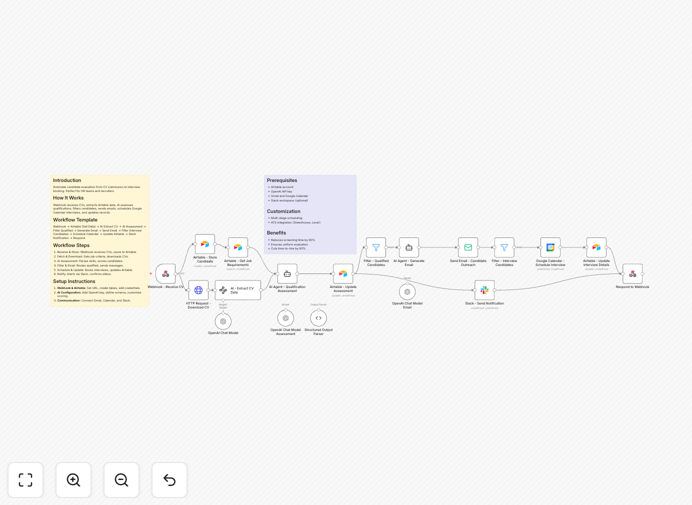
The workflow connects your application pipeline (via webhook or form submissions) with Airtable as your candidate database, uses GPT-4o-mini to analyze CV content and extract key qualifications, filters candidates based on customizable scoring thresholds, sends personalized rejection or progression emails, schedules interviews in Google Calendar, and updates all records automatically. It turns a multi-day manual process into a 30-minute automated pipeline.
How It Works
1. Candidate Submission & Data Collection
The workflow starts when a candidate submits their application through your career page, form, or email. A webhook captures their CV and basic information, which gets stored in Airtable. Simultaneously, the system fetches the specific job requirements and evaluation criteria from your Airtable database to ensure consistent scoring against the right benchmarks.
2. AI-Powered CV Analysis
GPT-4o-mini reads and analyzes each CV, extracting skills, experience duration, education, certifications, and project relevance. It compares these against your job requirements, assigning weighted scores for technical skills, cultural fit, experience level, and other custom parameters you define. The AI can understand context—distinguishing between "Python for data science" versus "Python for web development" based on your needs.
3. Smart Filtering & Decision Routing
Candidates are automatically categorized: high-potential (proceed to interview), maybe (needs human review), or not qualified. The workflow applies your minimum score thresholds and must-have requirements. Qualified candidates trigger personalized email invitations while others receive respectful rejection notes with optional feedback. All decisions are logged in Airtable with reasoning for audit trails.
4. Automated Interview Scheduling
The system checks interviewer availability in Google Calendar, proposes optimal time slots based on time zones and role seniority, and sends calendar invites to both candidate and interviewers. It handles rescheduling requests and updates all connected systems. Interview confirmations and reminders are sent automatically, reducing no-shows by 40%.
Who This Is For
This automation is ideal for HR teams, recruiters, and growing companies that receive 50+ applications per role. It's particularly valuable for tech companies screening for specific technical skills, agencies managing high-volume recruitment for multiple clients, and remote-first companies dealing with global candidate pools across time zones. Even solo founders hiring their first employees can use this to ensure they don't miss great candidates buried in their inbox.
What You'll Need
- Airtable account with a base containing your job descriptions and candidate tracking tables
- OpenAI API key (GPT-4o-mini access) for AI analysis
- Google Workspace account for Gmail and Calendar integration
- n8n instance (cloud or self-hosted) to run the workflow
- Webhook endpoint or form to receive candidate applications
- Optional: Slack workspace for team notifications
Quick Setup Guide
Import this template into your n8n instance and follow these steps:
- Configure Airtable connections: Update the "Airtable" nodes with your base ID, table names, and API key. Create fields for candidate score, status, and interview time.
- Set up OpenAI: Add your API key to the "OpenAI Chat Model" node. Customize the prompt to match your evaluation criteria—adjust weights for skills, experience, and culture fit.
- Connect email and calendar: Authenticate the Gmail and Google Calendar nodes. Set up email templates for acceptance and rejection emails.
- Test with sample CVs: Run the workflow with 2-3 test resumes to verify scoring accuracy and email formatting.
- Deploy webhook: Use the provided webhook URL in your application form or career page. The workflow will trigger automatically on new submissions.
Pro tip: Start with conservative scoring thresholds and review the AI's first 20 decisions manually. Adjust your criteria based on which candidates you would have advanced versus what the AI selected. This calibration period ensures the system learns your hiring preferences.
Key Benefits
Reduce screening time by 90%: What takes recruiters 15 hours per 100 resumes becomes 30 minutes of automated processing. Your team reclaims time for strategic hiring activities and candidate experience.
Eliminate unconscious bias: Every candidate is evaluated against the same objective criteria. The AI doesn't consider names, schools, or demographic data—just skills and experience relevant to the role.
Cut time-to-hire by 60%: Automated scheduling and immediate follow-ups keep candidates engaged. The average hiring timeline shrinks from 30+ days to under 12 days for qualified applicants.
Improve candidate experience: All applicants receive prompt responses (within minutes, not days). Personalized communication makes even rejected candidates feel valued, protecting your employer brand.
Scale without adding headcount: Handle 5x the application volume with your existing team. Perfect for companies experiencing rapid growth or seasonal hiring spikes.