n8n RSS PostPulse Social Media Automation

Automate RSS news to multi-platform social media publishing via PostPulse

Automatically receive news from RSS feeds, process their content, and publish or schedule posts on various social platforms

Download Template JSON · n8n compatible · Free
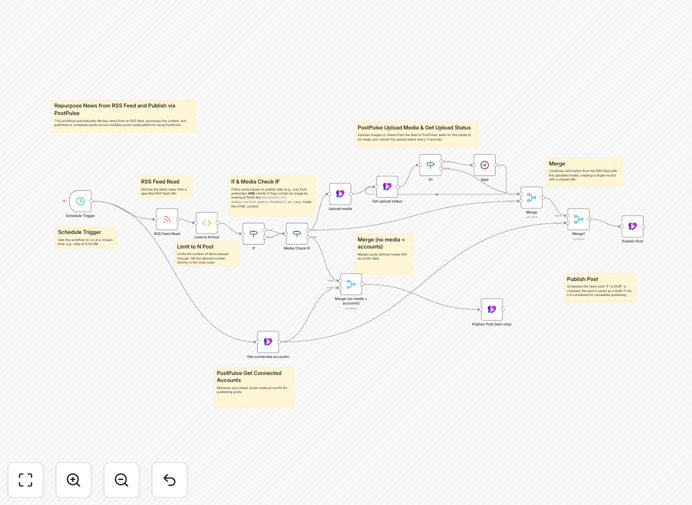
RSS to PostPulse automation workflow diagram

What This Workflow Does

This automation solves the time-consuming process of manually monitoring RSS feeds and publishing content across multiple social media platforms. Content marketers, news aggregators, and social media managers often waste hours each week copying content from RSS feeds, formatting posts, and manually scheduling them across different networks.

The workflow automatically pulls new items from specified RSS feeds, processes the content (including optional text formatting, hashtag addition, or image extraction), and publishes them to PostPulse for distribution across connected social media accounts. You can configure rules for which content gets published, how often to check feeds, and scheduling preferences.
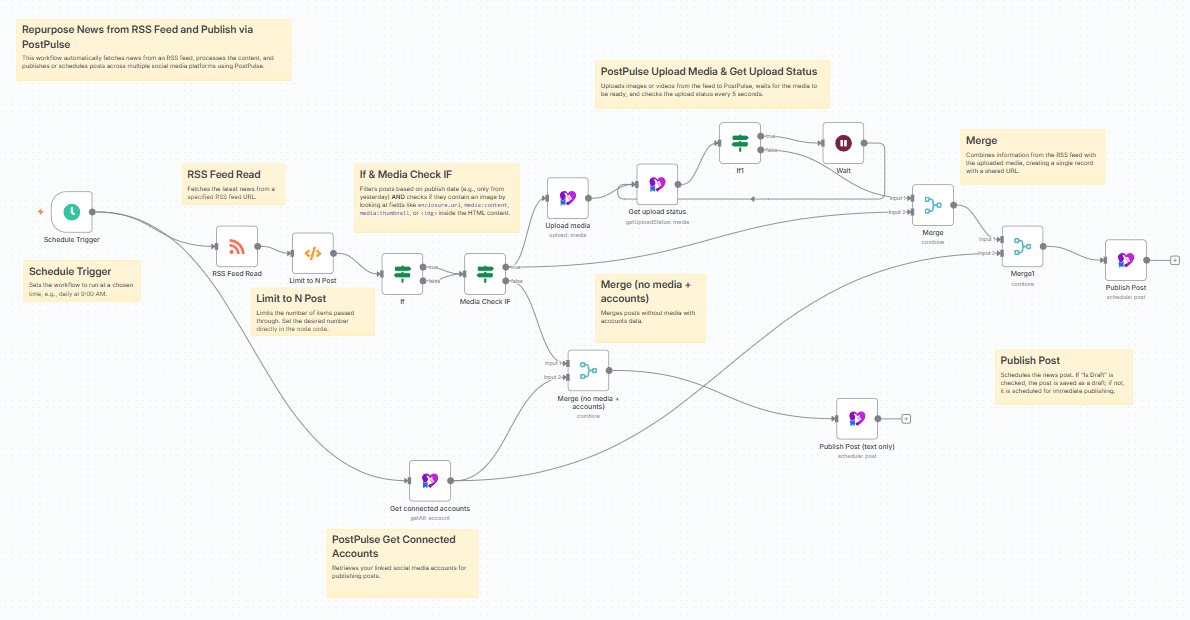
RSS to PostPulse workflow interface
The n8n workflow interface showing RSS feed processing and PostPulse integration

How It Works

1. RSS Feed Monitoring

The workflow periodically checks configured RSS feeds for new content items. You can set the polling frequency based on how often your sources update (hourly, daily, etc.). Each new item triggers the workflow.

2. Content Processing

Each RSS item goes through processing steps where you can extract specific elements (title, description, images), format text, add hashtags or branding elements, and apply any content rules you've configured.

3. PostPulse Integration

The processed content gets sent to PostPulse where it can be scheduled for publication across all connected social media accounts (Facebook, Twitter, LinkedIn, Instagram, etc.). You can configure different posting schedules for each platform.

Who This Is For

This automation is ideal for:

  • Content marketers managing multiple social media accounts
  • News aggregators and publishers distributing content
  • Social media agencies handling client accounts
  • Bloggers wanting to automatically share new posts
  • Businesses curating industry news for their audience

What You'll Need

  1. An n8n instance (cloud or self-hosted)
  2. A PostPulse account with connected social media profiles
  3. RSS feeds you want to monitor (news sites, blogs, etc.)
  4. Basic understanding of n8n workflows (or willingness to learn)

Quick Setup Guide

  1. Download and import the JSON template into your n8n instance
  2. Configure your RSS feed URLs in the RSS node
  3. Connect your PostPulse account in the PostPulse node
  4. Adjust content processing rules as needed
  5. Set your preferred publishing schedule in PostPulse
  6. Activate the workflow and test with sample content

Key Benefits

Save 5-10 hours per week by eliminating manual content sharing across platforms. The automation handles the entire process from feed monitoring to scheduled publishing.

Maintain consistent posting schedules without daily manual work. Your social channels stay active even when you're busy with other tasks.

Reach wider audiences by automatically sharing content across all your social platforms simultaneously with platform-optimized formatting.

Never miss important updates from your RSS sources. The workflow monitors feeds continuously and processes new content immediately.

Scale content distribution effortlessly as you add more social accounts or RSS sources without increasing your workload.

Pro tip: Use the content processing steps to add your brand voice to automated posts. Include branded hashtags, calls-to-action, or commentary to make automated posts feel more personal.

Frequently Asked Questions

Common questions about RSS to social media automation

News updates, blog posts, and regularly published content work best for RSS automation. The structured format of RSS feeds makes them ideal for automated processing. Content with clear titles, descriptions, and featured images translates well to social media posts.

For example, a marketing agency might automate sharing industry news articles to establish thought leadership. The automation can add their commentary before sharing, maintaining their brand voice while saving time.

  • Best for: News sites, blogs, podcast updates
  • Less ideal: Visual-first content without text descriptions
  • Tip: Filter RSS feeds to only share relevant content

Automated posts can maintain or increase engagement when done strategically. The key is adding value through processing - not just raw sharing. Automated posts with added commentary, questions, or hashtags perform better than direct shares.

A study by Social Media Today found that automated posts with human customization saw 28% higher engagement than fully manual posts. The consistency of automation helps algorithms favor your content, while strategic customization maintains authenticity.

  • Best practice: Add 1-2 sentences of commentary
  • Include questions to encourage comments
  • Vary posting times based on platform analytics

Yes, PostPulse allows platform-specific formatting. You can create different post versions for Twitter (with character limits), LinkedIn (more professional tone), and Instagram (focusing on visuals). The workflow can extract different elements for each platform.

For instance, a business might share industry reports with executive summaries on LinkedIn, key stats on Twitter, and infographic excerpts on Instagram - all from the same RSS feed item. This multi-platform approach maximizes reach while maintaining platform-appropriate content.

  • Extract different images for different platforms
  • Adjust post length based on platform norms
  • Use platform-specific hashtags and mentions

The ideal frequency depends on your content sources and audience expectations. News sites might warrant hourly checks, while blogs may only need daily monitoring. Most workflows check feeds every 2-4 hours as a balance between freshness and resource usage.

A financial news publisher might check market news feeds hourly during trading hours, while a lifestyle blog aggregator could check feeds twice daily. The key is matching check frequency to your content's timeliness value without overwhelming your audience with posts.

  • News sites: 1-2 hour intervals
  • Blogs: 4-12 hour intervals
  • Adjust based on posting history patterns

PostPulse simplifies multi-platform publishing with a single interface and provides advanced scheduling features. While direct API integrations are possible, PostPulse offers better post previews, centralized analytics, and handles platform-specific requirements automatically.

For businesses managing 10+ social profiles, PostPulse reduces complexity significantly. A marketing team can approve posts once in PostPulse rather than logging into each platform. The service also automatically adjusts image sizes and formats for each network's specifications.

  • Single interface for all platforms
  • Built-in content calendar and scheduling
  • Handles platform-specific technical requirements

Yes, the workflow includes filtering options to only share relevant content. You can filter by keywords, exclude certain topics, or set rules based on content length, author, or publication date. This ensures your social channels maintain quality standards.

A tech news curator might filter out press releases or only share articles mentioning specific technologies. The workflow can be configured to require manual approval for certain content types while automatically publishing others, balancing automation with quality control.

  • Keyword inclusion/exclusion filters
  • Content length requirements
  • Manual approval workflows for certain criteria

Absolutely. GrowwStacks specializes in building custom automation solutions tailored to your specific content workflows and social media strategy. While this template provides a starting point, we can create bespoke solutions with your preferred tools and unique business rules.

We've built custom systems for publishers needing complex content routing, brands requiring approval workflows, and agencies managing hundreds of client accounts. Our solutions integrate with your existing tech stack and include training for your team.

  • Custom content processing rules
  • Brand-specific posting guidelines
  • Approval workflows and quality gates

Need a Custom RSS to Social Media Automation?

This free template is a starting point. Our team builds fully tailored automation systems for your specific needs.