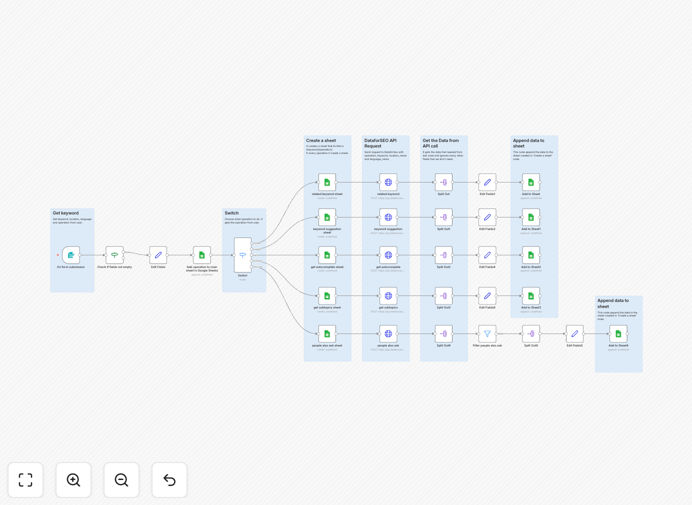
What This Workflow Does
This automation solves the time-consuming challenge of manual SEO research by connecting DataForSEO's powerful keyword and SERP data with the organizational capabilities of Google Sheets. The workflow automatically collects comprehensive search engine results page (SERP) data for your target keywords, analyzes competition levels, tracks ranking positions, and organizes everything in a structured spreadsheet.
By automating what would normally take hours of manual work, this template helps content teams, marketers, and SEO specialists make data-driven decisions faster. It eliminates the repetitive tasks of copying data between tools while ensuring your keyword research remains consistent and up-to-date.
How It Works
1. Keyword data collection
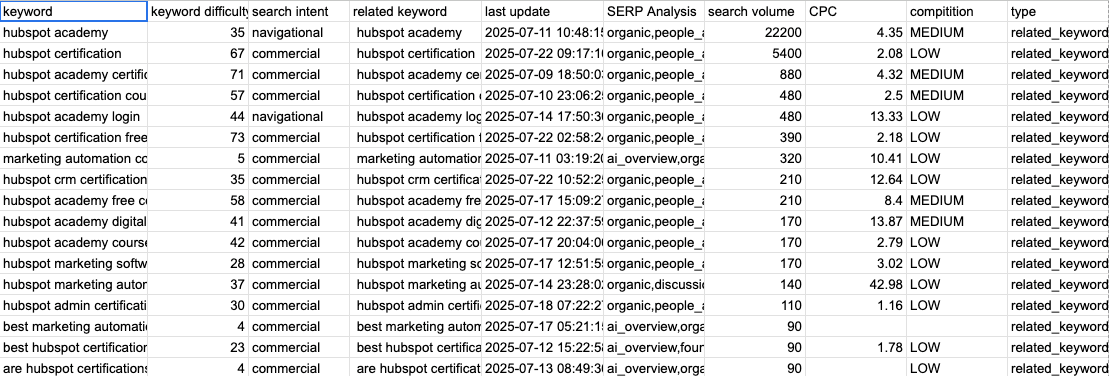
The workflow starts by sending your list of target keywords to DataForSEO's API. It retrieves comprehensive metrics including search volume, keyword difficulty, cost-per-click data, and SERP features present for each term.
2. SERP analysis automation
For each keyword, the workflow analyzes the top 100 search results, extracting domain authority scores, content types, word counts, and other ranking factors from competing pages.
3. Data processing and enrichment
The raw API data is processed to calculate additional insights like opportunity scores, trend analysis, and content gap identification between your pages and top competitors.
4. Google Sheets integration
All analyzed data is automatically organized into predefined sheets with color-coded metrics, pivot tables, and visualizations for easy interpretation and reporting.

Who This Is For
This automation is ideal for SEO agencies managing multiple clients, content teams producing data-driven articles, ecommerce stores optimizing product pages, and any business investing in organic search growth. Marketing managers will appreciate the time savings, while SEO specialists benefit from the depth of analysis.
Pro tip: Combine this with content calendar automation to automatically prioritize topics based on keyword opportunity scores.
What You'll Need
- An n8n instance (cloud or self-hosted)
- DataForSEO API credentials
- Google Sheets with edit permissions
- List of target keywords to analyze
Quick Setup Guide
- Download the JSON template file
- Import into your n8n instance
- Connect your DataForSEO API credentials
- Link to your Google Sheet
- Add your keyword list
- Test with a small keyword set first
- Schedule regular runs for ongoing tracking
Key Benefits
Save 5-10 hours weekly by eliminating manual keyword research and data entry between tools.
Improve content strategy with data-driven insights about what actually ranks for your target keywords.
Track competitors systematically with automated monitoring of their ranking pages and performance changes.
Standardize reporting with consistent metrics and visualizations across all your keyword analyses.
Scale SEO efforts by processing hundreds of keywords simultaneously instead of one-by-one manual analysis.