SEO Google Search Console GA4 Google Sheets Zapier

Automate SEO reporting with Google Search Console, GA4, and Google Sheets

Free workflow template to combine keyword rankings with conversion metrics automatically

Download Template JSON · Zapier compatible · Free
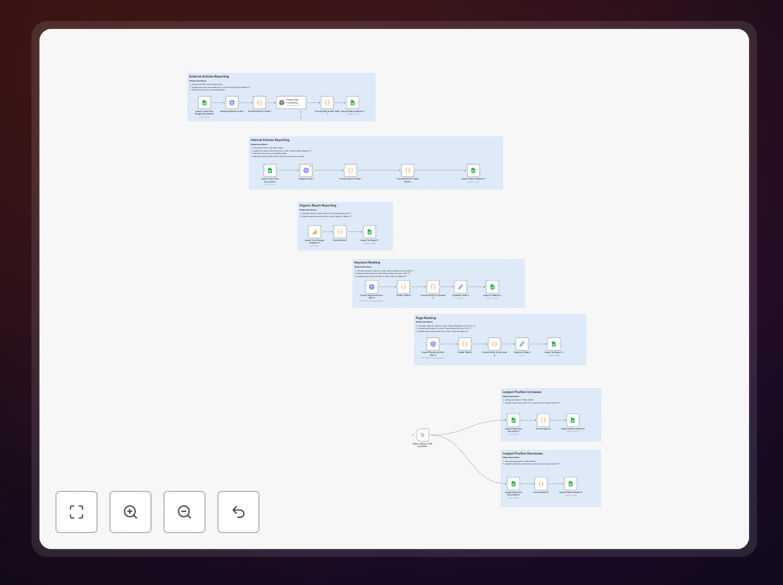
Screenshot of automated SEO reporting workflow in Zapier

What This Workflow Does

This automation solves the time-consuming manual process of compiling SEO reports by automatically combining data from Google Search Console and Google Analytics 4 into organized Google Sheets reports. Marketing teams often spend hours each week copying and pasting data between platforms, leaving less time for actual optimization work.

The workflow extracts key SEO metrics like keyword rankings, impressions, click-through rates, and combines them with GA4 conversion data to show the full customer journey from search to conversion. This gives marketers a comprehensive view of what search terms are actually driving business results, not just traffic.

How It Works

1. Data Extraction from Search Console

The workflow first connects to Google Search Console API to pull performance data for your selected properties. It gathers metrics for queries, pages, countries, and devices based on your configuration.

2. GA4 Metric Integration

Simultaneously, the system retrieves conversion data from GA4, matching URLs from Search Console with corresponding engagement and conversion metrics in your analytics.

3. Data Transformation

The workflow cleans and formats the raw data, calculating additional useful metrics like ranking changes week-over-week, conversion rates from search, and value-per-click estimates.

4. Google Sheets Population

Finally, the processed data gets written to designated Google Sheets in an organized structure ready for analysis. The template includes pre-built formulas for common SEO calculations.

Pro tip: Add a final step to automatically email the report to stakeholders or generate Data Studio visualizations for easier consumption.

Who This Is For

This automation is ideal for SEO specialists, content marketers, and digital marketing managers who need to regularly report on organic search performance. Agencies managing multiple clients will particularly benefit from the time savings of automated reporting.

Businesses with content-heavy websites, ecommerce stores relying on organic traffic, and SaaS companies tracking signups from search will get the most value from these automated insights.

What You'll Need

  1. Google Search Console account with verified property access
  2. Google Analytics 4 property connected to your website
  3. Google Sheets (part of Google Workspace)
  4. Zapier account (free plan works for basic implementation)

Quick Setup Guide

  1. Download the template JSON file
  2. Import into your Zapier account
  3. Connect your Google Search Console, GA4, and Sheets accounts
  4. Configure the property URLs and date ranges
  5. Set your preferred report frequency (daily/weekly/monthly)
  6. Test with a small date range before full implementation

Key Benefits

Save 5-10 hours per week by eliminating manual data collection and spreadsheet work. The automation handles all the tedious copying and pasting between platforms.

Spot trends faster with consistent, timely reporting. Automated reports ensure you never miss important changes in rankings or traffic patterns.

Focus on insights, not data entry by having all key metrics in one place. Spend your time analyzing what the numbers mean rather than compiling them.

Improve decision-making with complete visibility into which search terms actually drive conversions, not just clicks.

Frequently Asked Questions

Common questions about SEO reporting automation

Automated SEO reporting saves 5-10 hours per week by eliminating manual data collection. The system automatically pulls Search Console rankings and GA4 metrics, combines them in Sheets, and can even generate visual reports.

For example, an agency managing 10 clients might spend 15 hours weekly compiling reports manually. Automation reduces this to 1-2 hours of review time while providing more consistent, error-free data.

  • Eliminates copying/pasting between platforms
  • Reduces human error in data transcription
  • Ensures reports run consistently on schedule

The most valuable metrics to automate are keyword rankings, click-through rates, impressions, organic traffic, and conversion rates. Combining Search Console data with GA4 conversion metrics provides a complete picture of SEO performance.

A content publisher might track rankings and traffic for their top 50 articles, while an ecommerce site would focus more on conversion rates from branded vs. non-branded searches to measure ROI.

  • Prioritize metrics tied to business outcomes
  • Segment branded vs. non-branded performance
  • Track ranking changes for strategic keywords

Most businesses benefit from weekly automated reports to track short-term trends while allowing enough time for meaningful data accumulation. Monthly comprehensive reports help analyze longer-term patterns.

An enterprise running frequent content tests might use daily position tracking for key pages while reserving deeper analysis for weekly summaries. The frequency should match your optimization cycle.

  • Weekly for tactical adjustments
  • Monthly for strategic analysis
  • Adjust based on content velocity

Yes, automated reports can highlight high-impression/low-CTR keywords for content optimization, pages with declining rankings needing updates, and high-performing content to replicate.

One client discovered 27 keywords with 1,000+ monthly impressions but below 2% CTR. Optimizing these pages increased organic traffic by 38% in three months through better meta tags and content alignment.

  • Flag keywords with high impressions but low CTR
  • Identify pages losing rankings
  • Surface top-converting content themes

Common mistakes include tracking vanity metrics instead of business outcomes, not aligning GA4 goals with SEO objectives, failing to filter out branded search terms, and creating reports that are too complex.

A SaaS company initially tracked all keyword rankings equally until realizing branded terms accounted for 80% of conversions. Refocusing on commercial intent non-branded terms revealed their true growth opportunities.

  • Focus on metrics that impact revenue
  • Segment branded vs. non-branded performance
  • Keep reports simple and actionable

Automated reporting provides consistent, timely data that removes guesswork from SEO strategies. Teams can quickly identify what's working, spot negative trends early, and allocate resources more effectively.

An ecommerce brand used automated reports to discover that 60% of their blog content drove just 5% of conversions. They reallocated their content budget to product page optimizations that increased revenue by 22%.

  • Makes data available immediately after collection
  • Reduces bias in performance evaluation
  • Enables faster response to ranking changes

Yes, GrowwStacks specializes in building custom SEO reporting automations tailored to your specific KPIs, tools, and business goals. We can integrate additional data sources and create custom dashboards.

For a recent client, we built a system that combined SEO data with CRM information to show how organic search influenced pipeline generation. This revealed their blog was driving 28% of qualified leads they hadn't been tracking.

  • Integrate with your existing tech stack
  • Focus on your unique business metrics
  • Include alerts for critical changes

Need a Custom SEO Reporting Automation?

This free template is a starting point. Our team builds fully tailored automation systems for your specific needs.