WordPress Yoast SEO API Integration Content Automation

Automate WordPress SEO Updates with Yoast API

Programmatically update SEO titles and descriptions across your WordPress site or WooCommerce store

Download Template JSON · n8n compatible · Free
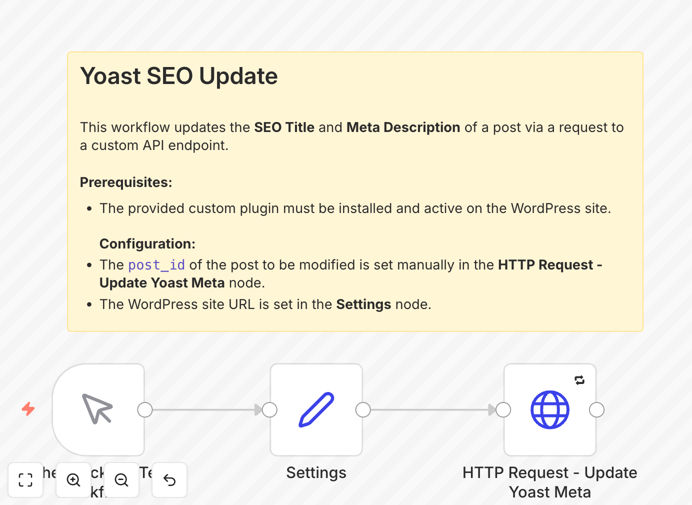
WordPress SEO automation workflow diagram showing API connections between n8n and Yoast

What This Workflow Does

This automation solves the tedious manual process of updating SEO metadata across WordPress sites. Marketing teams waste hours copying optimized titles and descriptions into the Yoast SEO fields for each post or product. This workflow eliminates that bottleneck by programmatically pushing updates through the Yoast API.

The solution handles both standard WordPress posts and WooCommerce products, making it valuable for content-heavy sites and ecommerce stores alike. It's particularly powerful when combined with content calendars or product information management systems that already contain optimized metadata.

How It Works

1. Trigger Initiation

The workflow can be triggered manually for one-off updates or connected to schedule triggers for regular SEO refreshes. Webhook triggers also allow integration with external content management systems.

2. WordPress API Authentication

Secure API calls authenticate using WordPress credentials with proper editing permissions. The workflow handles the OAuth handshake and token management automatically.

3. Metadata Update Execution

The core HTTP request node sends properly formatted JSON payloads to the Yoast API endpoint, updating specified fields while preserving all other existing SEO settings.

4. Result Verification

Built-in error handling confirms successful updates and logs any issues for troubleshooting, ensuring data integrity across your site.

Who This Is For

This automation delivers the most value for:

  • Content teams managing large WordPress sites
  • Ecommerce stores with extensive WooCommerce catalogs
  • Agencies handling multiple client websites
  • SEO specialists implementing bulk optimizations
  • Developers building automated content pipelines

What You'll Need

  1. A WordPress site with administrator access
  2. Yoast SEO plugin (premium version recommended)
  3. The companion Yoast SEO API Manager plugin installed
  4. n8n instance with HTTP request capabilities
  5. Basic understanding of WordPress REST API authentication

Quick Setup Guide

  1. Install the Yoast API Manager plugin on your WordPress site
  2. Configure WordPress API credentials in n8n
  3. Import the workflow JSON template
  4. Map your content source fields to the API parameters
  5. Test with a single post before scaling to bulk updates

Key Benefits

Save 5-10 hours weekly by eliminating manual copy-paste of SEO metadata across hundreds of posts and products.

Maintain consistent optimization by programmatically enforcing your SEO title and description templates site-wide.

Reduce human error that occurs when manually transferring metadata between systems.

Enable dynamic updates that reflect current keyword strategies or content changes automatically.

Scale across multiple sites with centralized control over all your WordPress properties' SEO configurations.

Frequently Asked Questions

Common questions about WordPress SEO automation and integration

Automating SEO updates ensures consistency across your site, saves hours of manual work, and allows for dynamic content optimization based on data triggers or scheduled updates.

Manual updates become impractical for sites with hundreds of posts or frequent content changes. Automation maintains SEO quality at scale while freeing your team for strategic work.

The Yoast SEO API allows programmatic updates of metadata through REST endpoints, enabling bulk changes and integration with external data sources without manual WordPress dashboard access.

The API exposes specific fields like titles and descriptions while maintaining all other Yoast functionality. It requires proper authentication and follows WordPress's standard REST API patterns.

Beyond titles and descriptions, you can automate focus keywords, canonical URLs, social media meta tags, and schema markup through similar API integrations.

Advanced implementations can sync SEO settings with external content calendars, pull optimization suggestions from AI tools, or implement A/B testing for metadata performance.

Best practice suggests reviewing metadata quarterly or whenever content significantly changes. Automation allows real-time updates when source data changes.

Seasonal businesses may update product SEO monthly, while news sites might optimize headlines daily. The right frequency balances freshness with stability for search engines.

Yes, the workflow handles both posts and WooCommerce products, making it ideal for ecommerce sites needing bulk product SEO optimization.

Product-specific fields like SKUs or attributes can be incorporated into dynamic SEO templates, ensuring each product page gets properly optimized metadata.

The workflow uses WordPress authentication and implements proper user permission checks to ensure only authorized updates occur.

Best practices include using application passwords instead of admin credentials, limiting API access to specific IPs, and implementing rate limiting to prevent abuse.

Our team builds tailored WordPress automation solutions including bulk SEO updaters, content synchronization systems, and AI-powered metadata generators.

Custom implementations can integrate with your existing tech stack, support multi-site architectures, and incorporate advanced features like:

  • Automated keyword research integration
  • Content quality scoring systems
  • Competitor analysis triggers
  • Performance monitoring dashboards

Need a Custom WordPress SEO Automation?

This free template is a starting point. Our team builds fully tailored automation systems for your specific business needs.