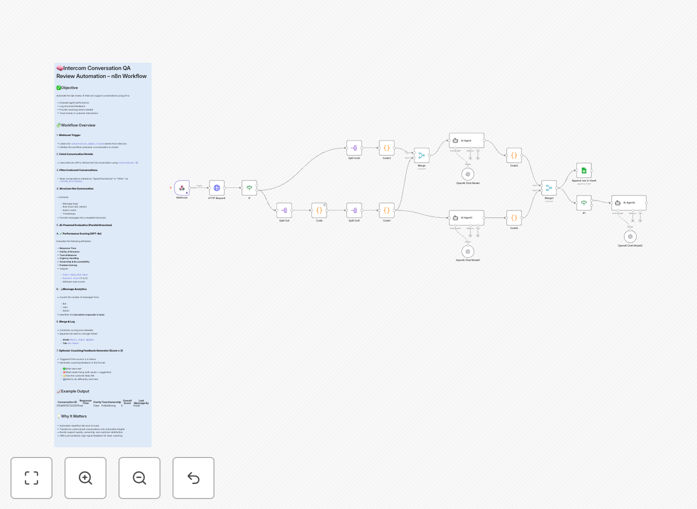
What This Workflow Does
Manual quality assurance for support conversations is time-consuming, inconsistent, and often gets deprioritized as ticket volume grows. This leaves teams without clear visibility into agent performance, customer satisfaction trends, or training opportunities.
This n8n workflow solves this by automatically reviewing every closed Intercom conversation using AI. It evaluates response quality across multiple dimensions, logs structured scores in Google Sheets for analysis, and provides immediate coaching feedback for agents who need improvement. What used to be a weekly manual audit becomes a continuous, automated improvement system.
How It Works
The automation follows a logical sequence to transform raw conversations into actionable insights.
1. Trigger on Conversation Closure
A webhook listens for conversation.admin.closed events from Intercom. Whenever a support ticket is resolved, the workflow automatically begins its QA process without any manual intervention.
2. Fetch Complete Conversation Data
The workflow retrieves the full conversation thread from Intercom's API, including all messages, timestamps, agent details, and customer information. This provides the complete context needed for accurate evaluation.
3. Structure and Prepare for Analysis
The conversation is formatted into a clear transcript, separating agent and customer messages, noting response times, and highlighting key moments like escalations or solutions provided.
4. AI-Powered Evaluation
Using OpenAI's GPT models, the system analyzes the conversation across five critical dimensions: response time, clarity of communication, tone and professionalism, urgency handling, and problem ownership/resolution effectiveness.
5. Score Logging and Feedback
Scores (1-5 scale) for each dimension are written to a Google Sheet with conversation metadata. If any score falls below a threshold (typically 3), the system generates specific, constructive feedback for the agent to review.
Who This Is For
This template delivers immediate value for customer support teams, managers, and operations leaders across various scenarios:
- Support Managers who need consistent quality metrics without spending hours reviewing tickets manually.
- Growing SaaS Companies where support volume is increasing faster than QA capacity.
- Remote Support Teams requiring objective performance measurement across different agents and time zones.
- Customer Success Departments aiming to proactively identify training needs and improve customer satisfaction scores.
- Startups wanting to establish quality standards early without hiring dedicated QA staff.
What You'll Need
- An Intercom account with admin access to set up webhooks and API credentials.
- An OpenAI API key with access to GPT models (like gpt-3.5-turbo or gpt-4).
- A Google Sheets document prepared with appropriate columns for logging scores and metadata.
- An n8n instance (cloud or self-hosted) where you can import and run the workflow.
- Basic understanding of webhook configuration in Intercom and Google Sheets API permissions.
Quick Setup Guide
Get your automated QA system running in under 30 minutes with these steps:
- Download and Import: Download the template file and import it into your n8n workspace.
- Configure Credentials: Set up your Intercom, OpenAI, and Google Sheets credentials in n8n's credentials management.
- Set Up Intercom Webhook: In your Intercom workspace, create a webhook pointing to your n8n webhook URL for the
conversation.admin.closedevent. - Prepare Google Sheet: Duplicate the sample sheet structure or adapt your existing sheet to match the expected columns.
- Test with Sample Data: Manually trigger the workflow with a test conversation ID to verify all connections work correctly.
- Activate and Monitor: Activate the workflow and monitor the first few entries in your sheet to ensure scoring aligns with your quality expectations.
Pro tip: Start with a small subset of conversations (like those from your top agents) to calibrate the AI scoring before rolling out to your entire team. Adjust the evaluation criteria in the GPT prompt to match your specific quality standards.
Key Benefits
Consistent 100% Coverage: Every single support conversation gets evaluated, not just a random sample. This eliminates selection bias and gives you complete visibility into your team's performance across all interactions.
Massive Time Savings: What typically takes a manager 10-15 minutes per conversation review now happens automatically in seconds. Reclaim 10+ hours weekly that can be redirected to coaching and strategy.
Objective, Data-Driven Insights: AI evaluation removes human subjectivity from quality scoring. You get consistent metrics that allow for fair performance comparisons and clear trend analysis over time.
Immediate Agent Development: Low scores trigger instant feedback delivery, turning QA from a retrospective audit into a real-time coaching tool. Agents learn and improve faster with timely, specific guidance.
Scalable Quality Management: The system handles increasing conversation volume at zero marginal cost. Your QA process actually improves as you scale, with more data leading to better insights and trend identification.