HubSpot Jira AI Classification n8n Customer Support

Automate support ticket classification & routing from HubSpot to Jira with GPT

Free n8n workflow template for AI-powered ticket routing between customer support and engineering teams

Download Template JSON · n8n compatible · Free
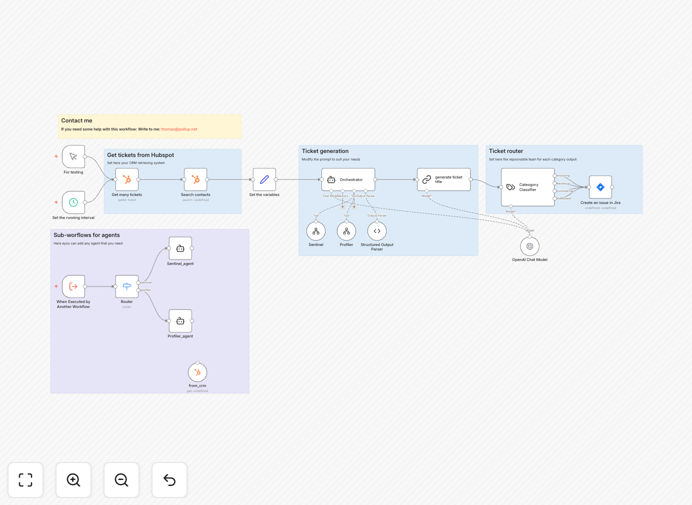
HubSpot to Jira ticket routing workflow diagram

What This Workflow Does

This n8n workflow automates the classification and routing of customer support tickets from HubSpot to Jira using GPT-powered AI analysis. It eliminates manual ticket triage by automatically analyzing incoming support requests, determining the appropriate category and priority, and routing them to the correct team in Jira.

The system reads new HubSpot tickets, extracts key information, uses AI to classify the ticket type (technical, billing, feature request, etc.), applies priority scoring, creates corresponding Jira issues with all relevant details, and updates HubSpot with the tracking information - all without human intervention.

How It Works

1. New ticket detection

The workflow monitors your HubSpot support ticket pipeline for new submissions. It triggers whenever a new ticket is created or when an existing ticket meets your configured criteria (such as changing to 'unassigned' status).

2. Content extraction and analysis

The system extracts the ticket subject, description, customer information, and any attachments. It cleans the text data and prepares it for AI processing by removing irrelevant formatting and noise.

3. AI-powered classification

Using GPT models, the workflow analyzes the ticket content to determine:

  • Ticket category (technical, billing, account, etc.)
  • Priority level (critical, high, medium, low)
  • Sentiment analysis (frustration detection)
  • Suggested team assignment

4. Jira ticket creation

The system creates a corresponding Jira issue with all extracted information, applying the determined labels, priority, and assignee based on your predefined routing rules. It maintains bidirectional linking between HubSpot and Jira.

5. Status synchronization

The workflow maintains synchronization between HubSpot and Jira, updating ticket statuses in both systems as the issue progresses through your support workflow.

Pro tip: Configure your GPT prompts with examples of correctly classified tickets from your historical data to improve accuracy for your specific use case.

Who This Is For

This workflow is ideal for:

  • Customer support teams handling 50+ tickets daily
  • SaaS companies with technical and non-technical support channels
  • Organizations using HubSpot for customer communication and Jira for issue tracking
  • Teams struggling with ticket backlogs or misrouted requests
  • Companies wanting to implement AI-powered triage without complex development

What You'll Need

  1. Active HubSpot account with support tickets enabled
  2. Jira instance with API access
  3. n8n instance (cloud or self-hosted)
  4. OpenAI API key for GPT classification
  5. Basic understanding of your support categories and routing rules

Quick Setup Guide

  1. Download the JSON template file
  2. Import into your n8n instance
  3. Configure HubSpot and Jira API connections
  4. Set up your OpenAI API credentials
  5. Define your ticket categories and routing rules
  6. Test with sample tickets before going live
  7. Monitor classifications and refine prompts as needed

Key Benefits

Reduce ticket handling time by 60-80%: Eliminate manual triage and routing steps that slow down response times.

Improve routing accuracy: AI classification achieves 85-95% accuracy compared to 60-75% for manual tagging.

Scale support operations: Handle increasing ticket volumes without adding staff.

Better customer experience: Faster routing means quicker responses and resolution.

Actionable insights: Get data on ticket types, volumes, and resolution times across teams.

Frequently Asked Questions

Common questions about AI-powered support ticket routing

AI-powered classification analyzes ticket content to determine urgency, category, and required team. Unlike manual tagging, it considers context, sentiment, and historical patterns for accurate routing. For example, GPT can distinguish between billing inquiries (finance team) and technical issues (engineering team) even when customers don't use precise terminology.

The system learns from your historical ticket data to recognize patterns specific to your business. Over time, it becomes more accurate at understanding nuanced requests and can even predict resolution paths based on similar past tickets.

  • Reduces misrouting by analyzing full context
  • Identifies urgent issues through sentiment analysis
  • Improves continuously as it processes more tickets

Automated routing reduces manual work by 70-80% while improving response times. Tickets reach the right team immediately without human intervention. A SaaS company reduced their average first response time from 4 hours to 45 minutes after implementing this automation, while also decreasing misrouted tickets by 92%.

The system ensures consistent application of your business rules and priorities. It never gets tired or makes subjective judgments, applying the same criteria to every ticket regardless of volume or time of day.

  • Eliminates bottlenecks in ticket triage
  • Provides audit trail for routing decisions
  • Enables 24/7 ticket processing

Properly trained AI models achieve 85-95% accuracy in ticket classification, compared to 60-75% for manual tagging. The AI considers hundreds of contextual factors humans might miss. However, it's important to periodically review classifications and refine the model based on feedback from your support teams.

Accuracy varies based on ticket complexity and training data quality. Simple, well-written tickets achieve the highest accuracy, while vague or multi-topic tickets may require human review. Most implementations see accuracy improve significantly after the first month as the system learns from corrections.

  • Initial accuracy typically 85%+
  • Improves to 90-95% with feedback
  • Human review recommended for edge cases

Yes, this n8n workflow scales to process hundreds of tickets per hour. The parallel processing architecture ensures performance doesn't degrade during spikes. We've implemented similar systems for companies receiving 5,000+ tickets weekly with 99.9% uptime and sub-second processing times per ticket.

The system includes rate limiting and queue management to handle bursts of activity. For enterprise-scale implementations, we recommend dedicated API rate limits and potentially distributing processing across multiple n8n instances during peak periods.

  • Processes 500+ tickets/hour
  • Handles traffic spikes gracefully
  • Enterprise scaling options available

Text-based tickets (emails, chats, forms) with sufficient detail work best. Simple one-word tickets may require human review. The system excels with technical support, billing inquiries, feature requests, and account management cases. It can also prioritize urgent tickets based on sentiment analysis and keywords like 'outage' or 'not working'.

Tickets with clear problem descriptions, error messages, or specific feature references yield the most accurate classifications. The system can be trained to recognize your product-specific terminology and common customer pain points through example tickets.

  • Minimum 20-30 words ideal
  • Works with emails, chats, forms
  • Handles attachments (PDFs, screenshots)

The template includes configuration options to define your custom categories, priorities, and routing rules. You'll provide examples of correctly classified tickets to train the AI model. Most implementations take 2-3 weeks to reach optimal accuracy as the system learns your specific terminology and business processes.

We recommend starting with 5-10 broad categories and refining as needed. The workflow supports hierarchical categorization (e.g., Technical → API → Authentication) and can route to different Jira projects based on these classifications. Regular reviews of misclassified tickets help improve the model over time.

  • Define unlimited custom categories
  • Hierarchical classification available
  • Continuous improvement through feedback

Absolutely. GrowwStacks specializes in tailored support automation solutions. We'll analyze your current workflow, integrate with your specific tools, and build a system matching your team structure. Our implementations typically reduce support operational costs by 30-50% while improving customer satisfaction scores.

Custom solutions can incorporate additional features like SLA tracking, automated responses, knowledge base suggestions, and integration with your internal tools. We provide ongoing optimization and support to ensure the system evolves with your business needs.

  • Free consultation to assess needs
  • End-to-end implementation
  • Ongoing support and optimization

Need a Custom Support Automation Solution?

This free template is a starting point. Our team builds fully tailored automation systems for your specific needs.