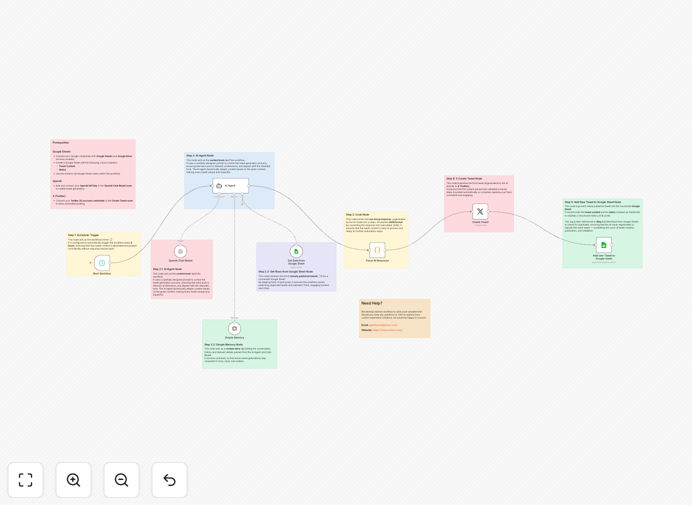
What This Workflow Does
This n8n template solves the constant challenge of maintaining an active, engaging social media presence without spending hours each week on content creation. It creates a fully autonomous Twitter (X) manager that generates unique, high-quality posts using GPT-4, ensures content originality by checking against a history log in Google Sheets, and publishes on a consistent schedule you control.
The workflow eliminates the manual work of brainstorming ideas, writing tweets, checking for repetition, and remembering to post. It transforms social media from a daily task into a strategic asset that works automatically in the background, keeping your audience engaged while you focus on other business priorities.
How It Works
1. Scheduled Trigger
The workflow automatically starts at your chosen interval—every 6 hours, daily, or whatever schedule fits your content strategy. This ensures consistent posting without manual initiation.
2. AI Content Generation
GPT-4 receives a detailed prompt with your brand voice, topics, character limits, and hashtag preferences. It crafts engaging, relevant tweets that match your style and audience interests.
3. Duplicate Prevention
Before finalizing the tweet, the AI agent checks your Google Sheets log of all previously published posts. This ensures every new piece of content is unique and avoids repetition that could annoy followers.
4. Automated Posting
The approved, unique tweet is automatically posted to your connected Twitter account through the Twitter API. The process handles authentication, character limits, and posting mechanics.
5. History Logging
After successful posting, the workflow logs the new tweet back into your Google Sheets document. This updates the history for the next cycle, creating a continuous learning loop.
Who This Is For
This template is ideal for social media managers, marketing teams, startup founders, content creators, and small business owners who want to maintain a consistent Twitter presence without daily manual effort. It's particularly valuable for:
- Marketing agencies managing multiple client accounts
- Solopreneurs who wear many hats and need automation
- Startups building brand awareness with limited resources
- Content creators who want to focus on creation rather than posting
- Businesses looking to establish thought leadership through consistent sharing
What You'll Need
- n8n instance – Either n8n Cloud or a self-hosted installation where you can import and run workflows.
- OpenAI account with API key – Active billing enabled to access GPT-4 language models for content generation.
- Google account and prepared Sheet – A Google Sheet with "Tweet Content" and "Status" columns to serve as your posting history log.
- Twitter (X) Developer account – Approved developer profile with an app created, featuring v2 API access and Write permissions for posting.
Quick Setup Guide
Follow these steps to get your autonomous social media manager running:
- Import the template – Download the JSON file above and import it into your n8n instance through the workflow import function.
- Configure the schedule – In the Schedule Trigger node, set your desired posting frequency (e.g., every 6 hours for consistent presence).
- Connect OpenAI – Add your API key in the OpenAI Chat Model node and customize the prompt in the AI Agent node with your brand voice and topics.
- Set up Google Sheets – Connect your Google account, specify your Sheet's Document ID and name in both the "Get Data" and "Add new Tweet" nodes.
- Link Twitter (X) – Authenticate your Twitter account in the Create Tweet node with your developer app credentials.
- Activate and test – Save the workflow, toggle it to Active, and monitor the first few posts to ensure quality and alignment.
Pro tip: Start with a conservative posting frequency (once daily) and gradually increase as you confirm the AI's content quality matches your brand standards. Review the Google Sheets log weekly to identify patterns and refine your prompts.
Key Benefits
Save 5–10 hours weekly on social media content creation, scheduling, and manual posting. This time can be redirected to strategy, engagement, or other business priorities.
Ensure consistent brand presence even during holidays, vacations, or busy periods. Your audience receives regular value without gaps in your posting schedule.
Generate unique, on-brand content that avoids repetition and maintains quality standards through AI intelligence combined with your historical data.
Create a searchable content archive in Google Sheets that serves as both a performance log and a source for future content ideas and analysis.
Scale your social media efforts without proportional increases in time or staffing. The same workflow can be adapted for multiple accounts or platforms.