What This Workflow Does
Manual visitor management is a time-consuming, error-prone, and insecure process for offices, coworking spaces, and event venues. Reception staff waste 10–15 minutes per visitor on data entry, badge printing, and notifications, with no guarantee the provided email is even real. This creates security gaps, poor guest experiences, and zero reliable audit trails.
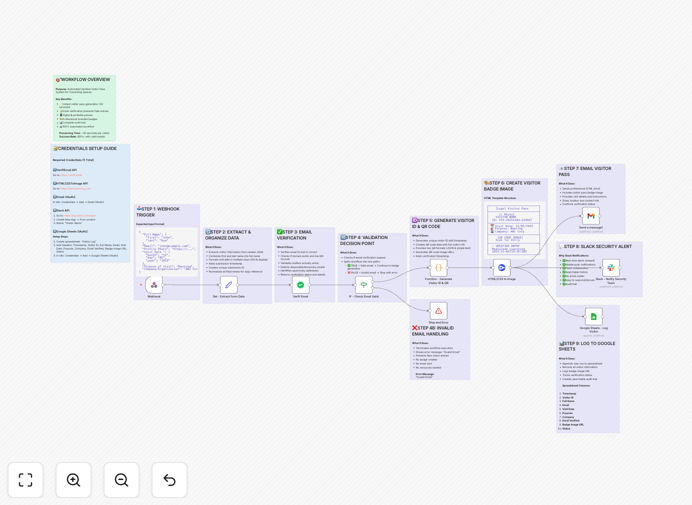
This automated workflow solves all these problems. It acts as a complete digital concierge: capturing visitor data from any online form, instantly verifying the email's authenticity to block fake registrations, generating a professional branded digital pass with a QR code, emailing it to the visitor, alerting your security team on Slack, and logging every detail to a Google Sheets database—all in under 30 seconds, with zero manual intervention.
How It Works
The automation follows a logical, secure sequence to ensure every visitor is properly vetted and processed.
Step 1: Capture & Validate
The workflow is triggered when a visitor submits a registration form (from Jotform, Typeform, etc.). The submitted data—name, email, company, visit purpose—is received via webhook. The first critical action is email verification using the VerifiEmail API, which checks if the address is valid and not from a disposable service, preventing spam and fake entries.
Step 2: Create & Design
For verified emails, the system generates a unique visitor ID and a scannable QR code containing the visitor's details. It then uses the HTML/CSS to Image API to create a visually appealing, branded digital visitor badge. This badge includes your logo, the visitor's information, the QR code, and visit details, producing a professional pass that works on any smartphone.
Step 3: Notify & Log
The digital pass is automatically attached to a personalized email sent to the visitor, providing arrival instructions. Simultaneously, a real-time alert is posted to a designated Slack channel, informing your security or host team of the visitor's imminent arrival with all relevant details. Finally, the entire visitor record—timestamp, details, verification status—is appended to a Google Sheets spreadsheet, creating a permanent, searchable audit trail for compliance and reporting.
Who This Is For
This automation delivers immense value to any business or venue that manages guest access. It's perfect for coworking spaces and shared offices that handle dozens of daily guests and need scalable, professional check-in. Corporate headquarters benefit from enhanced security and contractor tracking. Event venues and conference centers can automate attendee registration and check-in. Healthcare facilities, educational institutions, manufacturing plants, and hotels all gain from streamlined, secure, and contactless visitor processing.
What You'll Need
- A Form Tool: Any form service (Jotform, Typeform, Google Forms) that can send data via webhook.
- VerifiEmail API Account: A free or paid account from verifi.email for email validation.
- HTML/CSS to Image API Account: Credentials from htmlcsstoimg.com to generate badge images.
- Gmail or SMTP Access: An email account (via OAuth2 or SMTP) to send passes to visitors.
- Slack Workspace: Admin access to create a Slack app and get a bot token for alerts.
- Google Account: To create and connect the Google Sheets log.
Pro tip: Start with a free tier for the VerifiEmail and HTML/CSS to Image APIs to test the workflow. You can process a significant number of visitors before needing to upgrade.
Quick Setup Guide
- Download & Import: Click the "Download Template" button above and import the JSON file into your n8n instance.
- Configure Credentials: In n8n, set up credentials for VerifiEmail, HTML/CSS to Image, Gmail, Slack, and Google Sheets using the accounts you prepared.
- Customize Content: Update the HTML badge template node with your company logo, brand colors, and contact information. Adjust the email template's wording.
- Set Your Slack Channel: In the Slack node, replace the placeholder Channel ID with the ID of your actual security or reception channel.
- Connect Your Form: Copy the webhook URL generated by n8n's Webhook node and paste it as the submission endpoint in your form tool's settings.
- Test Thoroughly: Activate the workflow and submit a test form entry. Verify the email is received, the Slack alert fires, and data appears in your Google Sheet.
Key Benefits
⚡ Slash Processing Time from 15 Minutes to 30 Seconds. Eliminate every manual step—data entry, badge design, email composition, logging—and reclaim hundreds of staff hours per year for more valuable work.
🔐 Block Fake Registrations with Email Verification. Automatically reject disposable or invalid email addresses before they enter your system, closing a major security loophole and ensuring you only communicate with legitimate visitors.
📈 Gain a Complete, Searchable Audit Trail. Every visitor detail is automatically logged to Google Sheets with a timestamp. This is invaluable for security compliance, contact tracing, and analyzing visitor trends over time.
👔 Deliver a Professional, Branded Guest Experience. Visitors receive a sleek, digital pass via email immediately after registering. This creates a strong positive first impression, making your space feel modern and well-organized.
🤖 Enable Real-Time Team Coordination with Slack Alerts. Keep your security and host teams instantly informed of visitor arrivals, including all relevant details, eliminating phone calls, walkie-talkie chatter, and missed greetings.