n8n FFmpeg Google Drive Video Processing Automation

Automate Video Uploads to Thumbnails with FFmpeg & Google Drive

Upload a video, auto-extract a thumbnail, and save it to Google Drive—all in one automated workflow. Perfect for content teams, developers, and agencies.

Download Template JSON · n8n compatible · Free
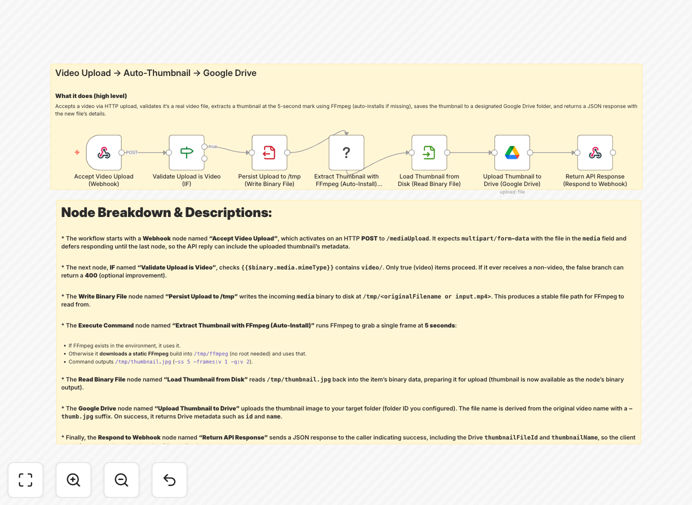
n8n workflow diagram showing video upload, FFmpeg processing, and Google Drive integration

What This Workflow Does

This automation solves a common bottleneck for teams that handle video content: the manual, time-consuming process of creating thumbnails. Instead of opening video editing software, taking screenshots, cropping, and saving files, this workflow handles everything automatically.

When a video is uploaded via HTTP, the workflow validates it's a legitimate video file, extracts a frame at the 5-second mark using FFmpeg (installing it automatically if needed), uploads the generated thumbnail to your specified Google Drive folder, and returns a structured JSON response with the new file's details. It turns what was a 10-15 minute manual task into a 30-second automated process.

How It Works

1. Accept Video Upload

The workflow starts with a webhook endpoint that accepts multipart form-data uploads. Videos can be sent via simple HTTP POST requests, making it accessible from any application or platform.

2. Validate & Process

An IF node checks that the uploaded file is actually a video (not an image or document). Valid videos are temporarily saved to disk for stable processing, while invalid files can be rejected with helpful error messages.

3. Extract Thumbnail with FFmpeg

The Execute Command node runs FFmpeg to extract a frame at the 5-second mark. The workflow includes logic to automatically install a static FFmpeg build if it's not present on the system, ensuring reliability across different hosting environments.

4. Upload to Google Drive

The generated thumbnail is read from disk and uploaded to your specified Google Drive folder using OAuth2 authentication. The file is named intelligently (originalname-thumb.jpg) for easy identification.

5. Return Structured Response

A final Respond to Webhook node sends back a JSON response containing the Drive file ID, name, web links, size, and checksums—everything needed to integrate the thumbnail into your applications.

Who This Is For

Marketing & Social Media Teams who need consistent, branded thumbnails for YouTube, social posts, and campaign content without manual editing. Developers building applications that require automated video processing capabilities. Agencies & Creators managing multiple client projects who need standardized asset workflows. E-learning Platforms generating course preview images from lecture recordings. News Organizations extracting stills from video reports for article headers.

What You'll Need

  1. A self-hosted n8n instance or n8n.cloud account with Execute Command node permissions
  2. Outbound internet access (to download FFmpeg if not pre-installed)
  3. Google Drive OAuth2 credentials with access to your target folder
  4. Adequate temporary storage space for video files during processing
  5. Basic familiarity with n8n workflow import and credential setup

Quick Setup Guide

  1. Import the workflow JSON into your n8n instance
  2. Configure Google Drive credentials in n8n's credential store
  3. Set your target folder ID in the Google Drive upload node
  4. Test with a sample video using curl or Postman to the webhook URL
  5. Customize the timestamp (default 5 seconds) if needed for your content
  6. Add error handling for non-video uploads if required for your use case

Pro tip: For production use, add a cleanup step to delete temporary video files after processing to prevent storage bloat. You can also implement rate limiting and file size validation to protect your system.

Key Benefits

Save 2-3 hours per video by eliminating manual thumbnail creation, editing, and file management tasks. What used to require video editing software and manual effort now happens automatically.

Ensure brand consistency with standardized thumbnail generation across all your video content. Every thumbnail follows the same quality standards and naming conventions automatically.

Accelerate publishing timelines by processing videos immediately upon upload. Social media teams can go from raw footage to published content in minutes instead of hours.

Reduce human error in file naming, format conversion, and storage location. The automation handles these details consistently every time.

Create API-first video processing capabilities for your applications without building complex media infrastructure. Developers get production-ready video processing with minimal coding.

Frequently Asked Questions

Common questions about video processing automation and integration

Automating video thumbnail generation saves content teams 2-3 hours per video by eliminating manual screenshotting, editing, and file management. It ensures consistent branding, accelerates publishing timelines, and reduces human error in asset creation.

For example, a marketing agency producing 20 videos per month saves 40-60 hours monthly—nearly two full work weeks—that can be redirected to strategy and creative work instead of repetitive production tasks.

FFmpeg provides reliable, programmatic video processing within automation workflows. It enables precise frame extraction, format conversion, and metadata reading without manual video editing software.

This turns complex media operations into a single automated step, making professional video processing accessible to non-technical teams through simple API calls. FFmpeg handles hundreds of video formats and codecs, ensuring compatibility with virtually any uploaded content.

Connecting video processing to Google Drive creates a centralized, searchable media library with automatic version control and team collaboration. It eliminates manual file transfers and provides instant access to processed assets across devices.

The integration also enables seamless workflows with other Google Workspace tools—thumbnails can be automatically inserted into Docs, Slides, or Sites, and shared with specific team members or made publicly accessible with controlled permissions.

Common use cases include social media teams generating post images from raw footage, e-learning platforms creating course previews, marketing agencies producing client campaign assets, and news organizations extracting stills from video reports.

Product teams also use this automation to create feature demos and tutorial images from screen recordings. Any business creating video content benefits from eliminating the manual thumbnail creation bottleneck.

  • Social media content scheduling
  • E-learning course material preparation
  • Marketing campaign asset production

The workflow validates video MIME types, processes common formats (MP4, MOV, AVI, etc.), and can be configured with size limits and format restrictions. FFmpeg handles format conversion automatically when needed.

Conditional logic can route unsupported files for manual review or conversion, ensuring reliable processing across diverse input sources. For enterprise use, you can add pre-processing steps to normalize video dimensions or compress files before thumbnail extraction.

Key security considerations include file validation to prevent malicious uploads, secure API endpoints with authentication, temporary file cleanup to avoid storage bloat, and proper Google Drive permissions management.

The workflow should include virus scanning for enterprise use and audit logging for compliance in regulated industries. Implementing rate limiting and file size caps also protects your system from abuse while maintaining availability for legitimate users.

Yes, GrowwStacks specializes in custom video processing automations tailored to your specific workflows. We can build systems for batch processing, multi-platform distribution, AI-enhanced thumbnail selection, watermarking, and transcription integration.

Our team designs complex media pipelines that connect your existing tools into a seamless production system. Whether you need advanced video analytics, custom format support, or integration with specialized media platforms, we can develop a solution that fits your exact requirements and scales with your business.

Need a Custom Video Processing Automation?

This free template is a starting point. Our team builds fully tailored automation systems for your specific business needs.