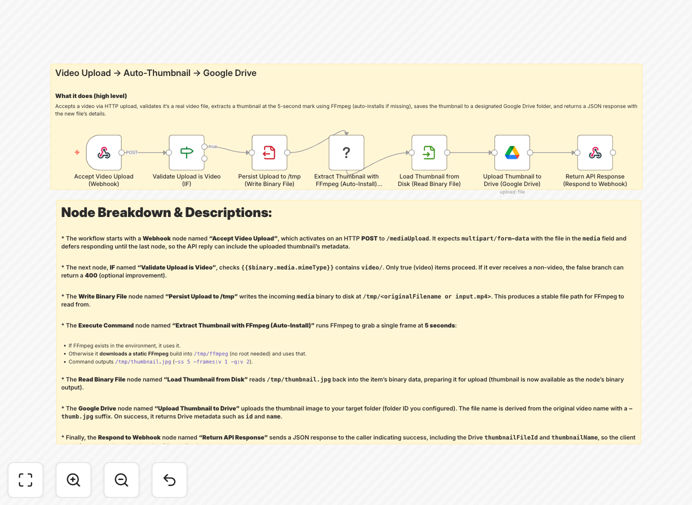
What This Workflow Does
This automation solves a common bottleneck for teams that handle video content: the manual, time-consuming process of creating thumbnails. Instead of opening video editing software, taking screenshots, cropping, and saving files, this workflow handles everything automatically.
When a video is uploaded via HTTP, the workflow validates it's a legitimate video file, extracts a frame at the 5-second mark using FFmpeg (installing it automatically if needed), uploads the generated thumbnail to your specified Google Drive folder, and returns a structured JSON response with the new file's details. It turns what was a 10-15 minute manual task into a 30-second automated process.
How It Works
1. Accept Video Upload
The workflow starts with a webhook endpoint that accepts multipart form-data uploads. Videos can be sent via simple HTTP POST requests, making it accessible from any application or platform.
2. Validate & Process
An IF node checks that the uploaded file is actually a video (not an image or document). Valid videos are temporarily saved to disk for stable processing, while invalid files can be rejected with helpful error messages.
3. Extract Thumbnail with FFmpeg
The Execute Command node runs FFmpeg to extract a frame at the 5-second mark. The workflow includes logic to automatically install a static FFmpeg build if it's not present on the system, ensuring reliability across different hosting environments.
4. Upload to Google Drive
The generated thumbnail is read from disk and uploaded to your specified Google Drive folder using OAuth2 authentication. The file is named intelligently (originalname-thumb.jpg) for easy identification.
5. Return Structured Response
A final Respond to Webhook node sends back a JSON response containing the Drive file ID, name, web links, size, and checksums—everything needed to integrate the thumbnail into your applications.
Who This Is For
Marketing & Social Media Teams who need consistent, branded thumbnails for YouTube, social posts, and campaign content without manual editing. Developers building applications that require automated video processing capabilities. Agencies & Creators managing multiple client projects who need standardized asset workflows. E-learning Platforms generating course preview images from lecture recordings. News Organizations extracting stills from video reports for article headers.
What You'll Need
- A self-hosted n8n instance or n8n.cloud account with Execute Command node permissions
- Outbound internet access (to download FFmpeg if not pre-installed)
- Google Drive OAuth2 credentials with access to your target folder
- Adequate temporary storage space for video files during processing
- Basic familiarity with n8n workflow import and credential setup
Quick Setup Guide
- Import the workflow JSON into your n8n instance
- Configure Google Drive credentials in n8n's credential store
- Set your target folder ID in the Google Drive upload node
- Test with a sample video using curl or Postman to the webhook URL
- Customize the timestamp (default 5 seconds) if needed for your content
- Add error handling for non-video uploads if required for your use case
Pro tip: For production use, add a cleanup step to delete temporary video files after processing to prevent storage bloat. You can also implement rate limiting and file size validation to protect your system.
Key Benefits
Save 2-3 hours per video by eliminating manual thumbnail creation, editing, and file management tasks. What used to require video editing software and manual effort now happens automatically.
Ensure brand consistency with standardized thumbnail generation across all your video content. Every thumbnail follows the same quality standards and naming conventions automatically.
Accelerate publishing timelines by processing videos immediately upon upload. Social media teams can go from raw footage to published content in minutes instead of hours.
Reduce human error in file naming, format conversion, and storage location. The automation handles these details consistently every time.
Create API-first video processing capabilities for your applications without building complex media infrastructure. Developers get production-ready video processing with minimal coding.