Website Monitoring AI Analysis Multi-Channel Alerts

Automate website monitoring with GPT-4 Mini & MCP tools

Get real-time alerts about website changes, performance issues, and content updates across multiple channels. This AI-powered workflow reduces manual checks while ensuring you never miss critical changes.

Download Template JSON · Zapier compatible · Free
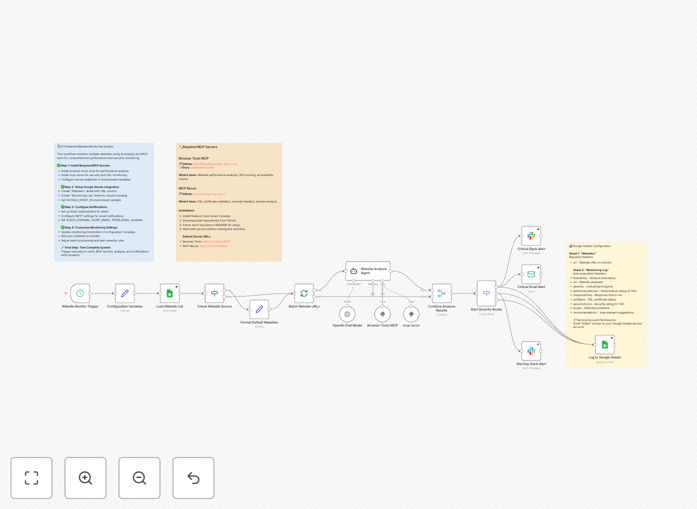
Website monitoring automation workflow diagram showing AI analysis and multi-channel alerts

What This Workflow Does

This automation continuously monitors websites for changes, analyzes them using GPT-4 Mini's AI capabilities and MCP tools, then sends targeted alerts through multiple channels. It eliminates the need for manual website checks while providing intelligent analysis of changes.

The system distinguishes between routine updates and significant modifications, reducing alert fatigue. It's particularly valuable for tracking competitor websites, monitoring your own site's content accuracy, and ensuring critical pages remain functional.

How It Works

1. Website Monitoring Setup

The workflow begins by configuring which URLs to monitor and how frequently to check them. You can set different monitoring schedules for different types of pages based on their importance.

2. AI-Powered Change Detection

GPT-4 Mini analyzes detected changes to determine their significance. It can identify content modifications, price changes, broken elements, and other important updates while ignoring minor formatting changes.

3. Contextual Analysis with MCP Tools

The MCP tools component adds another layer of understanding, evaluating changes in the context of your specific monitoring goals and business needs.

4. Multi-Channel Alerting

When significant changes are detected, the system generates alerts that are sent through multiple channels (email, Slack, SMS) to ensure they're seen by the right people quickly.

Who This Is For

This workflow is ideal for digital marketers tracking competitor activity, e-commerce managers monitoring product pages, content teams maintaining accuracy, and IT teams ensuring website uptime. It's particularly valuable for businesses that rely on their website for lead generation or sales.

What You'll Need

  1. A Zapier account with available tasks
  2. Access to GPT-4 Mini API
  3. MCP tools integration configured
  4. Alert channels set up (Slack, email, SMS)
  5. List of URLs to monitor

Quick Setup Guide

  1. Download and import the JSON template into your Zapier account
  2. Connect your GPT-4 Mini and MCP tools accounts
  3. Configure the URLs you want to monitor
  4. Set up your preferred alert channels
  5. Test the workflow with a few sample URLs
  6. Activate the automation

Key Benefits

Reduces manual monitoring time by 80%: Automating website checks frees up team members for higher-value work while ensuring more consistent monitoring coverage.

Improves issue detection speed: Real-time monitoring catches problems faster than periodic manual checks, reducing potential revenue impact.

Provides intelligent change analysis: The AI components help distinguish between routine updates and significant changes that require action.

Customizable alert thresholds: Adjust sensitivity to match your specific monitoring needs and reduce unnecessary notifications.

Frequently Asked Questions

Common questions about website monitoring and automation

AI-powered website monitoring provides real-time analysis of website performance, content changes, and potential issues. It helps businesses maintain uptime, track competitors, and ensure content accuracy. The GPT-4 Mini integration adds natural language understanding to analyze changes and generate meaningful alerts.

For example, an e-commerce business can automatically detect when competitors change prices or run new promotions. The system can prioritize these alerts based on their potential impact on your business, allowing for faster competitive responses.

This workflow can detect content updates, price changes, broken links, SEO element modifications, and performance issues. The MCP tools component adds contextual understanding to identify significant versus routine changes, reducing false positives in alerts.

A marketing team might use it to track changes to competitor product descriptions or blog content, while an IT team could monitor for unexpected changes to security certificates or page load times that might indicate technical issues.

Multi-channel alerts ensure critical notifications reach the right teams via their preferred platforms (email, Slack, SMS). This redundancy prevents missed alerts and enables faster incident response, especially for time-sensitive website issues affecting customer experience or revenue.

In practice, this means technical teams might receive urgent downtime alerts via SMS while marketing gets content change notifications through Slack. The system can be configured to escalate alerts if they're not acknowledged within a set timeframe.

MCP tools provide contextual understanding of website changes, distinguishing between routine updates and significant modifications. This reduces alert fatigue while ensuring teams only get notified about changes that actually require attention or action.

For instance, when monitoring a blog, MCP tools can differentiate between a minor typo correction and a substantial change to the article's key points or conclusions, helping content teams focus on what matters most.

For most business websites, monitoring should run at least daily. Critical e-commerce sites or competitive intelligence tracking may require hourly checks. The workflow can be customized to match your specific monitoring frequency needs and traffic patterns.

Consider monitoring frequency based on how quickly you need to respond to changes. Price-sensitive businesses might need near real-time monitoring, while content-focused sites may only require daily checks unless tracking breaking news topics.

Yes, the workflow can monitor multiple websites simultaneously. It's particularly effective for tracking competitor pricing changes, content updates, and promotional activities across different domains while maintaining separate alert channels for each monitored site.

Business development teams often use this capability to maintain competitive dashboards, automatically compiling changes from key competitors into a single report while still receiving immediate alerts for critical changes.

Absolutely! Our team specializes in building tailored website monitoring solutions that match your specific business requirements, integrating with your existing tools and alerting workflows. We can customize monitoring frequency, analysis depth, and notification channels to fit your operational needs.

Custom solutions might include specialized change detection for your industry, integration with internal ticketing systems, or advanced reporting features that combine monitoring data with other business metrics for comprehensive competitive intelligence.

Need a Custom Website Monitoring Integration?

This free template is a starting point. Our team builds fully tailored automation systems for your specific needs.