WHMCS Gemini AI n8n Support Automation

Automate WHMCS support ticket creation with Gemini AI chatbot

AI-powered workflow to transform customer inquiries into properly formatted WHMCS tickets automatically

Download Template JSON · n8n compatible · Free
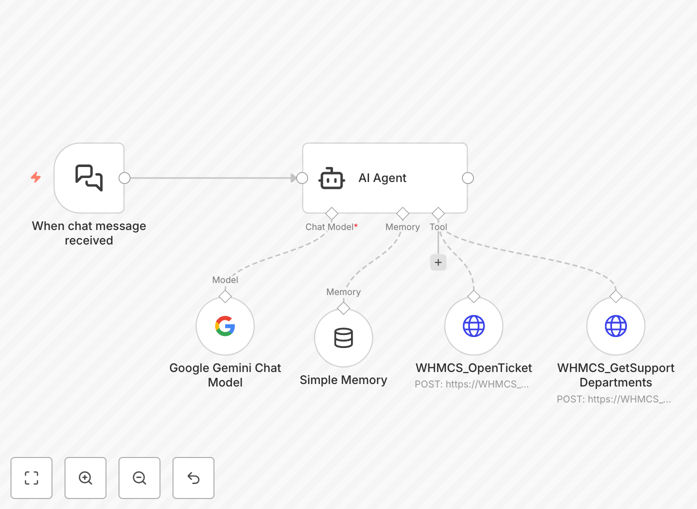
WHMCS support ticket automation workflow diagram

What This Workflow Does

This automation transforms customer support inquiries into properly formatted WHMCS tickets using Gemini AI's natural language processing. It eliminates manual ticket creation while ensuring all necessary details are captured consistently.

The system analyzes incoming messages (from chat, email, or forms), extracts key information like customer accounts, service issues, and urgency levels, then creates complete WHMCS tickets with proper categorization and prioritization. This reduces support team workload while improving response times and ticket quality.

How It Works

1. Customer inquiry processing

The workflow receives customer messages through your preferred channel (website chat, email, or API). Gemini AI analyzes the text to understand the request type, technical details, and customer sentiment.

2. Information extraction

The AI identifies and extracts critical details like domain names, account IDs, error messages, and service types. It also assesses urgency based on language cues and problem severity.

3. Ticket creation

The system formats the extracted information into a complete WHMCS ticket with proper department assignment, priority level, and all required fields populated. It can optionally notify customers that their ticket has been created.

Pro tip: Configure the AI to ask clarifying questions when information is ambiguous before creating the ticket, reducing back-and-forth later.

Who This Is For

This automation is ideal for web hosting companies using WHMCS that want to:

  • Reduce support ticket creation workload
  • Improve first-response times
  • Ensure consistent ticket formatting
  • Handle high volumes of customer inquiries
  • Provide 24/7 initial support

What You'll Need

  1. An active WHMCS installation with API access
  2. Google Cloud account for Gemini AI API
  3. n8n instance (cloud or self-hosted)
  4. Your customer support channels configured (chat, email, etc.)
  5. WHMCS department IDs and ticket categories

Quick Setup Guide

  1. Download and import the JSON template into your n8n instance
  2. Configure your WHMCS API credentials in the HTTP Request node
  3. Set up your Gemini AI API key in the appropriate node
  4. Map your ticket categories and departments in the Function nodes
  5. Test with sample customer inquiries and refine the AI prompts as needed

Key Benefits

80% faster ticket creation: Transform customer inquiries into properly formatted tickets in seconds rather than minutes.

30% reduction in support workload: Free your team from manual data entry to focus on solving problems.

Improved ticket quality: AI ensures all required fields are populated with accurate information.

24/7 availability: Handle customer inquiries outside business hours with automated processing.

Multilingual support: Process customer requests in multiple languages while creating standardized tickets.

Frequently Asked Questions

Common questions about WHMCS integration and automation

AI chatbots can instantly analyze customer inquiries, categorize issues, and create properly formatted support tickets without human intervention. This reduces response times from hours to seconds while ensuring tickets contain all necessary details. Hosting providers using AI chatbots typically see 30-50% reduction in first-response times and improved ticket quality.

The automation handles routine inquiries while intelligently escalating complex issues. For example, when a customer reports website downtime, the AI can immediately check server status and create a high-priority ticket with all relevant technical details pre-populated.

  • Reduces manual ticket creation workload
  • Ensures consistent ticket formatting
  • Provides instant acknowledgment to customers

Gemini AI can process common hosting support requests like billing questions, technical issues, account management, and service inquiries. It understands natural language to extract key details like domain names, error messages, and account information. The AI can also escalate complex technical issues that require human intervention.

For billing inquiries, the AI might identify overdue invoices and create tickets with payment links. For technical issues, it can distinguish between server outages, plugin conflicts, and DNS problems, routing each to the appropriate support team with relevant diagnostic details included.

  • Processes both technical and non-technical requests
  • Extracts domain-specific terminology
  • Identifies urgency from language cues

Automated ticket creation eliminates manual data entry, allowing support agents to focus on solving problems rather than administrative tasks. Teams report handling 20-40% more tickets per day with AI-assisted workflows. The system also ensures consistent ticket formatting with all required fields populated, reducing back-and-forth with customers.

A hosting company might receive hundreds of "my website is down" messages daily. The automation standardizes these into tickets with server IDs, error logs, and proper priority levels, saving agents 5-10 minutes per ticket in information gathering and formatting.

  • Reduces repetitive administrative work
  • Standardizes ticket quality
  • Allows agents to focus on resolution

Yes, AI chatbots integrate seamlessly with WHMCS through its API. The automation preserves all WHMCS functionality while adding intelligent preprocessing of customer requests. Implementation typically requires API credentials and mapping the chatbot's output to WHMCS ticket fields, with no changes needed to the WHMCS installation itself.

The integration works with both new and established WHMCS setups. For companies with custom ticket fields or workflows, the AI output can be adapted to match these specific requirements while maintaining all existing business rules and processes.

  • No WHMCS modifications required
  • Preserves existing workflows
  • Adapts to custom ticket fields

Quality controls include confidence scoring for AI interpretations, required field validation, and optional human review for low-confidence cases. The system can be configured to ask clarifying questions when information is ambiguous. Regular audits of AI-generated tickets help refine the models and catch any systematic errors.

For example, if a customer message contains conflicting details about their domain name, the system might respond with "I see two domain names mentioned - which one needs assistance?" before proceeding with ticket creation. This interactive approach maintains accuracy while preserving automation benefits.

  • Confidence thresholds for auto-processing
  • Interactive clarification when needed
  • Continuous improvement through feedback

Modern AI like Gemini supports multilingual ticket processing, understanding customer inquiries in dozens of languages while creating standardized tickets in your preferred language. This eliminates language barriers in global hosting businesses while maintaining consistent ticket quality across all support channels.

A Japanese customer might submit a support request in their native language, which the system translates to English for your team while preserving all technical details. The response can then be automatically translated back to Japanese, providing seamless multilingual support without requiring bilingual staff.

  • Processes inquiries in multiple languages
  • Maintains consistent ticket language
  • Preserves technical accuracy across translations

Absolutely. GrowwStacks specializes in tailored WHMCS automation solutions that match your specific support workflows, ticket categories, and business rules. Our team can integrate additional systems like CRM, billing platforms, or monitoring tools to create a complete support automation ecosystem for your hosting business.

We analyze your current support processes to identify automation opportunities, then design solutions that fit seamlessly into your operations. Custom implementations might include specialized ticket routing, integration with your knowledge base, or automated follow-up systems to improve customer satisfaction.

  • Tailored to your specific workflows
  • Integration with existing systems
  • Ongoing optimization and support

Need a Custom WHMCS Integration?

This free template is a starting point. Our team builds fully tailored automation systems for your specific needs.