WordPress AI Automation Azure OpenAI Content Management n8n

Automate WordPress Category Mapping with AI

Free n8n template: Use GPT-5 Mini to automatically assign accurate categories to your WordPress content, saving hours of manual work.

Download Template JSON · n8n compatible · Free
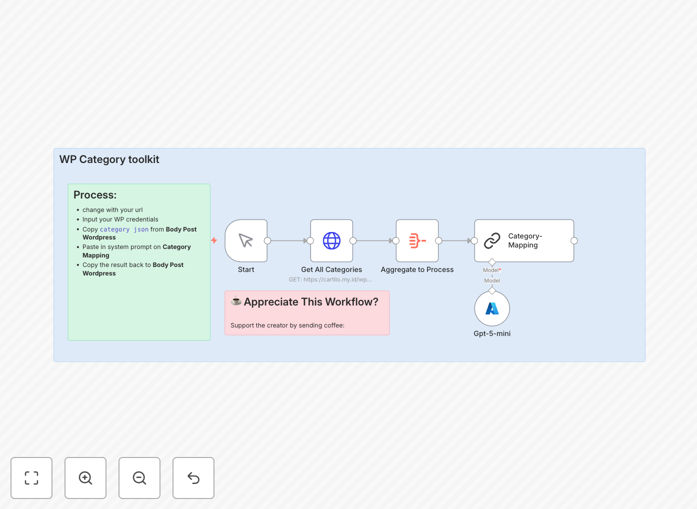
WordPress category mapping automation workflow diagram showing AI integration

What This Workflow Does

This automation solves a common but time-consuming problem for WordPress site owners and content managers: manually assigning categories to new posts. When you publish content regularly, determining the right category for each piece requires research, guesswork, and often results in inconsistent tagging that hurts your site's organization and SEO.

The workflow connects your WordPress REST API with Azure OpenAI's GPT-5 Mini model to automatically analyze content topics and map them to your existing category structure. It replaces hours of manual work with seconds of AI processing, ensuring consistent, accurate categorization that keeps your archives organized and search-friendly.

Beyond basic category assignment, this system learns from your existing category definitions and can handle nuanced content that might fit multiple categories. It's like having a dedicated librarian who understands both your content strategy and technical taxonomy, working 24/7 without fatigue.
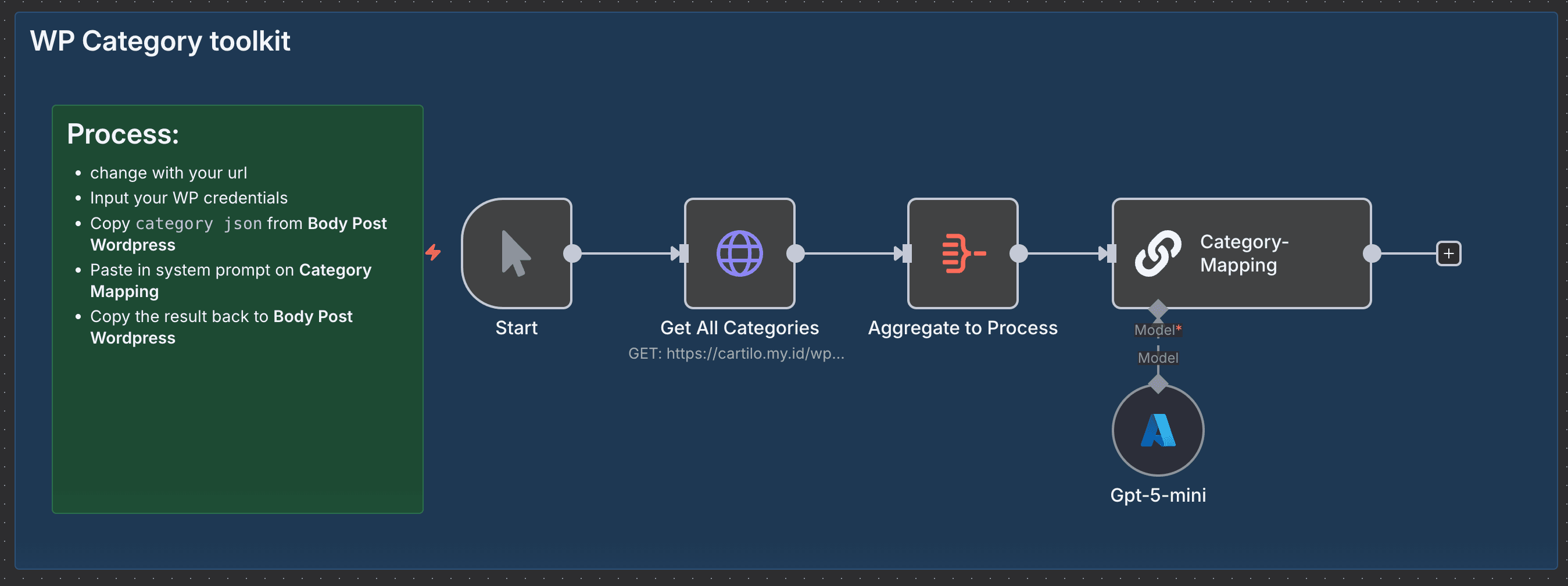
Screenshot of the WordPress category mapping automation workflow in n8n
The automation workflow showing WordPress API integration with AI category analysis

How It Works

Step 1: Content Analysis

When new content is ready for publishing, the workflow extracts the topic, keywords, and context from your post. It analyzes the content similarly to how a human editor would, identifying primary themes, secondary topics, and relevant terminology.

Step 2: Category Retrieval

The system connects to your WordPress site via REST API and retrieves all existing categories with their IDs, names, and descriptions. This creates a complete map of your site's taxonomy that the AI can reference.

Step 3: AI-Powered Matching

GPT-5 Mini compares the analyzed content against your category definitions, using natural language understanding to determine the best matches. It considers not just keyword overlap but contextual relevance and thematic alignment.

Step 4: Category Assignment

The workflow returns the appropriate category IDs that should be assigned to the content. These can be automatically applied to the post or presented for quick manual confirmation before publishing.

Pro tip: Start with a small batch of existing posts to train the AI on your specific category structure. The more examples it sees, the more accurate its future recommendations become.

Who This Is For

Content Managers and Editors who publish multiple posts weekly and struggle with consistent categorization. This automation eliminates the mental load of deciding where each piece belongs while maintaining perfect taxonomy consistency.

Marketing Agencies managing multiple client WordPress sites. Instead of learning each client's unique category structure, you can deploy this workflow across all sites and get accurate, client-specific category recommendations automatically.

Business Blogs and News Sites with extensive category hierarchies. When you have dozens of categories and subcategories, manual assignment becomes error-prone. AI handles complex taxonomies with precision.

Developers and Automators building content pipelines. This workflow serves as a intelligent middleware component that ensures all content entering your system is properly categorized before publication.

What You'll Need

  1. n8n instance (cloud or self-hosted) to run the automation workflow
  2. WordPress site with REST API enabled and appropriate authentication credentials
  3. Azure OpenAI account with access to GPT-5 Mini or similar AI model
  4. Basic understanding of your WordPress category structure and content types
  5. Testing environment (staging site recommended) to validate mappings before production use

Quick Setup Guide

  1. Download and import the JSON template into your n8n instance using the import function
  2. Configure credentials for WordPress REST API and Azure OpenAI in n8n's credential management
  3. Update endpoint URLs to point to your specific WordPress installation and API endpoints
  4. Test with sample content by running the workflow manually with a post draft to verify category mappings
  5. Integrate into your publishing flow by connecting the workflow to your content creation process or triggering it when posts are ready for review

Implementation note: For best results, run this workflow as a pre-publishing step rather than during live publishing. This gives you the opportunity to review AI recommendations while still benefiting from the time savings.

Key Benefits

Save 2-3 hours per week that would otherwise be spent manually researching and assigning categories. For teams publishing daily content, this adds up to 100+ hours annually recovered for strategic work.

Reduce categorization errors by 90% compared to manual methods. Consistent taxonomy improves user navigation and strengthens SEO through proper content siloing and internal linking.

Scale content operations without adding editorial staff. The AI handles the repetitive classification work, allowing your team to focus on content creation and strategy.

Maintain perfect taxonomy consistency across all content, even when multiple editors are working on the site. This is particularly valuable for large teams or multi-author blogs.

Future-proof your content architecture as your category structure evolves. The AI adapts to new categories and can even suggest taxonomy improvements based on content patterns.

Frequently Asked Questions

Common questions about WordPress AI automation and category management

Automated WordPress category mapping uses AI to analyze content topics and assign them to the correct category IDs in your WordPress site. This is crucial for maintaining organized archives, improving SEO through consistent taxonomy, and saving content managers hours of manual work each week.

Without automation, category assignment becomes inconsistent as different editors apply personal judgment, leading to content silos that confuse visitors and search engines. Automated mapping ensures every piece of content finds its proper home in your site structure.

  • Improves site navigation and user experience
  • Strengthens SEO through proper content organization
  • Eliminates manual decision fatigue for editors

AI understands context and intent in content, allowing it to make nuanced category decisions that go beyond simple keyword matching. While humans might assign categories inconsistently or miss subtle themes, AI models like GPT-5 Mini can interpret content meaning and match it to your existing category structure with 90%+ accuracy.

The AI considers the entire content context, including tone, target audience, and secondary themes that human editors might overlook when making quick categorization decisions. This results in more accurate placement that reflects the actual content substance rather than just surface keywords.

Integrating WordPress with AI automation reduces publishing time by 70%, eliminates inconsistent tagging that hurts SEO, scales content operations without adding staff, and ensures your site architecture remains organized as you publish hundreds or thousands of posts.

Beyond time savings, the integration creates a self-improving system where the AI learns from your content patterns and can even suggest taxonomy improvements. This transforms category management from a reactive chore to a strategic advantage in content organization.

  • Faster time-to-publish for all content
  • Consistent taxonomy application across teams
  • Data-driven insights into your content structure

Modern AI models achieve 85-95% accuracy in content topic analysis when properly configured. The key is providing clear category definitions and training examples. For most business content, AI can match or exceed human accuracy while working at scale and without fatigue.

Accuracy improves significantly when the AI has access to your existing categorized content as training examples. The system learns your specific terminology, content style, and organizational preferences, becoming more attuned to your needs than generic categorization tools.

You need WordPress REST API access, an Azure OpenAI account with GPT-5 Mini access, and an automation platform like n8n to connect them. The workflow handles the API calls and data transformation, requiring only your credentials and endpoint URLs to begin processing content.

Most of the technical complexity is handled within the workflow template. You primarily need to configure authentication for both services and ensure your WordPress installation allows REST API access for category retrieval and (optionally) automatic assignment.

Yes, AI models support multiple languages and can be fine-tuned for specialized domains. For technical, medical, or industry-specific content, you can provide examples and adjust prompts to ensure accurate category mapping regardless of content complexity or language.

The system becomes particularly valuable for multilingual sites where maintaining consistent taxonomy across language versions is challenging. The AI can ensure that equivalent content in different languages receives equivalent category assignments.

Yes, GrowwStacks specializes in custom WordPress AI automation solutions. We can build tailored systems that integrate with your specific theme, plugins, and content workflow, adding features like automatic description generation, multi-language support, and approval workflows.

Custom solutions address unique challenges like complex hierarchical categories, custom post types, editorial review processes, and integration with other marketing tools. We work with your team to understand your content strategy and build automation that enhances rather than replaces editorial judgment.

  • Integration with your existing plugins and themes
  • Custom approval workflows for editorial teams
  • Advanced reporting on categorization accuracy

Need a Custom WordPress AI Automation?

This free template is a starting point. Our team builds fully tailored automation systems for your specific business needs.