Zapier Telegram Workflow Automation

Automate workflow execution with Telegram Bot Command Center

Control business processes through simple Telegram commands

Download Template JSON · Zapier compatible · Free
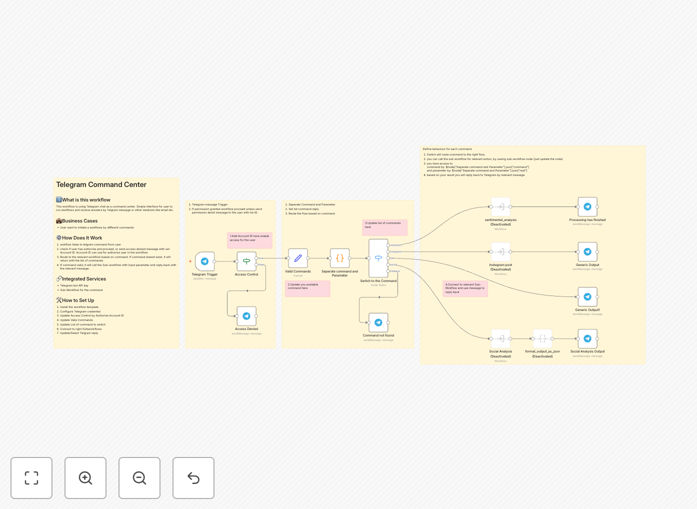
Telegram bot command center interface showing workflow controls

What This Workflow Does

This Telegram bot command center template transforms your messaging app into a powerful workflow control panel. It allows team members to execute business processes through simple chat commands, eliminating the need to switch between multiple apps or log into complex systems.

The automation is particularly valuable for mobile teams and remote workers who need quick access to business tools without carrying laptops. Managers can approve requests, field staff can update job statuses, and sales teams can check inventory - all through Telegram's familiar interface.

How It Works

1. Command Recognition

The bot listens for specific slash commands (like /approve or /status) and validates the user's permissions before processing.

2. Workflow Triggering

Each command maps to a specific business workflow in your automation platform, initiating the connected processes.

3. Response Handling

The bot provides real-time feedback, confirming successful execution or explaining any errors in simple terms.

Pro tip: Start with 3-5 essential commands and expand based on user feedback. Too many options initially can overwhelm users.

Who This Is For

This solution benefits businesses with:

  • Mobile or field teams needing remote access to systems
  • Managers who travel frequently but need to approve requests
  • Operations teams requiring quick status checks without full system logins
  • Companies already using Telegram for team communication

What You'll Need

  1. A Telegram account to create and test your bot
  2. Zapier account (free or paid)
  3. Access to the business systems you want to control (CRM, ERP, etc.)
  4. Basic understanding of your existing workflows

Quick Setup Guide

  1. Download and import the template into your Zapier account
  2. Connect your Telegram bot using the provided instructions
  3. Map the demo commands to your actual business workflows
  4. Test with a small group before company-wide rollout
  5. Monitor usage and add new commands as needed

Key Benefits

80% faster workflow execution by eliminating app switching and login processes. Employees complete tasks in seconds from their phones.

Reduced training time since most teams already know how to use Telegram. The familiar interface requires minimal instruction.

24/7 availability allows global teams to trigger workflows across time zones without waiting for office hours.

Audit trail of all commands and responses is automatically maintained in Telegram's chat history.

Frequently Asked Questions

Common questions about Telegram integration and automation

Telegram bots provide instant mobile access to business workflows without needing specialized apps. They enable remote team members to trigger processes through simple chat commands, reducing training time and IT support needs.

Many businesses use Telegram bots for inventory checks, CRM updates, or report generation while on-the-go. The platform's global reach and reliability make it ideal for distributed teams working across different regions and time zones.

  • No additional app installation required
  • Works on any device with Telegram
  • Lower barrier to adoption than custom apps

Telegram offers end-to-end encryption for secret chats and supports two-factor authentication. For business automation, implement additional security by whitelisting authorized user IDs, requiring authentication tokens, and limiting command permissions.

The platform's API also allows IP restrictions for added protection of sensitive workflows. For financial or compliance-related processes, consider adding secondary verification steps through the bot interface itself.

  • Use Telegram's built-in security features
  • Implement role-based command access
  • Log all bot interactions for auditing

Telegram command centers excel at quick-action workflows like status checks, approval processes, and data retrieval. Common implementations include sales teams checking inventory levels, managers approving purchase requests, or field staff updating job statuses.

The interface works best for workflows requiring minimal input parameters. Complex processes needing multiple data points or file uploads may require a web interface alongside the Telegram commands for optimal usability.

  • Approval workflows with simple yes/no responses
  • Data lookup commands with clear parameters
  • Status update triggers with predefined options

Yes, Telegram bots can connect to thousands of business apps through automation platforms. Typical integrations include triggering Slack notifications, updating Google Sheets, creating Trello cards, or querying Salesforce data.

The bot acts as a mobile-friendly front-end to your existing tech stack. This template demonstrates how to map Telegram commands to actions in other systems while maintaining security and access controls.

  • Connect to CRM, ERP, and productivity tools
  • Trigger complex workflows with simple commands
  • Maintain existing system permissions

Telegram bots offer lightweight command-based control optimized for quick actions, while full chatbot platforms provide conversational AI. Bots work well for employees familiar with specific commands, whereas chatbots suit customer-facing interactions needing natural language understanding.

Telegram's simplicity makes it ideal for internal team automation where users can be trained on specific command syntax. The predictable structure also makes the automation logic simpler to build and maintain compared to NLP-based solutions.

  • Command bots for repetitive internal tasks
  • Chatbots for customer conversations
  • Hybrid approaches for complex needs

Implement clear error messages with troubleshooting steps in the bot responses. For critical workflows, set up failure notifications to technical staff via email or Slack. The template includes error handling that logs issues while providing users with simple retry options and support contacts.

Consider implementing a /help command that explains common errors and solutions. For system outages, configure the bot to provide status updates and estimated resolution times to maintain transparency with users.

  • User-friendly error explanations
  • Technical alerting for support teams
  • Automated logging for diagnostics

Absolutely! GrowwStacks specializes in tailored Telegram automation solutions. Our team can design custom command workflows integrated with your specific business apps, complete with user management, analytics, and enterprise security features.

We'll help you identify the highest-impact workflows to automate, design an intuitive command structure, and implement robust error handling. The solution scales as your automation needs grow across departments and use cases.

  • Custom command design for your workflows
  • Enterprise-grade security implementation
  • Ongoing support and optimization

Need a Custom Telegram Automation?

This free template is a starting point. Our team builds fully tailored automation systems for your specific needs.