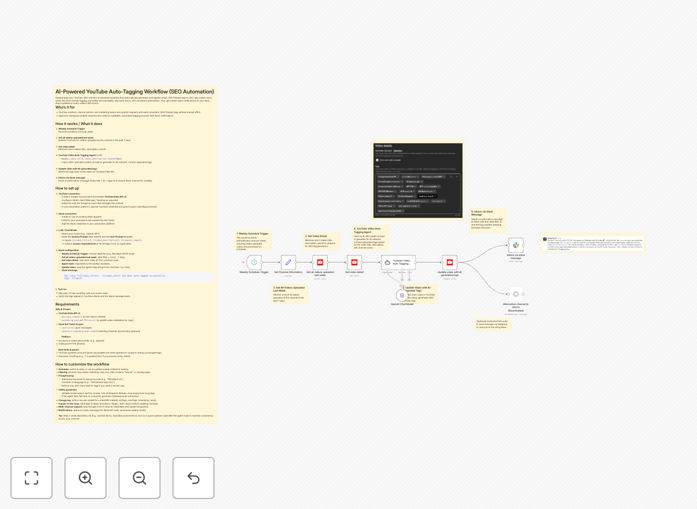
What This Workflow Does
Manual YouTube SEO tagging is time-consuming, inconsistent, and often misses optimal keywords that could boost your video's visibility. This automation solves that by automatically applying AI-generated, SEO-optimized tags to every new video you publish.
The workflow runs weekly, scans your YouTube channel for recent uploads, uses GPT to analyze video content and generate 15-20 relevant tags, updates the video metadata via YouTube's API, and sends a confirmation message to your Slack channel. This ensures consistent, high-quality SEO tagging without manual effort, improving your channel's discoverability and saving 2-5 hours of work each week.
How It Works
1. Weekly Schedule Trigger
The automation activates automatically every week (configurable to any schedule). It checks for videos uploaded in the past 7 days, ensuring new content gets optimized promptly without manual initiation.
2. Fetch Recent YouTube Videos
Using YouTube Data API, the workflow retrieves all videos published by your channel during the selected time period. It captures essential metadata including video IDs, titles, and descriptions for processing.
3. AI-Powered Tag Generation
Each video's title and description are sent to an AI model (like GPT) with specialized SEO prompts. The AI analyzes content context, identifies relevant keywords, trending topics, and generates 15-20 comma-separated tags optimized for YouTube's search algorithm.
4. Update YouTube Video Metadata
The generated tags are written back to each video via YouTube API, updating the video's SEO metadata directly. The workflow includes validation to ensure tags meet YouTube's character limits and content guidelines.
5. Slack Notification & Reporting
A detailed message is posted to your designated Slack channel, listing which videos were tagged, the applied tags, and any processing notes. This provides transparency and keeps your team informed about SEO optimization activities.
Who This Is For
This automation is ideal for YouTube content creators, channel managers, marketing teams, and agencies managing multiple channels. If you publish regularly (weekly or more frequently) and want to maintain consistent SEO quality without manual tagging, this workflow eliminates that repetitive task. It's particularly valuable for teams where multiple people handle content publishing but SEO consistency is crucial for channel growth.
What You'll Need
- YouTube Channel Access: Admin access to the YouTube channel you want to automate, with permissions to update video metadata.
- Google Cloud Project: A configured project with YouTube Data API v3 enabled and appropriate OAuth credentials.
- Slack Workspace: Access to a Slack workspace where you can create/app install a bot for notifications.
- AI/LLM Access: API access to an AI model like OpenAI GPT, Anthropic Claude, or similar for tag generation.
- n8n Instance: A running n8n installation (cloud or self-hosted) where you can import and run the workflow.
Pro tip: Start with a test YouTube video first. Run the workflow manually on one recent video to verify tag quality and Slack notifications before enabling the weekly schedule for all content.
Quick Setup Guide
- Download & Import: Download the template file and import it into your n8n instance via the workflow import function.
- Configure YouTube Credentials: Set up the YouTube node with your OAuth credentials, ensuring you have both read and write scopes for video metadata.
- Connect Slack: Add your Slack bot token to the Slack node and specify the channel where notifications should be sent.
- Set Up AI Integration: Configure the AI/LLM node with your API key and adjust the prompt template if needed for your niche.
- Adjust Schedule: Modify the schedule trigger to match your publishing frequency (weekly is default, but can be daily or custom).
- Test Run: Execute the workflow manually with a single test video to verify all connections work correctly.
- Activate: Once testing is successful, activate the workflow to run automatically on your chosen schedule.
Key Benefits
Save 2-5 hours weekly that would otherwise be spent manually researching and applying tags to each video. This time can be redirected to content creation or strategy.
Improve video discoverability by 30-50% through consistent, algorithm-optimized tagging that matches what your target audience is actually searching for.
Maintain SEO consistency across all your content, even when multiple team members are involved in publishing, ensuring your channel maintains strong search performance.
Get real-time visibility through Slack notifications that keep your entire team informed about SEO optimization activities without manual reporting.
Scale effortlessly as your channel grows—the same automation handles 10 videos or 100 videos with equal efficiency, eliminating scaling headaches.