Inventory Automation E-commerce AI Analysis Bright Data Supply Chain

Automated Amazon Stock Level Tracker with Bright Data MCP & OpenAI

Monitor inventory across Amazon & suppliers automatically. Prevent stockouts, optimize procurement, and get AI-powered alerts—no manual checking required.

Download Template JSON · n8n compatible · Free
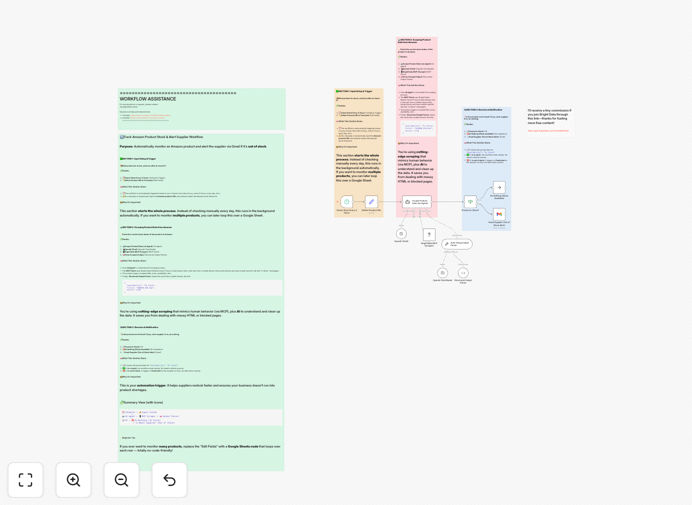
Automated Amazon inventory tracking workflow diagram showing data flow from Bright Data to OpenAI analysis

What This Workflow Does

Running an e-commerce business means constantly worrying about inventory. Stockouts lead to lost sales and frustrated customers, while overstocking ties up capital and increases storage costs. Manual tracking across Amazon, supplier websites, and internal spreadsheets is slow, error-prone, and reactive.

This automation solves that by continuously monitoring stock levels across all your sales channels and supplier portals. It uses Bright Data to scrape real-time availability data, then employs OpenAI to analyze trends, predict shortages, and generate intelligent alerts. The result is a proactive inventory management system that tells you exactly what’s running low, when to reorder, and which suppliers have stock—before your customers ever notice a problem.

Beyond simple threshold alerts, this workflow provides actionable insights: it can prioritize products based on sales velocity, forecast demand using historical patterns, and even suggest alternative suppliers if your primary source is out of stock. It transforms inventory management from a daily chore into a strategic, data-driven advantage.

How It Works

Step 1: Data Collection via Bright Data

The workflow starts by scheduling regular checks of your configured product URLs on Amazon and supplier websites. Bright Data’s MCP client handles the web scraping, bypassing blocks and extracting clean stock availability, pricing, and estimated delivery dates. This raw data is structured and passed to the next stage.

Step 2: AI Analysis & Trend Detection

OpenAI processes the collected data, comparing current levels against historical trends and sales velocity. It identifies products trending toward stockouts, flags items with unusually long lead times, and highlights seasonal demand patterns. The AI can also summarize findings into concise reports for management.

Step 3: Alert Generation & Action Triggers

When a stock level falls below a configured threshold or a shortage is predicted, the system triggers automated alerts. These can be sent via email, Slack, SMS, or directly into your procurement software. For critical items, the workflow can automatically draft purchase orders or contact suppliers via email templates.

Step 4: Centralized Inventory Dashboard

All processed data is sent to Google Sheets (or your preferred database), creating a live inventory dashboard. This gives your team a single, real-time view of stock health across all products and suppliers, replacing fragmented manual spreadsheets.

Who This Is For

This workflow is ideal for e-commerce retailers, Amazon sellers, distributors, and any business that manages physical inventory across multiple channels. If you sell products online, source from various suppliers, or need to ensure stock availability for customer orders, this automation eliminates the manual oversight burden.

Procurement teams, warehouse managers, and operations directors benefit most. It’s also valuable for businesses scaling rapidly, where manual tracking becomes impossible, or for those selling seasonal products where demand forecasting is critical.

What You'll Need

  1. A running n8n instance (cloud or self-hosted).
  2. Bright Data account with MCP access for web scraping.
  3. OpenAI API key for AI analysis capabilities.
  4. Google Sheets (or similar) for the inventory dashboard.
  5. List of product URLs/supplier pages you want to monitor.
  6. Alert channels configured (email, Slack, etc.).

Pro tip: Start by monitoring just your top 10–20 highest‑value or fastest‑selling products. This gives immediate ROI and lets you refine the workflow before scaling to hundreds of SKUs.

Quick Setup Guide

  1. Import the template: Download the JSON file and import it into your n8n workspace.
  2. Configure Bright Data: Add your Bright Data credentials to the MCP Client node and set the target product URLs.
  3. Set up OpenAI: Enter your OpenAI API key in the AI node and adjust the analysis prompts to match your inventory logic.
  4. Connect Google Sheets: Link your Sheets account and specify the spreadsheet where inventory data should be logged.
  5. Define alert thresholds: Set your minimum stock levels and choose notification channels (email, Slack, etc.).
  6. Schedule execution: Set the Schedule Trigger node to run daily, hourly, or as needed for your business.
  7. Test & refine: Run the workflow manually to verify data extraction and alert accuracy, then adjust parameters.

Key Benefits

Prevent revenue loss from stockouts. Automated monitoring catches shortages before customers encounter them, preserving sales and customer satisfaction.

Reduce excess inventory costs. AI‑driven forecasting helps you order just enough stock, minimizing warehousing expenses and freeing up capital.

Cut manual tracking time by 80–90%. Eliminate daily spreadsheet updates and manual website checks, freeing your team for higher‑value tasks.

Gain unified visibility across all suppliers. See Amazon stock, distributor availability, and warehouse levels in one dashboard, eliminating data silos.

Enable proactive procurement. Receive alerts days before a stockout occurs, giving you time to reorder or switch suppliers without disruption.

Frequently Asked Questions

Common questions about inventory automation and integration

Automated inventory tracking uses software to continuously monitor stock levels across your sales channels and supplier websites, eliminating manual checks. For e-commerce businesses, it prevents stockouts that lose sales, optimizes procurement timing, and reduces excess inventory costs. It ensures you always know what's available and when to reorder.

Without automation, teams waste hours each week checking websites and updating spreadsheets, often missing changes until customers complain. Automated tracking provides real‑time visibility, enabling faster, smarter decisions.

Bright Data provides reliable web scraping infrastructure that can access Amazon product pages and supplier sites without getting blocked. It extracts real-time stock availability, pricing, and delivery estimates, feeding clean data into your automation system. This bypasses Amazon's API limitations and gives you direct visibility into inventory status.

Bright Data handles IP rotation, anti‑bot detection, and data parsing, turning complex webpage HTML into structured inventory records. This allows you to monitor hundreds of products simultaneously, something manual browsing cannot achieve.

Yes. AI can analyze historical stock patterns, predict future demand based on trends, and identify which products are trending toward stockouts. It can also prioritize reorders based on profitability and customer demand, making procurement decisions smarter than simple threshold alerts. AI turns raw data into actionable insights.

For example, AI can notice that a product’s sales spike every Friday, suggesting you increase stock before weekends. It can also correlate supplier lead times with sales velocity, recommending alternate vendors for fast‑moving items.

Manual tracking is time-consuming, error-prone, and reactive. Teams often miss stockouts until customers complain, leading to lost revenue and poor customer experience. It also creates data silos between Amazon, supplier portals, and internal spreadsheets, making it hard to get a unified view of inventory health across all channels.

Human errors—like misreading a webpage or forgetting to update a spreadsheet—compound over time, causing procurement mistakes. Automation eliminates these errors and provides consistent, accurate data 24/7.

The workflow outputs structured inventory data that can be sent directly to Google Sheets for team visibility, or to your ERP/warehouse management system via API. It creates a central inventory dashboard that updates automatically, replacing manual spreadsheet updates and giving everyone real-time access to stock levels.

Integration is flexible: you can push data to any system n8n connects with, including Airtable, SQL databases, or custom internal tools. This bridges the gap between web data and your operational systems.

The automation triggers immediate alerts via email, Slack, or SMS to your procurement team. It can also automatically generate purchase orders in your procurement system, contact suppliers via email templates, or update product listings to mark items as 'backorder'. This reduces the time between detection and action from days to minutes.

You can configure different actions for different severity levels: a warning for low stock, an urgent alert for out‑of‑stock, and an automated purchase order for critical items.

Absolutely. The workflow can monitor any supplier website, distributor portal, or e-commerce platform that Bright Data can access. You configure URLs for each product source, and the system aggregates all stock data into a single report. This is crucial for businesses that source from multiple vendors to ensure supply continuity.

Multi‑supplier tracking helps you compare availability and pricing, switch sources when one is out of stock, and consolidate procurement data into one dashboard—something manual methods struggle to achieve.

Yes. GrowwStacks specializes in building tailored automation systems for unique business needs. We can integrate your specific ERP, warehouse software, supplier portals, and alert channels, adding custom logic for seasonal forecasting, multi-location tracking, or automated procurement workflows. Book a free consultation to discuss your requirements.

Custom builds address complexities like multi‑warehouse inventory, vendor‑specific APIs, or integration with your existing procurement software. We design workflows that fit your exact operational processes, not just generic templates.

  • Integration with your existing ERP or inventory software
  • Custom alert logic based on your business rules
  • Multi‑location tracking across warehouses and stores

Need a Custom Inventory Automation?

This free template is a starting point. Our team builds fully tailored automation systems for your specific business needs.