What This Workflow Does
In today's AI-driven world, how artificial intelligence models like ChatGPT describe your brand matters more than ever. Millions of users rely on AI for product recommendations, company information, and competitive comparisons. Yet most businesses have zero visibility into how these powerful systems represent them.
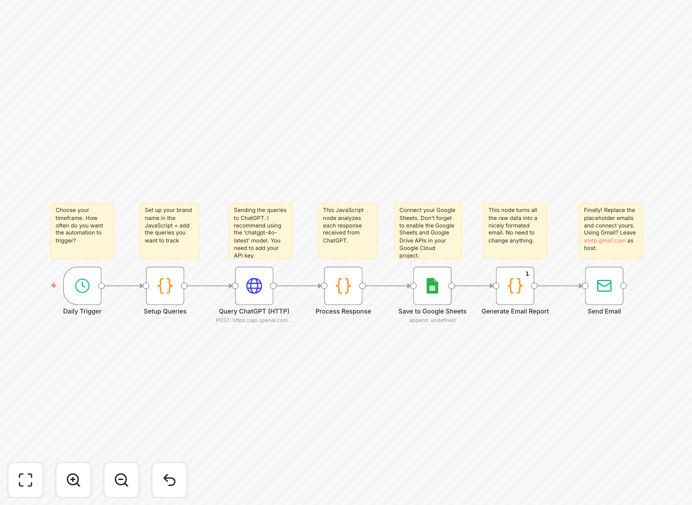
This automated workflow solves that blind spot. It systematically queries AI models with questions relevant to your market, analyzes responses for brand and competitor mentions, logs everything to Google Sheets for historical tracking, and delivers comprehensive email reports. What used to require hours of manual checking now happens automatically every day, giving you strategic intelligence about your brand's AI representation.
The system doesn't just track your brand—it monitors competitors too, providing comparative insights about how AI positions you in the market landscape. This isn't social media listening; it's algorithmic reputation management at scale.
How It Works
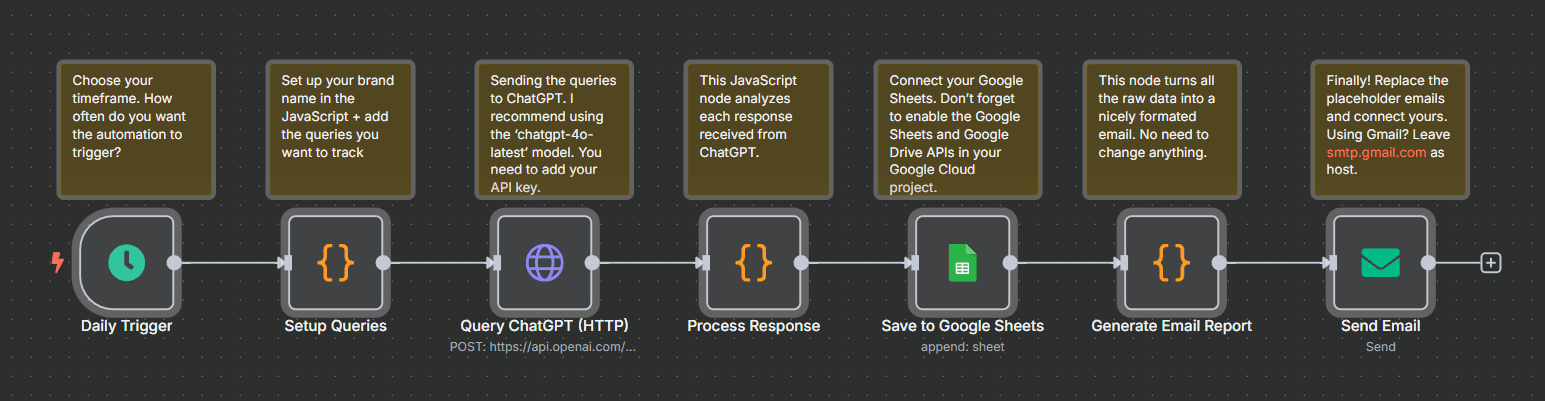
The automation runs on a scheduled basis (daily by default) and follows a structured process to gather, analyze, and report AI brand intelligence.
1. Configuration & Query Execution
The workflow begins by loading your predefined configuration: your brand name, list of competitors, and specific queries to ask the AI. These queries should reflect what potential customers might ask about your industry, products, or services. The system then sends each query to the OpenAI ChatGPT API (GPT-4o) via HTTP requests.
2. AI Response Analysis
Each AI response is processed through a custom code node that performs three critical checks: identifies mentions of your brand (case-insensitive), detects any listed competitors, and extracts the core response content. This analysis happens automatically, with the system handling variations in how brands might be referenced.
3. Data Logging & Organization
All results—timestamp, query, AI response, brand mention status, competitor mentions, and any errors—are appended to a designated Google Sheet. This creates a searchable historical database of how AI has represented your brand over time, enabling trend analysis and pattern recognition.
4. Report Generation & Delivery
The system compiles a comprehensive HTML email report summarizing total queries processed, brand mention frequency, competitor mentions (with breakdowns), and any issues encountered. This report includes both summary statistics and a detailed query-by-query breakdown, delivered automatically to your specified recipients.
Pro tip: Start with 5-10 core queries that represent your most valuable customer questions. Monitor for a week, then expand based on what you learn about how AI discusses your industry.
Who This Is For
This automation delivers value across multiple business functions and industries. Marketing teams gain insights into brand perception at algorithmic scale. Competitive intelligence professionals get systematic tracking of how AI positions their company versus rivals. PR and communications teams can identify misinformation or opportunities for better representation.
SEO specialists use the data to understand how AI discusses topics in their space, informing content strategy. Product managers learn how AI describes features and benefits compared to competitors. Executives receive consolidated intelligence about their brand's standing in the emerging AI information ecosystem.
Particularly valuable for SaaS companies, e-commerce brands, professional services, and any business where online reputation directly impacts customer acquisition. Also essential for industries with complex products or services that AI might oversimplify or misrepresent.
What You'll Need
- n8n instance (cloud or self-hosted) with workflow execution capabilities
- OpenAI API key with access to GPT-4o or ChatGPT models
- Google Sheets setup with a dedicated spreadsheet for logging
- Email service credentials (SMTP or service like SendGrid) for report delivery
- Brand configuration including your company name, key competitors, and initial query list
- Recipient list for daily/weekly report distribution
Quick Setup Guide
Getting started takes about 15 minutes if you have your credentials ready. Follow these steps to implement the brand monitoring automation.
- Import the template into your n8n instance using the downloaded JSON file
- Configure API connections for OpenAI, Google Sheets, and your email service
- Set your brand variables in the code node: company name, competitors, queries
- Test with single query to verify all connections and logic work correctly
- Schedule execution (daily recommended) and specify report recipients
- Review initial reports and refine queries based on insights gained
Pro tip: Create a separate Google Sheet tab for each month to maintain clean historical data. Use data validation in Sheets to create filters and pivot tables for deeper analysis.
Key Benefits
Eliminates 10-15 hours of manual monitoring weekly by automating what would require daily checking of multiple AI interactions. The system works while you focus on strategic decisions rather than data collection.
Provides objective brand intelligence free from human bias or selective attention. You see exactly how AI represents your brand, not how you hope or assume it does.
Delivers competitive positioning insights by tracking mentions of both your brand and key competitors. Understand your relative standing in AI-generated content.
Creates historical trend data in Google Sheets, enabling analysis of how brand representation evolves over time and in response to market changes.
Offers customizable reporting tailored to different stakeholders—executive summaries for leadership, detailed breakdowns for marketing teams, alert-based notifications for PR.