Gmail Google Sheets SMTP Cold Outreach

Automated Bulk Cold Email Sender

Personalized email sequences at scale with Gmail, SMTP and Google Sheets integration

Download Template JSON · n8n compatible · Free
Cold email automation workflow interface showing Gmail and Google Sheets integration

What This Workflow Does

This automation solves the time-consuming process of manually sending personalized cold emails to prospects. It automatically fetches uncontacted leads from your Google Sheet, validates their email addresses, sends customized emails on a schedule, and updates your CRM with tracking information.

The workflow handles the entire cold email sequence - from initial outreach to follow-ups - while maintaining personalization and avoiding spam filters. It integrates Gmail or SMTP for sending, Google Sheets as your CRM, and includes smart scheduling to optimize deliverability.

How It Works

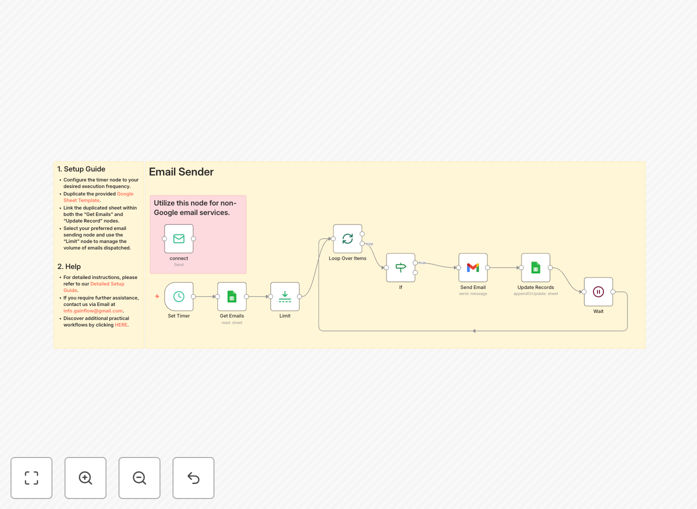
1. Scheduled Trigger

The workflow runs automatically at your configured intervals (default every 6 hours) to process new prospects.

2. Fetch New Leads

Connects to your Google Sheet to identify prospects marked as "Not Contacted" and prepares them for outreach.

3. Email Validation

Checks each email address for validity before sending to maintain high deliverability rates.

4. Personalized Email Dispatch

Sends customized emails using your Gmail or SMTP account with merge fields for personalization.

5. CRM Updates

Marks contacts as "Emailed" in your Google Sheet with timestamps and message IDs for tracking.

Workflow diagram showing cold email automation steps
Example of cold email automation workflow structure

Who This Is For

This template is ideal for:

  • Sales teams doing outbound prospecting
  • Recruiters reaching candidates at scale
  • Marketers running cold outreach campaigns
  • Founders doing business development
  • Agencies managing multiple client campaigns

Pro tip: Combine this with our LinkedIn automation template to build complete prospecting systems that capture leads from social and automate follow-up.

What You'll Need

  1. A Google Sheet with prospect data (template provided)
  2. Gmail account or SMTP service credentials
  3. n8n instance (cloud or self-hosted)
  4. Email content templates for your sequence

Quick Setup Guide

  1. Download and import the JSON template into your n8n instance
  2. Connect your Google Sheets and Gmail/SMTP credentials
  3. Duplicate the provided Google Sheet template
  4. Adjust sending intervals in the Schedule Trigger node
  5. Test with a small batch before full deployment

Google Sheets integration settings in the workflow
Configuring Google Sheets integration for the cold email workflow

Key Benefits

Save 10+ hours weekly by automating repetitive email tasks while maintaining personalization at scale.

Improve deliverability with built-in pacing controls that prevent triggering spam filters from sending too quickly.

Complete campaign visibility with automatic tracking of opens, replies, and conversions back to your Google Sheet.

Scale your outreach without adding headcount by processing hundreds of personalized emails daily.

Flexible integration works with Gmail, SMTP services, and any CRM that connects to Google Sheets.

Frequently Asked Questions

Common questions about cold email automation and integration

Automating cold emails saves hours per week, ensures consistent follow-up sequences, improves tracking of responses, and allows personalization at scale while maintaining deliverability.

Businesses typically see 3-5x more responses from automated sequences compared to manual sending because the system ensures no prospect falls through the cracks.

Automation tools spread emails over time, avoid spam triggers, validate addresses before sending, and maintain optimal sending volumes to protect sender reputation.

Our workflow includes built-in delays between sends, automatic bounce handling, and configurable daily limits to keep your domain reputation high.

Key metrics include open rates (aim for 40-50%), reply rates (10-20% is good), bounce rates (keep under 2%), and conversion rates from replies to meetings.

This workflow automatically tracks all these metrics in your Google Sheet, giving you real-time visibility into campaign performance without additional tools.

Use merge tags for names/companies, reference specific details from LinkedIn or company websites, and segment your list for tailored messaging to different industries/roles.

The template includes examples of personalization tokens you can use to dynamically insert prospect-specific information into your email templates.

Start with 50-100 emails/day from Gmail accounts. For SMTP, scale gradually to 200-300/day while monitoring engagement metrics and spam complaints.

This workflow includes a configurable limit node to control your daily sending volume and avoid triggering spam filters during initial testing.

Warm up accounts gradually, avoid spam trigger words, maintain good text-to-image ratio, personalize subject lines, and spread sends throughout business hours.

The template includes best practice email templates that have been tested for high inbox placement rates across major email providers.

Yes, our team builds tailored cold email systems with your specific CRM, custom sequencing logic, and advanced tracking dashboards for your outreach campaigns.

We can integrate with your existing tools, add lead scoring, build custom analytics, and create sophisticated nurture sequences beyond this starter template.

  • Custom CRM integrations
  • Advanced analytics dashboards
  • AI-powered response handling
  • Multi-channel sequencing

Need a Custom Cold Email Automation?

This free template is a starting point. Our team builds fully tailored automation systems for your specific business needs.