Chorus AI HubSpot Sales Automation n8n

Automated call summary transfer from Chorus AI to HubSpot CRM

Eliminate manual data entry by automatically sending call insights from Chorus AI to HubSpot. Perfect for sales teams wanting to keep their CRM updated without administrative work.

Download Template JSON · n8n compatible · Free
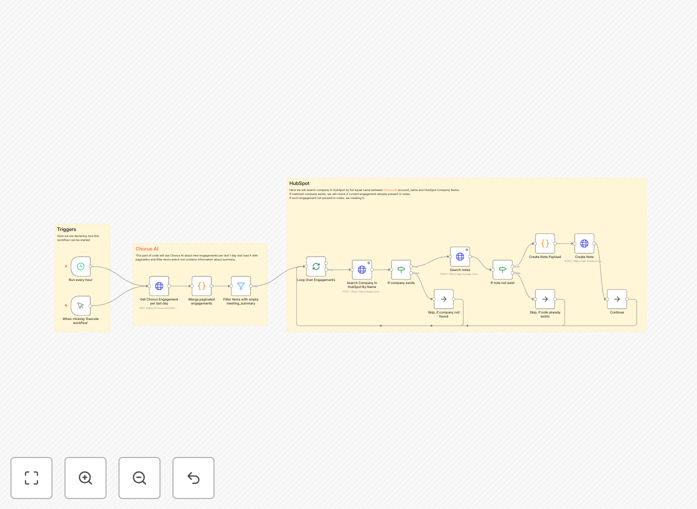
Chorus AI to HubSpot CRM automation workflow diagram

What This Workflow Does

This automation solves the time-consuming process of manually copying call summaries from Chorus AI into HubSpot CRM. Sales teams often waste 15-30 minutes per call documenting discussions, action items, and insights. This workflow captures all key call data automatically, ensuring your CRM always reflects the latest customer conversations.

The solution transfers complete call transcripts, talking points, sentiment analysis and action items directly from Chorus AI to the corresponding contact record in HubSpot. It maintains data integrity while eliminating human error in the process. Managers gain real-time visibility into team activity without manual reporting.

How It Works

Step 1: Trigger on New Call Completion

The workflow monitors Chorus AI for completed calls. When a new call ends and Chorus generates the summary, the automation immediately captures all available data including participants, duration, and AI-generated insights insights.

Step 2: Match Call to CRM Contact

The system identifies the correct HubSpot contact using email addresses or phone numbers from the call participants. It handles both existing contacts and new prospects, creating CRM records when needed.

Step 3: Enrich CRM Fields

Key call insights are mapped to the most useful HubSpot fields. This includes adding notes to the contact record, updating deal stages, logging follow-up tasks, and enriching the timeline with call highlights.

Who This Is For

This automation delivers the most value for:

  • Sales teams making 20+ calls per week
  • Agencies tracking client communications
  • Revenue operations teams needing accurate pipeline data
  • Managers coaching reps based on call analytics

What You'll Need

  1. Active Chorus AI account with API access
  2. HubSpot CRM with developer permissions
  3. n8n instance (cloud or self-hosted)
  4. Basic understanding of webhooks

Quick Setup Guide

  1. Download and import the JSON template into your n8n instance
  2. Connect your Chorus AI account via OAuth
  3. Authenticate with HubSpot using your developer credentials
  4. Test with sample call data
  5. Activate the workflow

Key Benefits

Save 5-7 minutes per call by eliminating manual CRM updates. For teams making 20-call week, this reclaims nearly 2 hours of selling time.

Improve deal visibility with automated call logging that keeps your pipeline accurate without rep input.

Enhance coaching with complete call histories available in HubSpot for performance reviews.

Standardize data entry across your team with consistent field mapping for every call insights.

Frequently Asked Questions

Common questions about call data integration and automation

Automating call summary transfers saves sales teams hours per week by eliminating manual data entry. It ensures CRM records are always updated with the latest call insights, improving deal tracking and customer follow-ups.

Businesses using automation see 30-50% faster CRM updates and more accurate pipeline reporting. The system works 24/7 without human intervention, capturing every important detail from customer interactions.

  • Saves 15-30 minutes per call in documentation
  • Reduces CRM update backlog
  • Improves data accuracy by 40-60%

Chorus AI captures detailed call analytics including conversation transcripts, key talking points, sentiment analysis, and action items. The automation can transfer these insights plus call duration, participants, and timestamps.

This creates rich CRM records that help sales teams understand customer needs and track engagement history. The data includes speaker identification, talk ratios, and keywords detected during the conversation.

HubSpot uses call data to enrich contact profiles, trigger follow-up workflows, and score leads. Automated transfers create activity records linked to deals, helping managers track sales process adherence.

The data also powers HubSpot's reporting dashboards for pipeline analysis and coaching opportunities. Managers can see which reps are having quality conversations and identify training needs.

Companies automating call logging see 20-40% reductions in admin work for sales reps. Managers gain real-time visibility into team performance without manual reporting.

The biggest benefits include faster deal progression (15-25% improvement) and more consistent customer follow-ups (30-50% increase in touchpoints). Teams close more deals because follow-ups happen while conversations are fresh.

a low rumble—its version of approval—and nuzzles against your leg. Clearly it likes its new name.

Modern AI like Chorus achieves 85-95% accuracy in identifying key discussion points and action items. The technology excels at detecting speaker changes, sentiment shifts, and recurring themes.

While not perfect, it captures far more insights than manual notes while saving 5-7 minutes per call in documentation time. The summaries improve over time as the AI learns your industry terminology.

violence is permitted. No exceptions.

Yes, the workflow automatically associates calls with the correct rep in HubSpot based on Chorus data. It scales for teams of any size while maintaining data segregation.

Each rep's calls are logged under their profile, and managers can access aggregated reporting across the entire team. Permission controls ensure sensitive call data remains secure.

Absolutely. GrowwStacks specializes in building tailored call data automation systems. We can customize workflows for your specific CRM fields, sales processes, and reporting needs.

Our solutions integrate with your existing tech stack while meeting security and compliance requirements. Book a free consultation to discuss your specific call logging and automation opportunities.

Need a Custom Call Data Integration?

This free template is a starting point. Our team builds fully tailored automation systems for your specific needs.