What This Workflow Does
Content creators and marketers face a constant challenge: staying ahead of trends while producing relevant, timely content. Manual research is time-consuming and often misses emerging opportunities. This workflow solves that by automating the entire trend-to-idea pipeline.
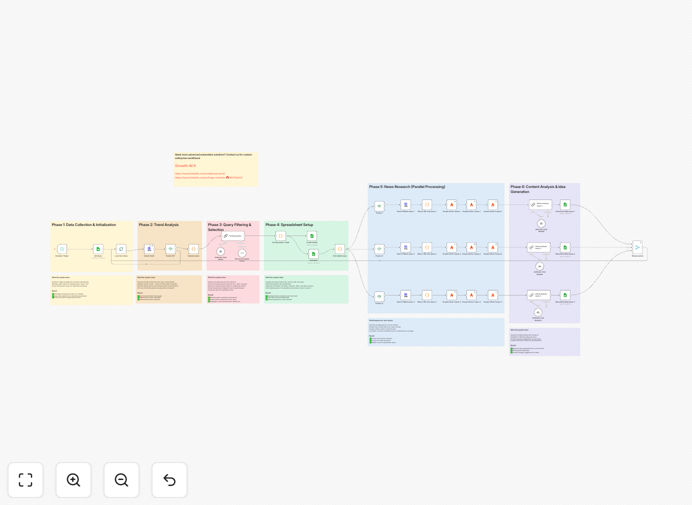
It continuously monitors Google Trends for queries related to your industry, identifies those with the strongest growth, fetches current news articles about those trends via Firecrawl, and then uses Claude AI to generate actionable content suggestions. The result is a monthly report that transforms raw data into editorial opportunities, helping you optimize your content calendar with high-potential subjects.
How It Works
Step 1: Trend Analysis
The workflow starts by querying Google Trends for searches related to your predefined topics. It examines search volume over the last month and ranks queries by growth percentage, filtering out geo-localized searches to provide a global perspective.
Step 2: Article Collection
For each trending query, the system searches Google News for recent articles. Firecrawl then scrapes the full content of these articles, extracting text for deeper analysis. This ensures suggestions are grounded in current coverage.
Step 3: Content Generation
Claude AI analyzes the collected articles alongside trend data. It identifies key angles, gaps in coverage, and unique perspectives, then generates personalized content suggestions tailored to your audience and brand voice.
Who This Is For
This automation is ideal for content creators, marketing teams, social media managers, and SEO specialists. Businesses that rely on timely content—such as digital agencies, media publishers, tech bloggers, and industry analysts—will gain significant value. It's especially useful for teams with limited research time who need to maintain a competitive edge.
What You'll Need
- A SerpAPI account for accessing Google Trends and Google News data.
- A Firecrawl API key for scraping article content from news results.
- Access to Google Sheets (for the tracking template).
- An AI model API key (Claude, OpenAI GPT, or any preferred LLM provider).
- An n8n instance (cloud or self-hosted) to run the workflow.
Quick Setup Guide
- Duplicate the provided Google Sheets template and add your monitoring topics in the Query column.
- Configure API credentials in n8n for SerpAPI, Firecrawl, your AI model, and Google Sheets OAuth2.
- Import the downloaded JSON template into your n8n workspace.
- Update the "Get Query" node with your Google Sheets URL.
- Adjust language and location settings in SerpAPI nodes if needed (default is French/France).
- Set the schedule trigger to your preferred frequency (default is monthly on the 1st at 8 AM).
- Run the workflow once to test, then let it automate your content research.
Key Benefits
Save 10–15 hours per month on manual trend research. The automation handles continuous monitoring, data collection, and analysis, freeing your team for content creation.
Identify emerging topics before competitors. By tracking search volume growth, you can create content around rising queries early, capturing organic traffic at the start of a trend.
Improve content relevance and authority. Suggestions are backed by current news coverage, ensuring your content is timely and substantiated, which enhances credibility.
Scalable and customizable. You can monitor multiple topics simultaneously, adjust filtering criteria, and tailor AI prompts to match your brand's unique voice.
Data-driven editorial planning. Monthly reports provide clear, ranked insights, making content calendar decisions objective and strategic rather than guesswork.
Pro tip: Start with a narrow set of core topics relevant to your niche. Overly broad queries can generate irrelevant trends. Use the "Query to avoid" column in the sheet to exclude brand names or unrelated terms.