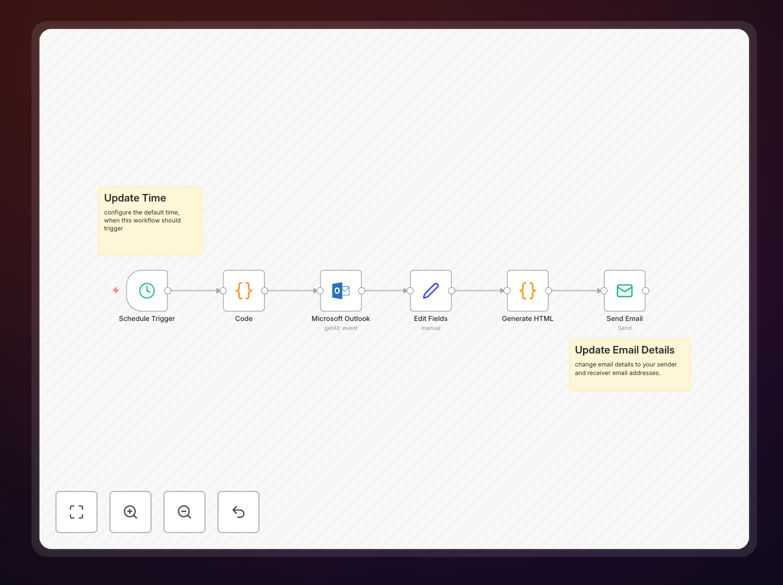
What This Workflow Does
Every morning, professionals waste precious time switching between calendar apps, mentally compiling their schedule, and trying to remember meeting details. This manual process is error-prone, stressful, and steals focus from more important work.
This automation solves that by delivering a beautifully formatted email digest of your entire day's Microsoft Outlook calendar meetings directly to your inbox at a scheduled time (default 8 AM). It fetches all events for the current day, extracts key details like subject, time, attendees, organizer, and meeting links, then presents them in an easy-to-scan HTML format. You get a complete overview of your day before it starts, without ever opening your calendar.
The workflow handles the entire process automatically: calculating date ranges, querying the Outlook API, transforming data, generating professional HTML, and sending the email. It turns a daily administrative task into a seamless background process that consistently delivers value.
How It Works
1. Scheduled Trigger
The workflow activates automatically at your chosen time each day using n8n's schedule trigger. This ensures the digest arrives consistently when you need it, typically in the morning before your workday begins.
2. Date Calculation
A code node dynamically calculates "today's" start and end timestamps based on when the workflow runs. This ensures it always fetches the correct day's events regardless of timezones or server location.
3. Outlook Calendar Query
The Microsoft Outlook node connects to your calendar using OAuth2 authentication and retrieves all events within the calculated date range using precise OData filters. It handles recurring meetings, cancelled events, and different meeting types.
4. Data Transformation
A Set node cleans and structures the raw calendar data, extracting only the most useful fields: meeting title, description, start/end times, attendees, organizer details, and virtual meeting links. This creates a consistent data format for email generation.
5. HTML Email Generation
Another code node processes all meeting data and generates a professional HTML email body. Each meeting becomes a visual "card" with clear formatting, proper time display, attendee lists, and clickable links. It also creates a dynamic subject line with the current date.
6. Email Delivery
The final Send Email node delivers the beautifully formatted digest to your specified email address using your SMTP credentials. The email arrives in your inbox ready to guide your day.
Who This Is For
This automation is ideal for busy professionals, executives, managers, consultants, and anyone who spends significant time in meetings. It's particularly valuable for:
Remote teams who need clear daily overviews without constant calendar checking. Managers and executives with packed schedules who need to prepare efficiently. Consultants and freelancers managing multiple client calendars. Sales teams who need to track customer meetings and internal syncs. Project managers coordinating across multiple meetings daily.
If you find yourself repeatedly opening your calendar throughout the morning to remember what's coming up, or if you've ever missed a meeting because it got lost in a crowded schedule, this automation will transform your daily routine.
What You'll Need
- A running n8n instance (cloud or self-hosted) with workflow execution capabilities.
- Microsoft Outlook account with calendar access and OAuth2 credentials configured in n8n.
- SMTP email credentials for sending the digest (Gmail, Office 365, or your company SMTP).
- Basic n8n knowledge to import the template and configure credentials.
- 5-10 minutes for initial setup and testing.
Pro tip: Test the workflow on a weekend first when your calendar is lighter. This lets you verify everything works without risking missing important weekday meetings during setup.
Quick Setup Guide
Follow these steps to get your daily digest running in minutes:
- Download the template using the button above and save the JSON file.
- Import into n8n by going to Workflows → Import from File and selecting the downloaded JSON.
- Configure Outlook credentials by creating an OAuth2 app in Azure Portal with Calendar.Read permissions, then adding those credentials to n8n.
- Set up SMTP credentials for email sending using your preferred email service.
- Update email addresses in the Send Email node to your desired sender and recipient.
- Adjust schedule time in the Schedule Trigger node to your preferred delivery time.
- Test the workflow manually once to ensure emails arrive correctly, then activate it for automated daily execution.
Key Benefits
Save 10–15 minutes every morning previously spent manually checking and mentally processing your calendar. That's 40–60 hours saved annually per person.
Never miss important meetings with a consistent morning reminder that includes all details in one place. The digest serves as both preview and confirmation of your schedule.
Reduce cognitive load by eliminating the need to constantly switch between apps to check upcoming meetings. Your schedule comes to you in an optimized format.
Improve meeting preparation with advance notice of attendees, agendas, and virtual links. You can gather materials or do quick research before meetings start.
Establish better daily routines by starting each day with clear context about your commitments. This helps with time blocking and priority setting for the rest of your work.