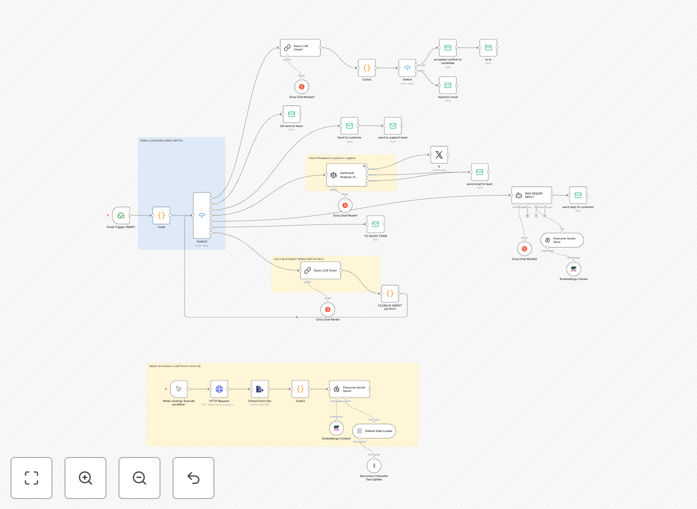
What This Workflow Does
This automation solves the universal business challenge of email overload by combining AI intelligence with workflow automation. The system analyzes incoming emails in real-time, categorizes them based on content and intent, then routes them to appropriate teams or triggers predefined responses.
Unlike basic email filters that rely on keywords, this solution uses Groq AI's natural language processing to understand context and Pinecone's vector database to match emails against historical patterns. The result is a smart classification system that improves over time as it processes more communications.
How It Works
Step 1: Email Capture
The workflow monitors your connected email inbox (Gmail, Outlook, etc.) for new messages. Each incoming email gets queued for processing while preserving all original metadata and attachments.
Step 2: AI Analysis
Groq AI examines the email content to determine: sender intent, emotional tone, urgency level, and relevant topics. This happens in milliseconds thanks to Groq's accelerated inference speed.
Step 3: Semantic Matching
Pinecone compares the email against your historical message patterns to identify similar past communications and their handling. This context helps determine the most appropriate classification.
Step 4: Classification & Routing
The system assigns one or more categories (e.g., "Sales Inquiry", "Support Ticket", "Invoice Query") and routes the email accordingly. Critical messages can trigger immediate alerts while routine ones get filed appropriately.
Step 5: Response Generation (Optional)
For common query types, the system can generate draft responses using your approved templates and knowledge base. These get reviewed before sending or can be configured for auto-reply in low-risk scenarios.
Who This Is For
This workflow benefits any business or team overwhelmed by email volume:
- Customer support teams handling 50+ daily inquiries
- Sales organizations processing lead responses
- HR departments managing job applications
- Legal practices receiving case-related communications
- Ecommerce stores with product questions
What You'll Need
- An n8n instance (cloud or self-hosted)
- Groq AI API access
- Pinecone account for vector database
- Email account (Gmail, Outlook, etc.)
- Category taxonomy for your business needs
Quick Setup Guide
- Download the JSON template file
- Import into your n8n instance
- Configure your email connection
- Set up Groq AI and Pinecone API credentials
- Define your email categories and routing rules
- Test with sample emails
- Activate the workflow
Key Benefits
80% faster email processing: Reduce time spent manually sorting and routing messages from minutes per email to seconds for entire batches.
Never miss critical communications: AI prioritization ensures urgent customer issues, sales leads, and time-sensitive requests get immediate attention.
Consistent categorization: Eliminate human variability in how emails get classified and routed across teams and shifts.
Scalable customer communication: Handle growing email volumes without proportionally increasing staff headcount.
Pro tip: Start with broad categories (5-7 main types) then refine as the system learns your patterns. Overly complex taxonomies initially reduce accuracy.