What This Workflow Does
Every morning, professionals waste precious time sifting through yesterday's emails, trying to separate signal from noise. This manual process leads to missed deadlines, overlooked action items, and fragmented team communication. The cognitive load of starting each day with an overflowing inbox reduces productivity and increases stress.
This automated workflow solves that problem completely. It runs daily at 8:00 AM, fetches all emails received in the previous 24 hours, and uses GPT-4o to generate a structured, actionable summary. The AI identifies key topics, extracts action items, highlights important deadlines, and categorizes emails by priority. The resulting digest is then posted directly to your team's Slack channel, providing everyone with a clear, concise starting point for the day.
If no emails were received, the system posts a polite notification confirming the inbox was empty—ensuring the team knows the automation is working. This creates consistency, eliminates manual work, and ensures critical information never gets buried in individual inboxes.
How It Works
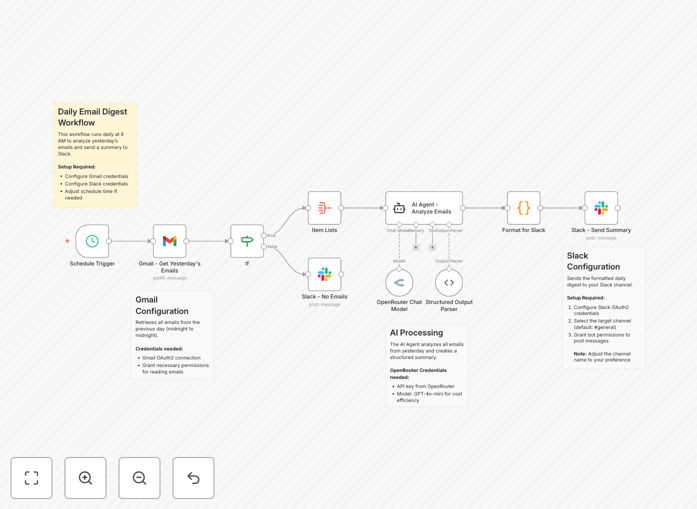
The workflow follows a logical sequence that transforms raw emails into intelligent insights:
1. Scheduled Trigger
A schedule node triggers the workflow every morning at 8:00 AM (configurable to any timezone). This ensures the digest arrives when your team starts their day, providing fresh insights without manual intervention.
2. Gmail Email Fetching
The workflow connects to Gmail via OAuth2 authentication (no password storage) and retrieves all emails from the previous day. You can customize this with labels, sender filters, or search queries to focus on specific projects or teams.
3. Conditional Logic & Aggregation
An "If" node checks whether any emails were found. If yes, they're aggregated into a single dataset. If no emails exist, the workflow branches to send a "no emails yesterday" notification to Slack, maintaining transparency.
4. AI-Powered Summarization
The aggregated emails are sent to GPT-4o (or your chosen AI model) with a carefully crafted prompt that instructs the AI to extract key points, action items, deadlines, and categorize by importance. The AI returns a structured summary in a consistent format.
5. Formatting & Delivery
A code node formats the AI output into clean, readable Slack markdown with proper sections, bullet points, and emojis for visual clarity. Finally, the formatted digest is posted to your designated Slack channel, where the entire team can see and act on it.
Who This Is For
This automation delivers immediate value to several key roles and scenarios:
Operations Leads & Project Managers: Who need visibility into vendor communications, support tickets, and project updates without drowning in individual email threads. The digest provides a single source of truth for team-wide communications.
Founders & Executives: Who receive high-volume emails from investors, partners, and team members but lack time to read everything. The AI summary highlights what truly matters for strategic decisions.
Client-Facing Teams: Including account managers, customer success, and sales professionals who need to track client communications across the team. The digest ensures nothing falls through the cracks between team members.
Remote & Hybrid Teams: Where email communication is critical but visibility is challenging. The Slack digest creates shared context and alignment without requiring everyone to CC each other on every email.
Any Professional with a Busy Inbox: If you spend more than 30 minutes daily processing emails, this automation will reclaim that time and reduce mental fatigue.
Pro tip: Start with a specific project or team inbox rather than personal email. This allows you to refine the AI prompts and filtering before scaling to more critical communications.
What You'll Need
- Gmail Account: With OAuth2 access enabled. This can be a personal Gmail, Google Workspace account, or a dedicated project inbox.
- Slack Workspace: With permissions to create incoming webhooks or install apps. You'll need access to the channel where digests should appear.
- AI API Access: An OpenRouter account (or direct access to OpenAI, Anthropic, etc.) with API credits. GPT-4o-mini is cost-effective for this use case.
- n8n Instance: Either n8n Cloud (free tier available) or self-hosted n8n with workflow execution capabilities.
- Basic Configuration Skills: Ability to follow setup instructions for connecting services and adjusting schedule times.
Quick Setup Guide
Follow these steps to implement this automation in under 15 minutes:
- Download & Import: Download the template file and import it into your n8n instance via the workflow import function.
- Connect Gmail: Click the Gmail node and authenticate using OAuth2. Test the connection by fetching a sample email.
- Configure Slack: Add your Slack credentials and select the target channel. Send a test message to verify the connection.
- Set Up AI: Add your OpenRouter (or other AI provider) API key in the credentials section. Select your preferred model (gpt-4o-mini recommended for cost).
- Adjust Schedule: Modify the schedule trigger to match your team's timezone and preferred delivery time.
- Test & Activate: Run the workflow once manually to verify everything works, then activate it to run automatically daily.
Key Benefits
Save 30-60 minutes daily per team member by eliminating manual email scanning and summarization. This time compounds to 10-20 hours monthly that can be redirected to higher-value work.
Never miss critical information because the AI systematically reviews every email and highlights action items, deadlines, and important updates that might be buried in lengthy threads.
Improve team alignment with consistent, shared digests that ensure everyone works from the same information. This reduces miscommunication and duplicate efforts.
Reduce cognitive load by starting the day with a pre-processed summary rather than an overwhelming inbox. This improves focus and decision-making throughout the day.
Create searchable archives of email summaries in Slack, making it easy to reference past communications without digging through individual email accounts.