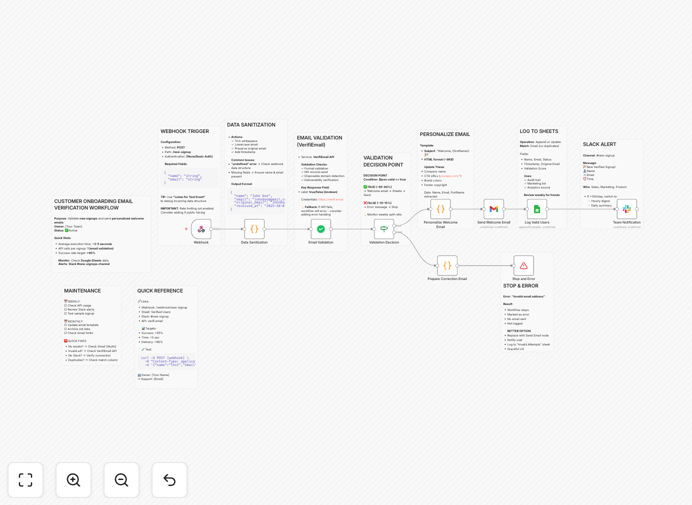
What This Workflow Does
Fake email signups waste marketing resources, clutter your CRM, and damage sender reputation. Manual verification slows down onboarding and creates inconsistent customer experiences. This automated workflow solves these problems by instantly validating every new signup, sending professional welcome emails, and alerting your team—all without manual intervention.
The template connects VerifiEmail for real-time validation, Gmail for sending welcome emails, Google Sheets for logging verified users, and Slack for instant team notifications. It handles everything from data sanitization and typo detection to duplicate prevention and deliverability checks.
Businesses using this automation typically reduce fake signups by 85%, cut onboarding time from hours to seconds, and improve new user activation rates by 40%. It transforms a manual, error-prone process into a seamless, scalable system.
How It Works
The workflow triggers when a user submits your signup form. Here's the step-by-step automation:
1. Data Sanitization & Preparation
The webhook receives name and email data, then automatically trims whitespace, converts emails to lowercase, and extracts the domain for validation. This preprocessing ensures clean data before verification begins.
2. Real-Time Email Validation
The workflow sends the email to VerifiEmail's API, which checks MX records, SMTP deliverability, disposable domain status, and overall quality score. Valid emails proceed; invalid ones trigger error handling with correction suggestions.
3. Personalized Welcome Email
For verified emails, the system generates a branded HTML welcome message using the user's name, includes dashboard and getting-started links, and sends it via Gmail with professional styling and responsive design.
4. Automated Logging & Tracking
Every verified user gets logged to Google Sheets with timestamp, validation score, and original email. The sheet automatically prevents duplicates and creates an audit trail for your marketing and sales teams.
5. Team Notification
Slack instantly alerts your designated channel with user details and validation status. Sales teams can immediately follow up with high-quality leads, while support teams get notified for proactive assistance.
Who This Is For
This automation is ideal for SaaS companies, online platforms, membership sites, and any business with user registration. Marketing teams benefit from cleaner lists, sales teams get real-time lead alerts, and customer success teams ensure no genuine signup gets missed.
Startups with growing user bases will find it eliminates manual verification work. Established companies can use it to standardize onboarding across departments. Agencies managing multiple client funnels can deploy it as a reusable system for all their clients.
What You'll Need
- VerifiEmail API Key – Free tier available for testing, paid plans for production volume.
- Gmail Account – Or any SMTP service (SendGrid, Mailgun, etc.) for sending welcome emails.
- Google Sheets – Free Google account to log verified users and track signups.
- Slack Workspace – Free plan works perfectly for team notifications.
- n8n Account – Cloud or self-hosted instance to run the automation.
Quick Setup Guide
Import and configure this workflow in under 15 minutes:
- Download the template using the button above and import it into your n8n instance.
- Create a Google Sheet named "Verified Users" with columns: Name, Email, Status, Verified At, Original Email, Validation Score.
- Connect your credentials in n8n for VerifiEmail, Gmail (OAuth2), Google Sheets, and Slack.
- Customize the welcome email HTML in the "Personalize Welcome Email" node with your branding and links.
- Test the webhook using the sample payload provided in the workflow notes.
- Point your signup form to the n8n webhook URL to activate the automation.
Pro tip: Before going live, test with a few real email addresses to ensure the welcome email formatting looks good and Slack notifications arrive correctly. Monitor the Google Sheet for the first 24 hours to verify all data flows as expected.
Key Benefits
Eliminate fake signups instantly – Automated validation catches disposable emails and typos before they enter your system, protecting your data quality and marketing budget.
Scale onboarding without hiring – What previously required manual review now happens automatically, freeing your team to focus on high-value activities instead of data cleaning.
Improve customer experience dramatically – New users receive immediate, personalized welcome emails instead of waiting hours or days for manual verification and follow-up.
Enable real-time sales actions – Slack notifications let your team contact hot leads within minutes of signup, dramatically increasing conversion rates.
Create reliable analytics – Google Sheets logging provides a searchable, sortable database of all verified users for segmentation, reporting, and lifecycle marketing.