What This Workflow Does
Manual payroll processing is time-consuming, error-prone, and frustrating for HR teams. This automation solves that by connecting your Google Sheets attendance logs directly to AI-powered calculation and communication systems.
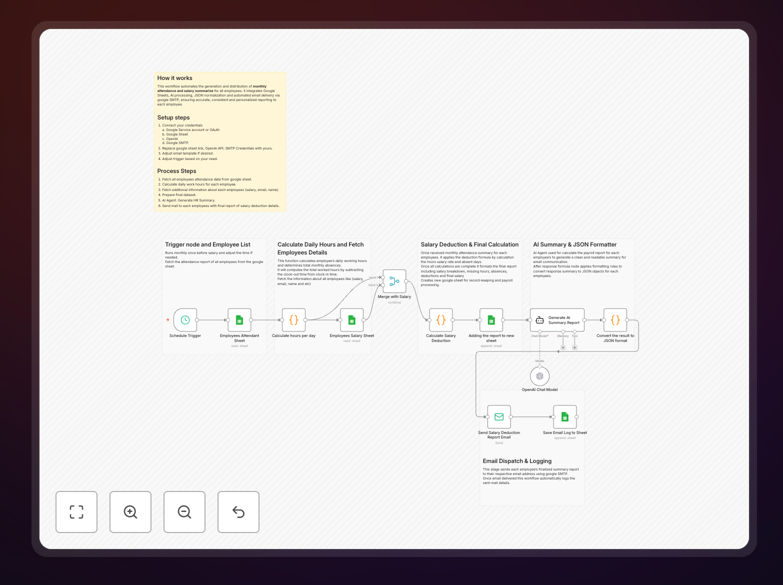
The workflow automatically processes monthly attendance data, calculates exact salary deductions for missing hours and absences, generates professional summaries using GPT-4, and sends personalized email reports to each employee. It transforms what was traditionally a 10-15 hour monthly task into a fully automated process that runs in minutes with zero manual intervention.
Beyond just calculations, it creates complete audit trails, stores results in organized Google Sheets, and ensures every employee receives clear, transparent communication about their compensation—reducing HR inquiries and improving employee satisfaction.
How It Works
1. Data Retrieval & Preparation
The workflow starts by fetching all employee attendance records from your Google Sheets daily log. It simultaneously retrieves the employee master sheet containing salaries, email addresses, and employment details. These datasets are merged to create a complete picture of each employee's monthly activity.
2. Attendance Analysis & Calculation
For each employee and each day, the system calculates actual hours worked versus expected hours. It identifies partial absences (late arrivals/early departures) and full-day absences. Using configurable rules, it computes hourly and daily rates from base salaries.
3. Deduction Computation
The automation applies your company's specific deduction policies—whether it's proportional deduction for partial hours or full-day deductions for absences. It calculates total deduction amounts and final payable salaries while maintaining all intermediate calculations for transparency.
4. AI-Powered Report Generation
GPT-4 processes the calculated data to create personalized, HR-friendly summaries for each employee. The AI explains attendance patterns, clarifies deductions in simple language, and adds appropriate professional tone—transforming raw numbers into meaningful communication.
5. Automated Distribution & Logging
Personalized emails with salary summaries are sent to each employee via your email system. All sent emails, their content, and delivery status are automatically logged back to Google Sheets, creating a complete audit trail for HR and finance teams.
Who This Is For
This automation is ideal for small to medium businesses, startups, agencies, and any organization managing 10-500 employees with monthly payroll. HR managers drowning in spreadsheet calculations will benefit immediately. Companies using Google Workspace who want to leverage their existing Sheets investment will find this particularly valuable.
It's perfect for businesses with hourly or daily wage employees where attendance directly impacts compensation. Educational institutions managing staff payroll, retail businesses with shift workers, and service companies with field staff can all eliminate manual calculation headaches.
Even larger enterprises can use this as a departmental solution before implementing expensive enterprise HR systems, or as a complementary automation for specific employee groups with unique calculation requirements.
What You'll Need
- Google Sheets Setup: Two structured sheets—one for daily attendance logs and one for employee master data with emails and salaries.
- Google Service Account: Credentials to allow the automation to read from and write to your Google Sheets.
- Email Service: Gmail/SMTP credentials for sending reports (can use company email or dedicated HR email).
- OpenAI API Key: For GPT-4 access to generate professional email summaries (optional but recommended).
- n8n Instance: Self-hosted n8n or n8n.cloud account to run the workflow.
Pro tip: Start with a test group of 5-10 employees to validate calculations before rolling out company-wide. Create a "sandbox" copy of your sheets for testing without affecting live data.
Quick Setup Guide
- Download & Import: Download the template JSON file and import it into your n8n instance.
- Configure Google Sheets Connection: Set up the Google Sheets node with your service account credentials and specify your attendance and master sheet IDs.
- Set Up Email: Configure the email node with your SMTP details or Gmail OAuth credentials.
- Add OpenAI Key: If using AI summaries, add your OpenAI API key to the AI Agent node.
- Test with Sample Data: Run the workflow with a small subset of data to verify calculations match your expectations.
- Schedule Execution: Set the workflow to trigger monthly (e.g., last Friday of each month) to automate your entire payroll cycle.
Key Benefits
Eliminate Calculation Errors: Manual spreadsheet formulas often break when adding new employees or changing formats. This automation applies consistent logic every time, ensuring 100% accurate calculations regardless of data volume or complexity.
Save 80-90% of HR Time: What typically takes days of manual compilation, calculation, and communication now happens automatically. HR teams can reallocate this time to strategic initiatives like employee development and culture building.
Improve Employee Transparency: AI-generated summaries explain deductions in clear, empathetic language. Employees understand exactly how their attendance impacted their pay, reducing confusion and payroll-related inquiries by 60-70%.
Create Audit-Ready Records: Every calculation is logged with timestamps, input data, and results. If questions arise about specific pay periods, HR can instantly retrieve complete calculation histories rather than reconstructing manual processes.
Scale Without Additional Headcount: As your company grows from 20 to 200 employees, the automation handles the increased volume without additional HR hours. The system processes 200 employees as easily as 20.