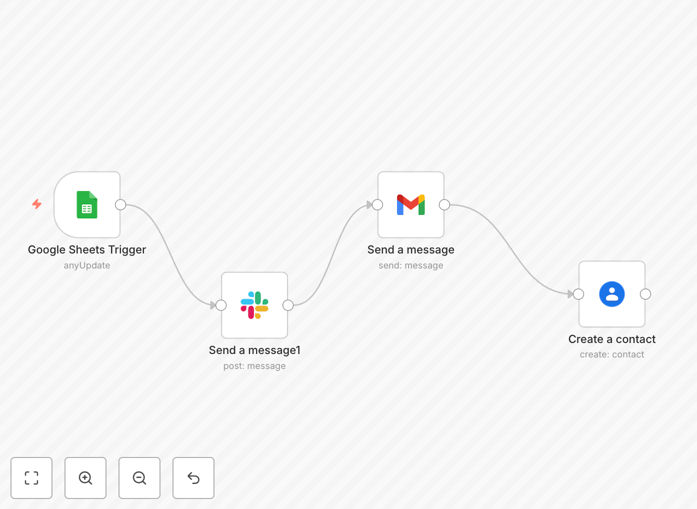
What This Workflow Does
Manual form response is a time-consuming bottleneck that costs businesses hours each week. When someone submits a Google Form, you typically need to: check the spreadsheet, notify your team, send a confirmation email, and add the contact to your database—all separately. This disjointed process leads to missed opportunities, delayed responses, and data entry errors.
This automated workflow solves that by creating a seamless pipeline from form submission to complete follow-up. When a new row appears in your Google Sheet (connected to your Google Form), the system instantly triggers three coordinated actions: sends a detailed notification to your team's Slack channel, delivers a personalized email response to the submitter via Gmail, and creates a new contact entry in Google Contacts. Everything happens within seconds, ensuring no inquiry is overlooked and every respondent receives immediate, professional acknowledgment.
How It Works
The automation follows a logical sequence that mirrors how you'd ideally handle form responses manually—but at machine speed and with perfect consistency.
Step 1: Trigger on New Form Submission
The workflow monitors your designated Google Sheet for new rows. When your Google Form receives a submission, it automatically populates a new row in this sheet. The automation detects this addition instantly, capturing all submitted data including name, email, message, and any custom fields you've configured.
Step 2: Send Internal Slack Notification
Immediately after detecting the new submission, the workflow posts a formatted message to your chosen Slack channel. This notification includes key details from the form, allowing your team to see new inquiries in real-time without constantly checking the spreadsheet. You can customize which fields appear and how they're presented.
Step 3: Deliver Personalized Gmail Response
Using the submitter's email address from the form, the system sends a tailored reply through your Gmail account. The email template can include dynamic fields like the person's name, specific answers they provided, and relevant next steps. This creates a professional, timely acknowledgment that improves respondent experience.
Step 4: Create Google Contact Entry
Finally, the workflow extracts contact information from the submission and creates a new entry in your Google Contacts. This automatically builds your contact database with accurate information, eliminating manual data entry and ensuring you can easily follow up or include respondents in future communications.
Pro tip: Add a conditional step to categorize submissions based on form answers. For example, route sales inquiries to a sales-specific Slack channel and support questions to your support team channel.
Who This Is For
This automation is ideal for any business or team that collects information through Google Forms and needs to respond promptly. Service providers like consultants, agencies, and freelancers can use it for client inquiry forms. Educational institutions benefit for application or information request forms. Sales teams can automate lead capture from website contact forms. Event organizers can handle registration confirmations. Customer support departments can acknowledge support tickets submitted via forms. Essentially, if you're manually checking a Google Sheet and sending individual responses, this workflow will save you significant time.
What You'll Need
- A Google Form connected to a Google Sheet (the standard setup)
- A Slack workspace with permissions to post to your desired channel
- A Gmail account for sending automated responses
- A Google Contacts account (usually part of your Google Workspace)
- An n8n instance (cloud or self-hosted) to run the workflow
- API credentials for Google Sheets, Slack, Gmail, and Google Contacts
Quick Setup Guide
Getting this automation running typically takes 15-20 minutes once you have your accounts and credentials ready.
- Download the template using the button above and import it into your n8n instance.
- Configure the Google Sheets trigger by connecting your Google account and selecting the specific spreadsheet and worksheet where form submissions appear.
- Set up the Slack node by connecting your Slack workspace and specifying the channel where notifications should be posted.
- Configure the Gmail node with your sending account and customize the email template with your branding and message.
- Connect the Google Contacts node and map the form fields to the appropriate contact fields (name, email, phone, etc.).
- Test the workflow by submitting a test form entry and verifying all three actions occur correctly.
- Activate the workflow and let it run automatically for all future submissions.
Pro tip: Before going live, send test submissions to verify the formatting and data flow. Check that Slack notifications are clear, emails look professional, and contact entries contain all necessary information.
Key Benefits
Eliminate manual follow-up entirely. What typically takes 5-10 minutes per form submission now happens automatically in seconds. For businesses receiving 20+ submissions weekly, this saves 2-3 hours of administrative work.
Improve response time from hours/days to seconds. Respondents receive immediate acknowledgment, which significantly improves their experience and perception of your professionalism. Studies show faster responses dramatically increase conversion rates for sales inquiries.
Ensure no submission is ever missed. With automatic Slack notifications, your entire team sees new inquiries as they arrive. There's no risk of someone forgetting to check the spreadsheet or overlooking an email notification.
Build a clean, organized contact database automatically. Every form respondent becomes a properly formatted contact in Google Contacts, complete with the context of their original inquiry. This creates valuable data for future marketing and follow-up campaigns.
Maintain consistent, branded communication. Automated emails follow your exact template every time, ensuring professional formatting, correct links, and appropriate messaging—eliminating the variability of manual responses.