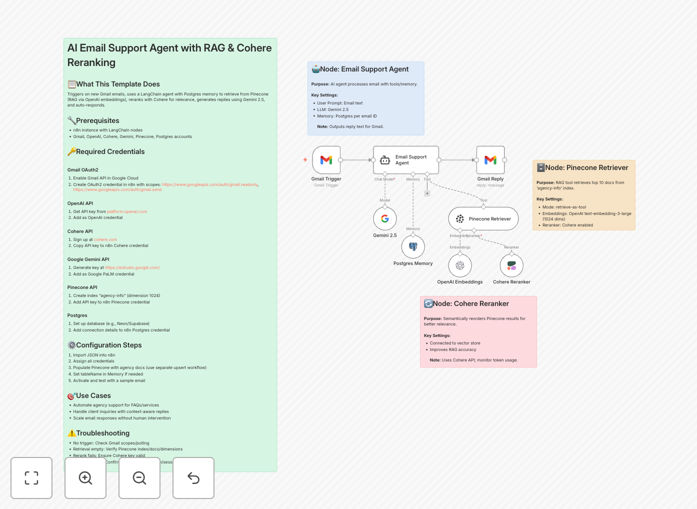
What This Workflow Does
Manual email support is time-consuming, inconsistent, and doesn't scale. This intelligent automation transforms your Gmail inbox into a 24/7 AI support agent that reads incoming emails, understands customer questions, searches your knowledge base using advanced RAG (Retrieval-Augmented Generation) with Cohere reranking, and sends personalized, accurate replies using Google's Gemini AI.
The system maintains conversation history for each customer, ensuring context-aware responses across multiple interactions. It automatically handles common inquiries about pricing, services, order status, and FAQs while flagging complex cases for human review. What used to take hours of manual work now happens in seconds, with consistent quality and unlimited scalability.
How It Works
1. Email Detection & Triggering
The workflow monitors your Gmail inbox every minute for new messages. When an email arrives from a customer, it extracts the sender information, subject, and body content for processing.
2. Context Retrieval with RAG
The system searches your Pinecone vector database (containing your company knowledge base, FAQs, and documentation) to find the most relevant information. Cohere's reranking technology then reorders results by semantic relevance, ensuring the AI has the best possible context.
3. AI Response Generation
Google's Gemini 2.5 AI analyzes the customer's email alongside retrieved knowledge, checks conversation history from PostgreSQL memory, and crafts a personalized, helpful response that matches your brand voice and provides accurate information.
4. Automated Reply & Logging
The generated response is sent back to the customer through Gmail, with the entire interaction logged in your database for quality monitoring and future reference. The system can also escalate complex cases to your human team when needed.
Who This Is For
This automation is ideal for e-commerce businesses drowning in order status inquiries, SaaS companies handling repetitive technical questions, agencies managing client communications, professional services firms answering service inquiries, and any organization with documented processes or knowledge bases. If you receive similar questions daily and have existing documentation, this system will dramatically reduce your support workload.
What You'll Need
- n8n instance (cloud or self-hosted) with LangChain nodes enabled
- Gmail account with API access enabled
- Google Gemini API key from AI Studio
- OpenAI API key for embeddings generation
- Cohere API key for semantic reranking
- Pinecone account with "agency-info" index (or your custom index)
- PostgreSQL database (Neon, Supabase, or self-hosted) for conversation memory
Pro tip: Start with a focused knowledge base of your 20 most common customer questions and their answers. This gives the AI high-quality context immediately and builds confidence in the system before expanding to more complex topics.
Quick Setup Guide
- Download and import the JSON template into your n8n instance
- Configure all required API credentials in n8n's credential manager
- Populate your Pinecone vector database with company documents and FAQs
- Test with a sample email from a controlled account
- Adjust the system prompt in the LangChain agent node to match your brand voice
- Activate the workflow and monitor initial responses for quality assurance
Key Benefits
24/7 customer support without staffing costs: Answer emails instantly at any hour, improving customer satisfaction while reducing support team workload by 60-80% for common inquiries.
Consistent, accurate information delivery: Every customer receives the same high-quality answer based on your actual documentation, eliminating human error and information inconsistency across team members.
Scalable solution that grows with your business: Handle 10 or 10,000 daily inquiries without adding staff. The system processes each email in seconds, maintaining quality regardless of volume.
Continuous learning and improvement: The PostgreSQL memory maintains conversation history, enabling context-aware responses and providing valuable data for optimizing your knowledge base and identifying common customer pain points.
Hybrid human-AI workflow efficiency: Automate routine questions while automatically flagging complex or emotional cases for human attention, ensuring the right resource handles each inquiry appropriately.