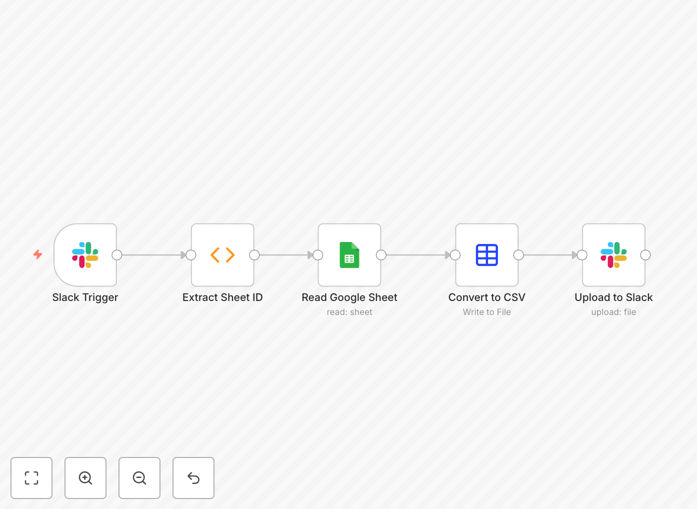
What This Workflow Does
This automation solves a common business bottleneck: teams needing to export Google Sheets data as CSV files for analysis, reporting, or system imports. Instead of manually downloading, converting, and sharing files, team members simply mention your Slack bot with a Google Sheets link. The workflow automatically extracts the data, converts it to CSV format, and uploads the file back to Slack—all within seconds.
The solution eliminates repetitive manual work, reduces errors from incorrect formatting, and creates a transparent audit trail of who requested which data. It's particularly valuable for marketing teams sharing campaign metrics, sales teams distributing lead lists, operations teams reporting inventory data, and finance teams providing budget snapshots to stakeholders.
How It Works
1. Slack Trigger
The workflow activates when your Slack bot is mentioned or receives a specific command in any channel. It captures the message content and identifies the sender and channel for response routing.
2. Google Sheets Link Extraction
The system scans the message for Google Sheets URLs, extracts the unique spreadsheet ID, and validates the link format. If no valid link is found, the workflow terminates gracefully without notification.
3. Data Retrieval
Using the extracted spreadsheet ID, the workflow connects to Google Sheets API, reads data from the specified tab, and prepares it for conversion while preserving formatting and data types.
4. CSV Conversion
The retrieved rows and columns are transformed into properly formatted CSV files with correct headers, delimiters, and encoding—ready for immediate use in any analysis tool or system.
5. File Delivery
The generated CSV file is uploaded back to the originating Slack channel (or a designated channel), providing instant access to the requested data with proper filename conventions.
Pro tip: Configure your Slack bot to respond with a "processing" message immediately after receiving the request. This improves user experience by confirming the system is working on their export.
Who This Is For
This automation delivers maximum value to data-driven teams across multiple departments:
Marketing & Analytics Teams: Regularly export campaign performance data, website analytics, or social media metrics for external agencies or internal reporting.
Sales & Business Development: Quickly share lead lists, prospect databases, or account planning sheets with partners or new team members without granting direct spreadsheet access.
Operations & Logistics: Distribute inventory reports, shipping schedules, or production data to warehouse teams, suppliers, or management in standardized CSV format.
Finance & Accounting: Provide budget snapshots, expense reports, or revenue data to department heads while maintaining control over the source spreadsheet.
What You'll Need
- Slack Workspace with App Permissions: Admin access to create a Slack app with bot tokens for receiving mentions and uploading files.
- Google Cloud Project: A Google Cloud project with Sheets API enabled and service account credentials configured for spreadsheet access.
- n8n Instance: Either self-hosted n8n or n8n.cloud account with available workflow execution capacity.
- Google Sheets Access: The service account or connected Google user must have at least view permissions on target spreadsheets.
- Slack Channel Strategy: Decision on whether files return to request channels or dedicated export channels for organization.
Quick Setup Guide
Follow these steps to implement this automation in under 30 minutes:
- Download & Import: Download the template file and import it into your n8n instance via the workflow import function.
- Configure Slack Credentials: Create a Slack app in your workspace, copy the bot token, and add it to n8n's Slack node credentials.
- Set Up Google Sheets Access: Create a service account in Google Cloud, enable Sheets API, share target spreadsheets with the service account email, and add credentials to n8n.
- Test Trigger Configuration: Invite your Slack bot to a test channel, mention it with a sample Google Sheets link, and verify the CSV delivery.
- Deploy & Monitor: Activate the workflow, train your team on the simple command syntax, and monitor initial exports for any formatting adjustments.
Pro tip: Start with a small pilot group and specific spreadsheets before rolling out organization-wide. This allows you to refine the workflow based on real usage patterns and edge cases.
Key Benefits
Save 15+ hours monthly per team member by eliminating manual export, conversion, and sharing processes. What typically takes 5-10 minutes per request becomes instantaneous.
Ensure 100% data consistency with automated formatting that follows predefined rules every time, eliminating human errors in CSV structure, delimiter usage, or header formatting.
Improve data security by providing CSV exports without granting direct spreadsheet edit access. Team members get the data they need without risking accidental modifications to source files.
Create complete audit trails through Slack message history showing who requested which data and when, providing transparency for compliance and accountability purposes.
Scale effortlessly across departments with a single automation serving multiple teams and use cases without additional configuration or maintenance overhead.