Google Sheets VAPI.ai Google Gemini HR Automation n8n

Automated HR Screening with AI Calls & Transcript Analysis

Scale candidate pre-screening with automated phone interviews. AI calls candidates, analyzes conversations, and updates your spreadsheet—zero manual work.

Download Template JSON · n8n compatible · Free
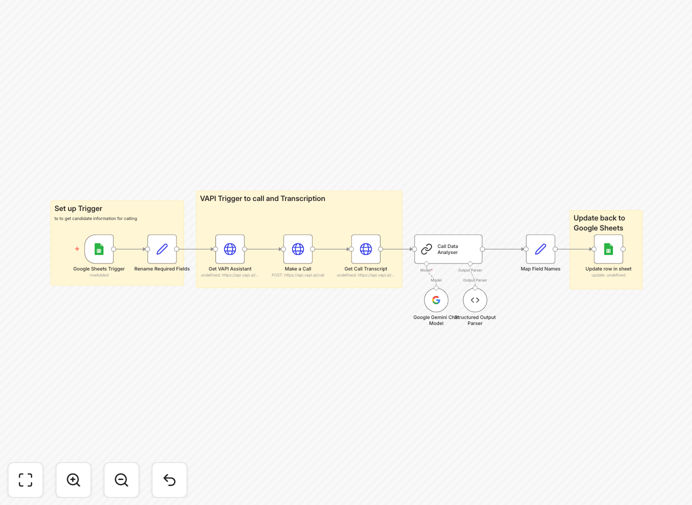
Visual diagram showing automated HR screening workflow: Google Sheets trigger, VAPI AI call, Gemini analysis, and data update

What This Workflow Does

Manual candidate screening is a massive time sink for HR teams. Recruiters spend hours calling applicants, taking notes, and manually entering data into spreadsheets or ATS systems. This process is slow, inconsistent, and prone to human error.

This automation solves that by creating a fully automated pre-screening pipeline. When a new candidate is added to your Google Sheet, an AI-powered phone call is initiated via VAPI.ai. The conversation is transcribed, analyzed by Google Gemini for key details (experience, salary expectations, notice period), and the structured insights are automatically written back to the same sheet. It’s like having a 24/7 recruiting assistant that never gets tired.

How It Works

The workflow follows a logical sequence to transform a candidate lead into structured, actionable data.

1. Trigger from Google Sheets

The automation watches a specific Google Sheet for new rows. Each new entry—containing candidate name, phone number, and role—triggers the entire process. This makes it easy to integrate with job boards, website forms, or manual imports.

2. AI Phone Call with VAPI.ai

Using the candidate’s phone number, the workflow initiates a call via VAPI.ai’s voice assistant. The AI conducts a structured interview based on your script, asking about work experience, current and expected CTC, notice period, and location preferences.

3. Transcript Retrieval & Analysis

After the call completes, the full conversation transcript is fetched. Google Gemini then parses this text, extracting specific data points and converting the natural language into clean, structured JSON fields.

4. Data Mapping & Sheet Update

The extracted insights are mapped to corresponding columns in your original Google Sheet. The candidate’s row is updated with their CTC, experience summary, notice period, and other key details—ready for recruiter review.

Who This Is For

This template delivers immediate value for recruitment agencies, in-house HR teams, startups scaling hiring, and businesses processing high volumes of applications. It’s perfect for roles with clear screening criteria (like sales, customer support, or IT) where initial filtering is repetitive but necessary.

If your team spends more than 5 hours a week on initial candidate calls, this automation will pay for itself in saved time within the first month. It’s also ideal for companies hiring across time zones, as AI can call candidates at any hour.

What You'll Need

  1. A Google Account with access to Google Sheets API (free).
  2. A VAPI.ai account with an Assistant ID, Phone Number ID, and API key.
  3. Google Gemini API access (via Google AI Studio).
  4. n8n instance (self-hosted version 1.40+ recommended, as this uses community nodes).
  5. A Google Sheet with columns for candidate data and parsed results.

Pro tip: Start with a small batch of test candidates to fine-tune your VAPI assistant script and Gemini parsing instructions. This ensures high accuracy before scaling to live applicants.

Quick Setup Guide

You can have this automation running in under 30 minutes.

  1. Import the template into your n8n instance using the downloaded JSON file.
  2. Configure credentials for Google Sheets, VAPI.ai (Bearer token), and Google Gemini in n8n.
  3. Update IDs in the workflow nodes: your Google Sheet ID, tab name, VAPI Assistant ID, and Phone Number ID.
  4. Test with a single row in your sheet containing a test phone number.
  5. Activate the workflow and let it process new candidates automatically.

Key Benefits

Save 10–15 hours per recruiter each week by eliminating manual screening calls and data entry. That time can be redirected to interviewing qualified candidates and improving the hiring process.

Ensure consistent, unbiased screening because every candidate gets asked the same questions in the same tone. This reduces human bias in early stages and improves compliance.

Capture data instantly and accurately directly into your system. No more lost notes, misinterpreted salary ranges, or typos in spreadsheets.

Scale hiring without scaling headcount. The AI can handle hundreds of calls simultaneously, allowing your team to manage larger talent pools without burnout.

Improve candidate experience with faster response times. Applicants get contacted quickly, at their convenience, and move through your pipeline faster.

Frequently Asked Questions

Common questions about AI-powered HR screening and automation

AI can automate initial candidate screening by using voice bots to conduct structured phone interviews, transcribing the conversation, and analyzing responses for key qualifications like experience, salary expectations, and notice period. This saves recruiters 10-15 hours per week on repetitive calls and data entry.

Instead of a human calling each applicant, the AI handles the first touchpoint, filters out clearly unqualified candidates, and provides recruiters with a summarized, structured report. This allows your team to focus only on engaging with the most promising prospects.

Integrating AI voice calls with HR workflows enables 24/7 candidate outreach, consistent interview questioning, and instant data capture into your CRM or ATS. It eliminates manual note-taking, reduces human bias in early screening, and allows recruiters to focus only on qualified, interested candidates.

Beyond efficiency, this integration creates a searchable database of candidate conversations. You can later analyze trends in salary expectations or notice periods across roles, providing valuable insights for your hiring strategy and compensation planning.

AI transcript analysis extracts structured data from conversations—like current CTC, expected salary, and availability—and automatically updates candidate records. This eliminates manual data entry errors, provides searchable insights for later review, and speeds up the shortlisting process by 70%.

The analysis can also detect sentiment, confidence levels, and specific skill mentions that might be missed by a human reviewer. This adds a layer of objective assessment to complement the recruiter's intuition.

Yes, when designed well. AI screening calls should be brief, transparent about being automated, and include clear next steps. Candidates appreciate quick responses and flexible scheduling. The key is to use the automation for data collection, not for final decisions, ensuring human touchpoints remain in later stages.

Best practices include letting candidates opt-out to speak with a human immediately, providing a clear FAQ about the process, and ensuring the AI voice is natural and respectful. The goal is to augment human interaction, not replace it entirely.

Tools like n8n are ideal because they connect HR tools (ATS, Google Sheets), AI services (Gemini, OpenAI), and communication platforms (VAPI.ai, Twilio) without coding. Look for platforms with pre-built connectors, conditional logic for routing candidates, and the ability to handle structured data output.

For HR specifically, prioritize automation platforms that offer strong data privacy controls, audit trails for compliance, and easy integration with your existing HRIS. The tool should make complex workflows simple to visualize and modify as your hiring needs evolve.

Always use vendors with SOC2 compliance, encrypt candidate data in transit and at rest, obtain explicit consent for recording and analysis, and limit data retention. Automated workflows should only access necessary information and integrate with your existing HR systems that already have security protocols.

Additionally, configure your automation to automatically redact or exclude sensitive personal information not relevant to screening. Regular security audits and clear data handling policies communicated to candidates build trust and ensure regulatory compliance.

Yes, GrowwStacks specializes in building tailored HR automation systems. We can design workflows that integrate with your specific ATS, customize AI questioning for your roles, add multilingual support, and create dashboards for tracking screening metrics. Book a free consultation to discuss your requirements.

Our team will analyze your current screening process, identify the highest-impact automation opportunities, and build a solution that scales with your hiring volume. We handle everything from initial design to deployment and training.

  • Integration with Greenhouse, Lever, or your existing ATS
  • Custom qualification scoring based on your criteria
  • Automated scheduling for next interview rounds

Need a Custom HR Screening Automation?

This free template is a starting point. Our team builds fully tailored automation systems for your specific business needs.