Jotform Xero Outlook Telegram Accounting

Automated invoice creation & customer communication

Streamline your billing process by automatically generating invoices from form submissions and notifying customers and teams

Download Template JSON · n8n compatible · Free
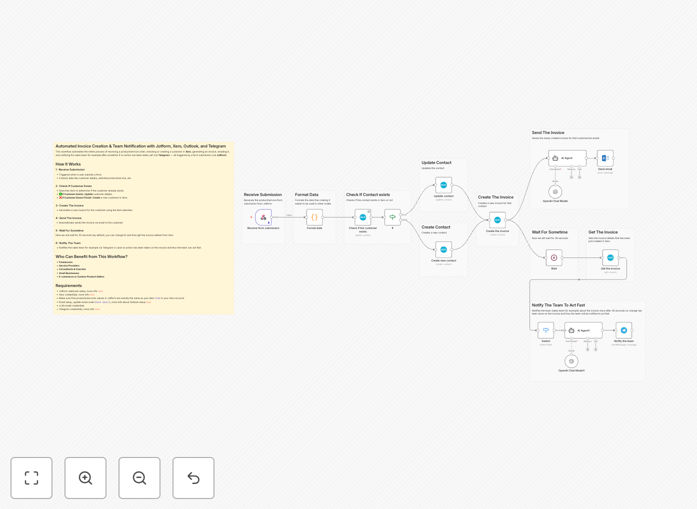
Automated invoice creation workflow diagram

What This Workflow Does

This automation solves the tedious manual process of creating invoices from customer submissions and following up with payment reminders. When a customer submits information through your Jotform, this workflow automatically creates a professional invoice in Xero, sends it to the customer via Outlook email (Outlook), and notifies your team via Telegram.

The system eliminates data entry errors, ensures timely invoice delivery, and keeps your team instantly informed about new transactions. It's particularly valuable for service businesses, consultants, and freelancers who need to bill clients quickly and professionally.

How It Works

1. Form submission trigger

The workflow starts when a customer submits your Jotform with their order details, contact information, and payment terms. The workflow captures all relevant fields including customer name, email address, items purchased, quantities, and prices.

2. Invoice creation in Xero

The workflow takes the form data and automatically generates a complete invoice in Xero with all line items, taxes, and totals calculated. It creates a professional PDF document with your branding that's ready for delivery.

3. Customer email notification

The system then sends the invoice PDF via Outlook email to the customer, with a personalized message thanking them for their business and including payment instructions. The email is sent from your professional business address.

4. Team alert via Telegram

Finally, the workflow sends an instant notification to your internal Telegram channel with key details about the new invoice - customer name, amount, and due date. This keeps your accounting and sales teams informed in real-time.

Pro tip: Add conditional logic to send different email templates based on customer type (new vs returning) or invoice amount thresholds.

Who This Is For

This automation is ideal for:

  • Service businesses that bill clients after work completion
  • E-commerce stores with custom order requirements
  • Consultants and freelancers who need fast invoicing
  • Accounting firms managing client billing
  • Any business using Jotform for order intake

What You'll Need

  1. Active accounts with Jotform, Xero, Outlook, and Telegram
  2. Your Jotform configured with the necessary billing fields
  3. A Telegram channel or group for team notifications
  4. n8n instance (self-hosted or cloud)
  5. <5>API access enabled for all connected platforms

Quick Setup Guide

  1. Download and import the JSON template into your n8n instance
  2. Connect your Jotform, Xero, Outlook, and Telegram accounts
  3. <3>Map your Jotform fields to the Xero invoice template <4>Customize the email template with your branding <5>Test with sample form submissions <6>Deploy the workflow

Key Benefits

Save 5-15 hours per week by eliminating manual data entry between systems. The workflow handles all repetitive invoice creation tasks automatically.

Reduce billing errors by 90%+ since information flows directly from the systems without manual transcription mistakes.

Get paid faster with immediate invoice delivery customers receive their bills within minutes of form submission.

Improve team visibility with real-time Telegram notifications that keep everyone informed about new transactions.

Enhance customer experience with professional, timely communications that build trust and credibility.

Frequently Asked Questions

Common questions about invoice automation and multi-platform integrations

Automated invoicing significantly accelerates your billing cycle by sending invoices immediately after order confirmation. This reduces the payment delay that occurs with manual billing processes.

For example, a consulting firm that implemented automation saw their average time-to-payment drop from 14 days to just 5 days. The faster customers receive invoices while their purchase decision is fresh, improving payment compliance.

  • Eliminates billing backlog delays
  • Reduces days sales outstanding (DSO)
  • Creates predictable cash flow patterns

Service-based businesses with recurring billing see the greatest impact from invoice automation. This includes agencies, consultants, SaaS companies, and professional service providers.

For instance, a marketing agency reduced their billing department workload by 70% while handling 3x more clients after automation. The system handles volume spikes effortlessly while maintaining accuracy.

  • Ideal for businesses with variable billing amounts
  • Perfect for companies with seasonal spikes
  • Essential for scaling service operations

Modern automation platforms use enterprise-grade security including encryption, access controls, and audit logging. Your financial data remains protected throughout the entire workflow.

Xero and other accounting platforms are specifically designed handle sensitive financial data securely, with bank-level encryption and compliance certifications like SOC 2. The automation simply connects these secure systems without storing sensitive data.

  • Data encrypted in transit and at rest
  • Role-based access controls available
  • Activity logs for all transactions

Absolutely. The workflow supports full customization of both the Xero invoice template and the Outlook email that delivers it. You can match your brand identity perfectly.

Most businesses start with their existing invoice design in Xero, then enhance the email template with professional signatures, logos, and personalized messaging. The template includes placeholder for all these elements.

  • Upload your company logo and brand colors
  • Add custom fields and messaging
  • Create multiple template variations

The workflow can include validation rules to catch common errors before invoice creation. For post-delivery corrections, Xero provides easy tools to edit and reissue invoices.

In practice, most businesses configure their Jotform with required fields and data validation to prevent submission errors. For the rare case where correction is needed, the Telegram notification alerts your team immediately.

  • Form validation prevents most errors
  • Audit trail tracks all changes
  • Team notified of corrections needed

Xero provides comprehensive reporting dashboards showing payment times, outstanding invoices, and revenue patterns. You can also configure the workflow to log key metrics to a spreadsheet or database.

Many businesses add a step that records each invoice event (creation, sent, paid) with timestamps analytics. This data helps identify bottlenecks and optimize the system's impact on cash flow.

  • Built-in Xero reporting tools
  • Optional logging for custom analytics
  • Telegram notifications include tracking links

Absolutely! GrowwStacks specializes in building completely custom automation systems for businesses of all sizes. While this free template provides a starting point, we can design solution tailored to your specific billing workflows.

We'll analyze your current process, identify optimization opportunities, and build automation that integrates with all your existing tools. The result is system that eliminates manual work while giving you complete control and visibility.

  • 100% customized to your business rules
  • Seamless integration with your tech stack
  • Ongoing support and optimization

Need a Custom Invoice Automation System?

This free template is a starting point. Our team builds fully tailored automation systems for your specific billing needs.