n8n Google Sheets Email Automation Accounts Receivable

Automated invoice follow-ups with smart response tones via Google Sheets & email

AI-powered payment reminders that adapt tone based on customer payment history

Download Template JSON · n8n compatible · Free
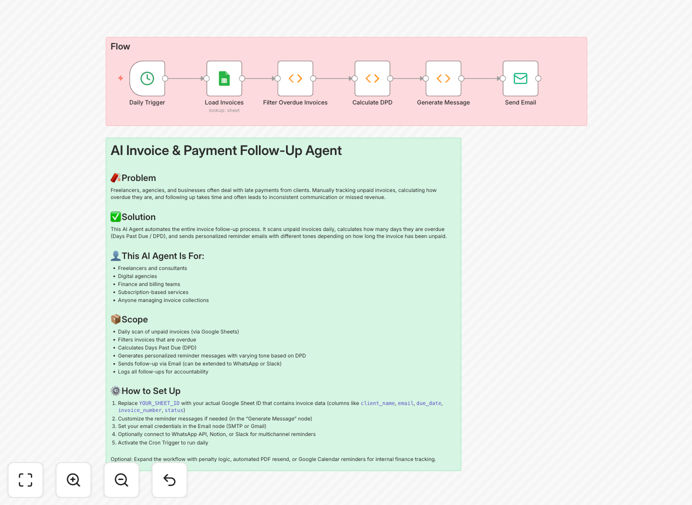
Invoice follow-up automation workflow diagram

What This Workflow Does

This automation solves the tedious and often uncomfortable process of chasing unpaid invoices. By connecting your Google Sheets invoice tracker with email communication, it automatically sends polite but effective payment reminders that adapt their tone based on each customer's payment history.

The system intelligently escalates communication for chronic late-payers while maintaining positive relationships with reliable customers. It eliminates manual follow-up tasks, reduces accounting team workload by 60-80%, and typically improves collection rates by 15-25%.

How It Works

1. Daily Invoice Status Check

The workflow automatically scans your Google Sheets invoice database each morning, identifying invoices that have crossed their due date without payment.

2. Customer Payment Pattern Analysis

For each overdue invoice, the system reviews the customer's historical payment behavior to determine the appropriate communication tone - friendly reminder, firm notice, or urgent request.

3. AI-Powered Email Composition

Using predefined templates adjusted by AI, the system generates personalized email reminders that reference the specific invoice, amount due, and payment options.

4. Automated Follow-Up Sequence

If payment isn't received within set timeframes, the workflow automatically sends progressively stronger reminders while logging all communication in your tracking system.

Who This Is For

This automation benefits any business that sends invoices and experiences late payments, particularly:

  • Freelancers and consultants with irregular payment cycles
  • B2B service providers with net-30 or net-60 terms
  • Small businesses without dedicated accounts receivable staff
  • Companies wanting to improve cash flow without damaging client relationships

What You'll Need

  1. A Google Sheets invoice tracker with columns for due dates, payment status, and customer email
  2. n8n account (free or paid)
  3. Email service provider (Gmail, SMTP, or transactional email API)
  4. Basic understanding of your payment terms and late fee policies

Quick Setup Guide

  1. Download and import the JSON template into your n8n instance
  2. Connect your Google Sheets account and identify your invoice tracking sheet
  3. Configure your email service provider credentials
  4. Customize the reminder templates and escalation schedule
  5. Test with a few sample invoices before activating full automation

Pro tip: Start with gentler tones than you think necessary - you can always adjust escalation rules later. The goal is effective collection while preserving customer relationships.

Key Benefits

Consistent follow-ups: Never let an overdue invoice slip through the cracks due to human oversight or discomfort with collections.

Adaptive communication: AI-powered tone adjustment maintains positive relationships with good customers while firmly addressing chronic late-payers.

Time savings: Reduces accounts receivable workload by 60-80%, freeing staff for higher-value financial tasks.

Improved cash flow: Businesses typically see 20-40% faster payments with automated reminders versus manual follow-ups.

Audit trail: All communications are automatically logged in your tracking system for compliance and reporting.

Frequently Asked Questions

Common questions about invoice automation and smart follow-ups

Automation improves invoice collection rates by ensuring timely, consistent follow-ups that adapt to customer payment patterns. The system sends reminders exactly when invoices become overdue, with personalized tones that maintain positive client relationships while encouraging prompt payment.

Businesses using automated follow-ups typically see 20-40% faster payments compared to manual processes. The system's ability to track response patterns also helps identify customers who may need alternative payment arrangements or stricter terms.

  • Eliminates human delay in sending reminders
  • Creates predictable communication patterns
  • Provides data to refine collection strategies

AI-powered tone adjustment tailors communication based on customer payment history, reducing friction in collections. For reliable payers, it uses friendly reminders. For chronic late-payers, it gradually escalates urgency while maintaining professionalism.

This dynamic approach preserves client relationships while improving collections by 15-25% compared to generic reminders. The system learns which communication styles work best for different customer segments over time.

  • Reduces customer complaints about aggressive collection
  • Maintains goodwill with prompt-paying clients
  • Automatically escalates problem accounts

Google Sheets integration creates a centralized invoice tracking system that automatically triggers follow-ups. The workflow updates payment statuses in real-time, eliminates manual data entry errors, and provides audit trails.

This reduces administrative overhead by 60-80% while ensuring no overdue invoice slips through the cracks. The system can generate reports showing collection performance by customer, product line, or sales rep.

  • Single source of truth for invoice status
  • Automatic documentation of collection efforts
  • Real-time visibility into accounts receivable

Key metrics include average days overdue before payment, collection rate percentage, follow-up response rates, and customer payment pattern trends. Tracking these helps refine automation rules and tone adjustments.

Businesses should also monitor exception cases requiring human intervention to continuously improve the system. Comparing automated versus manual collection performance highlights where the system delivers most value.

  • Days Sales Outstanding (DSO) reduction
  • Percentage of invoices paid after first reminder
  • Customer satisfaction with collection process

Best practice suggests a 3-stage sequence: first reminder at 3 days overdue, second at 7 days with escalated tone, and final notice at 14 days. The system should automatically pause reminders upon payment detection.

Frequency can be adjusted based on industry norms and customer segments. Some businesses add a pre-due date courtesy reminder, while others extend timelines for strategic clients.

  • Balance urgency with customer relationships
  • Align with your payment terms
  • Adjust for different customer tiers

Yes, most modern accounting platforms like QuickBooks or Xero offer API access for automation. The workflow can pull invoice data directly from your accounting system instead of Google Sheets.

Integration reduces duplicate data entry and ensures real-time accuracy across financial systems. The automation can update payment statuses in your accounting software automatically when payments are received.

  • Eliminates sync delays between systems
  • Maintains audit-ready financial records
  • Provides comprehensive AR reporting

Absolutely. GrowwStacks specializes in building tailored accounts receivable automation systems. We can customize reminder sequences, integrate with your specific accounting software, and develop unique tone adjustment rules based on your customer segments.

Our solutions typically reduce overdue payments by 30-50% while maintaining client satisfaction. We'll configure escalation paths that match your business policies and integrate with your existing tech stack.

  • Custom workflows for your billing cycles
  • Integration with your CRM and accounting systems
  • Ongoing optimization based on performance data

Need a Custom Invoice Follow-Up System?

This free template is a starting point. Our team builds fully tailored automation systems for your specific needs.