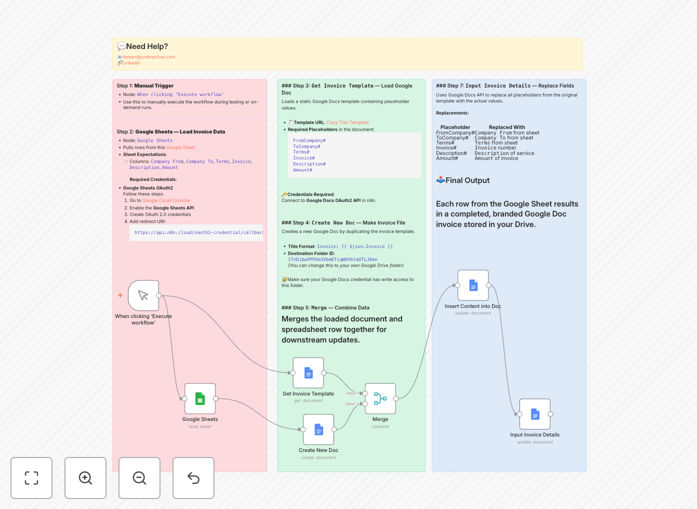
What This Workflow Does
Manual invoice creation is a tedious, error-prone process that drains valuable time from your team. This automation solves that by connecting your data source (Google Sheets) directly to your document creation tool (Google Docs). Whenever you add a new client, project, or billing entry to your spreadsheet, the workflow automatically generates a fully formatted, branded invoice document.
The system pulls structured data—client details, services, amounts, terms—and inserts them into a pre-designed template. What used to take 10-15 minutes per invoice now happens in seconds, with zero manual intervention. This ensures consistency across all client communications while eliminating costly data entry mistakes.
How It Works
Step 1: Data Extraction
The workflow reads your Google Sheet containing invoice data. Each row represents a unique invoice with columns for client information, line items, totals, and payment terms.
Step 2: Template Loading
It accesses your pre-designed Google Docs invoice template containing placeholder markers for dynamic data insertion.
Step 3: Document Creation
A new Google Doc is created as a copy of your template, automatically named and organized in your specified Drive folder.
Step 4: Data Merging
The system replaces all placeholder markers in the document with actual values from your spreadsheet—client names, amounts, dates, and descriptions.
Step 5: Delivery & Organization
The completed invoice is saved to your Drive, ready for review, sharing, or integration with your email system for automatic client delivery.
Pro tip: Add a timestamp column to your Google Sheet to trigger invoices automatically on specific dates, creating a completely hands-free recurring billing system.
Who This Is For
This automation is ideal for freelancers, small agencies, consultants, and service-based businesses that bill clients regularly. If you're currently copying data from spreadsheets into document templates, sending manual invoices via email, or struggling with billing consistency across team members, this workflow will transform your operations. It's particularly valuable for businesses with recurring clients, project-based billing, or multiple team members handling invoicing.
What You'll Need
- A Google Workspace account with access to Sheets and Docs
- A Google Sheet structured with invoice data (client, amount, description, etc.)
- A Google Docs invoice template with placeholder markers
- n8n instance (cloud or self-hosted) with Google OAuth credentials configured
- Basic understanding of how to import and activate n8n workflows
Quick Setup Guide
1. Download the template using the button above and import it into your n8n instance.
2. Connect your Google Sheets and Google Docs credentials via OAuth in n8n.
3. Update the workflow nodes with your specific Google Sheet ID and Docs template ID.
4. Test with a single row of data to ensure the invoice generates correctly.
5. Schedule the workflow to run automatically (daily, weekly, or on-demand).
Pro tip: Create a dedicated "Invoices" folder in Google Drive for the workflow to use. This keeps all generated documents organized and easily accessible for your team.
Key Benefits
Save 2-3 hours weekly per team member by eliminating manual invoice creation. What used to be a 15-minute task per invoice becomes instantaneous.
Eliminate 100% of data entry errors that occur during manual copying between systems. The automation ensures perfect data transfer every time.
Maintain perfect brand consistency across all client communications by using your standardized template for every invoice.
Scale your billing operations effortlessly as you add more clients or projects—the system handles increased volume without additional work.
Improve cash flow visibility by having all invoices systematically organized and easily accessible for tracking and follow-up.