n8n Google Sheets Gmail Accounts Receivable

Automated invoice payment reminders with Google Sheets and Gmail

Never miss a payment follow-up again with this systematic n8n workflow that sends reminders automatically based on your invoice tracking sheet

Download Template JSON · n8n compatible · Free
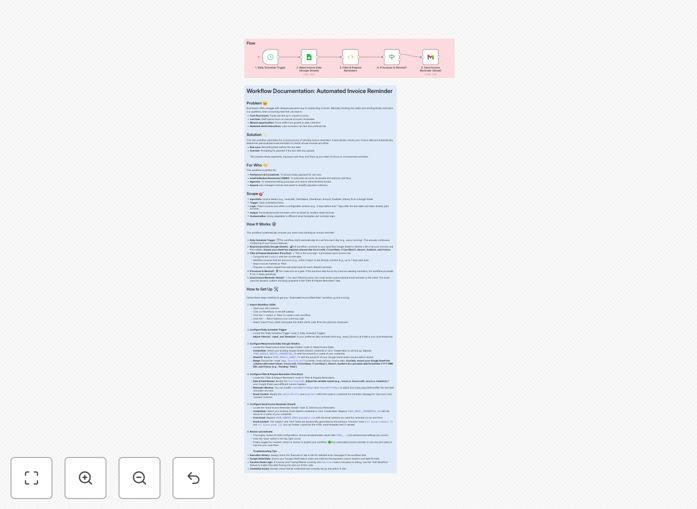
Screenshot of n8n workflow for automated invoice reminders

What This Workflow Does

Late payments create cash flow problems for 60% of small businesses. This n8n workflow automates your entire invoice follow-up process, ensuring timely payment reminders without manual effort. It connects your Google Sheets invoice tracker with Gmail to send personalized reminders at optimal intervals.

The system reduces days sales outstanding (DSO) by automatically identifying overdue invoices, determining appropriate reminder timing, and sending professional communications. You maintain complete control over messaging while eliminating the risk of human oversight in tracking payment deadlines.

How It Works

1. Daily Invoice Status Check

The workflow runs each morning, scanning your Google Sheets invoice log for any payments due or overdue. It evaluates each invoice against your payment terms to determine if a reminder is needed.

2. Reminder Logic Processing

For each overdue invoice, the system checks how many days past due and which reminder stage (1st, 2nd, or final notice) should be sent. This follows your configured escalation sequence.

3. Personalized Email Generation

Using your email templates, the workflow creates personalized messages with invoice details, due amounts, and payment instructions. It can include late fees if applicable.

4. Automated Sending via Gmail

The system sends reminders through your Gmail account with professional formatting and tracking. Each sent reminder is logged back to your sheet with timestamp.

Pro tip: Create different email templates for first reminders (friendly) versus final notices (firm) to maintain appropriate tone at each stage.

Who This Is For

This automation benefits any business that sends invoices and deals with late payments:

  • Freelancers and consultants billing by project
  • Small businesses with Net 30 payment terms
  • Service providers with recurring client billing
  • Companies using Google Sheets for basic accounting
  • Teams wanting to standardize collections processes

What You'll Need

  1. n8n account (self-hosted or cloud)
  2. Google Sheets invoice tracker with due dates and amounts
  3. Gmail or Google Workspace account
  4. Basic email templates for reminders
  5. Payment terms defined (Net 15, Net 30, etc.)

Quick Setup Guide

  1. Download the JSON template file
  2. Import into your n8n instance
  3. Connect your Google Sheets and Gmail accounts
  4. Map your spreadsheet columns to the workflow fields
  5. Customize email templates and reminder timing
  6. Test with a few sample invoices
  7. Activate the daily schedule trigger

Key Benefits

Reduce DSO by 15-30%: Systematic follow-ups significantly decrease average payment times compared to sporadic manual reminders.

Save 5+ hours monthly: Eliminate the time spent tracking due dates and composing reminder emails for each overdue invoice.

Improve client relationships: Consistent, professional communications prevent awkward ad-hoc chasing while maintaining payment accountability.

Complete audit trail: Every sent reminder is logged with timestamp, creating documentation for collections efforts if needed.

Scalable collections: The system handles 10 or 10,000 invoices with equal reliability, growing with your business.

Frequently Asked Questions

Common questions about invoice reminder automation

Most businesses follow a 3-reminder system: First reminder at 7 days past due, second at 14 days, and final notice at 30 days. The exact timing depends on your payment terms and customer relationships. Automation ensures consistency while allowing customization of timing and messaging for different client segments.

For high-value clients, you might extend the intervals or add personal calls between automated emails. The workflow can be configured to flag certain accounts for manual follow-up while handling routine reminders automatically.

Effective payment reminders should include: Invoice number and date, original due date, current balance due, payment methods accepted, and clear instructions for payment. Professional yet friendly tone works best. Automated templates can personalize these elements while maintaining brand consistency across all communications.

Later stage reminders should reference previous communications and may include consequences of non-payment (late fees, service suspension). Always provide multiple contact methods for questions or disputes to prevent frustration.

Automation reduces days sales outstanding (DSO) by 15-30% on average. It eliminates human error in tracking due dates, ensures timely follow-ups, and creates audit trails. Businesses report 40-60% faster payments when using systematic reminder workflows compared to manual processes.

The consistency of automated reminders also improves client relationships by removing variability in collections approaches. Staff can focus on exceptions and complex cases rather than routine follow-ups, increasing overall collections efficiency.

When properly configured, automated reminders actually improve relationships. Key is personalization and escalation logic. Start with polite reminders, then progressively firm. Include options for payment plans or dispute resolution. Automation lets you focus personal attention on truly problematic accounts while maintaining professional follow-ups for routine cases.

Clients appreciate consistency and clarity in payment expectations. Automated systems prevent emotional or inconsistent communications that sometimes occur with manual collections efforts.

Net 15 or Net 30 terms are most automation-friendly. Shorter terms (7-10 days) may require too frequent reminders. For recurring clients, consider milestone-based billing. The workflow can adapt to any terms, but consistency across clients simplifies automation setup and reduces exceptions needing manual handling.

Include terms clearly on invoices and in contracts. Automated systems work best when payment expectations are unambiguous from the outset. Consider offering small discounts for early payment to incentivize timely remittance.

The Google Sheets integration automatically logs each sent reminder with timestamp. You can add columns for reminder stage (1st, 2nd, final), response status, and next action date. This creates a complete audit trail and prevents duplicate or missed communications while providing visibility into collection efforts.

For legal protection, maintain these records for at least your statute of limitations period. The automated system provides documentation showing reasonable collection efforts if disputes arise.

Yes, GrowwStacks specializes in tailored accounts receivable automation. We can build workflows that integrate with your existing accounting software, add escalation rules for VIP clients, include SMS reminders, or create exception handling for disputed invoices. Our solutions typically reduce late payments by 40-70% while maintaining positive client relationships.

Custom automations can incorporate your unique billing cycles, client tiers, payment plans, and approval workflows. We'll design a system that matches your collections philosophy while maximizing efficiency.

Need a Custom Invoice Reminder System?

This free template is a starting point. Our team builds fully tailored automation systems for your specific needs.