Zapier Google Sheets LinkedIn Indeed Hiring

Automated Job Applications & Status Tracking

Apply to jobs automatically from Google Sheets, track application status on LinkedIn & Indeed, and get notified of updates. Transform your job search from manual to automated.

Download Template JSON · n8n compatible · Free
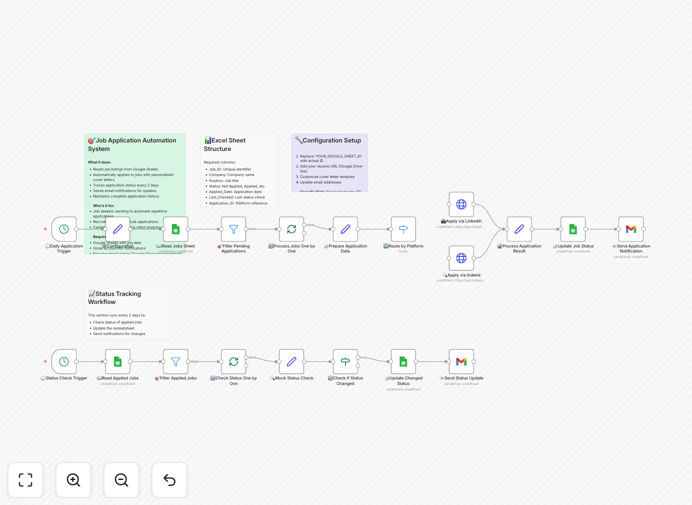
Automated job application workflow diagram showing Google Sheets connected to LinkedIn and Indeed with status tracking

What This Workflow Does

Job searching is a time-consuming, repetitive process that often feels like a full-time job itself. Between finding openings, tailoring applications, submitting materials, and then anxiously checking for updates across multiple platforms, it's easy to get overwhelmed and miss opportunities.

This automation solves that problem by turning your job search into a systematic, hands-off operation. It reads job listings from your Google Sheet, automatically applies to positions on LinkedIn and Indeed, tracks each application's status, and sends you notifications when anything changes—from interview invitations to rejections. You maintain complete control through a simple spreadsheet while the system handles the repetitive work.

The workflow transforms job searching from a reactive, stressful activity into a proactive, organized system. Instead of spending hours each day manually applying and checking statuses, you can focus on networking, interview preparation, and skill development while the automation works in the background.

How It Works

The system operates on two synchronized schedules that work together to manage your entire application lifecycle.

1. Daily Application Processing

Every weekday morning, the workflow scans your Google Sheet for new job entries marked "Not Applied" with Medium or High priority. For each qualified position, it extracts the job URL, detects whether it's LinkedIn, Indeed, or another platform, and submits your application using your pre-configured resume and cover letter template.

2. Intelligent Platform Detection

The system analyzes each job URL to determine the correct platform and uses the appropriate submission method. For LinkedIn, it can simulate form submissions; for Indeed, it can use their application system; for other platforms, it can send emails or use custom API integrations.

3. Real-Time Status Tracking

Once applications are submitted, the workflow updates your spreadsheet with submission timestamps and generates unique tracking IDs. Every two days, it checks back with each platform to monitor for status changes—moving applications from "Applied" to "Under Review," "Interview Scheduled," or other categories.

4. Smart Notification System

When status changes occur, you receive immediate email notifications with all relevant details. The system also prevents duplicate applications by checking your submission history and manages rate limiting to avoid being flagged by job platforms.

Who This Is For

This automation is perfect for active job seekers, career changers, recruitment agencies, and anyone managing multiple applications simultaneously. It's particularly valuable for:

Tech professionals applying to 50+ positions during a job search who need to track numerous applications across different companies and platforms.

Recruitment agencies that need to submit candidates to multiple job postings while maintaining detailed tracking for client reporting.

Career coaches helping clients manage their job search process with better organization and follow-up systems.

Recent graduates entering competitive job markets who need to maximize their application volume while maintaining quality tracking.

What You'll Need

  1. A Google account with access to Google Sheets (free tier works perfectly)
  2. A Gmail account for receiving status notifications
  3. Your resume hosted online (Google Drive, Dropbox, or personal website)
  4. An n8n instance (cloud or self-hosted) to run the automation
  5. LinkedIn and Indeed accounts (for the full automated application features)
  6. Basic understanding of how to set up API credentials in n8n

Pro tip: Start with a test run using 2-3 job applications to verify everything works before scaling up. This helps you refine your cover letter templates and ensure platform compatibility.

Quick Setup Guide

Getting started takes about 30 minutes. Follow these steps to deploy your automated job search system:

  1. Download the template using the button above and import it into your n8n instance.
  2. Create your job tracking Google Sheet with the required columns: Job_ID, Company, Position, Status, Applied_Date, Last_Checked, Application_ID, Notes, Job_URL, and Priority.
  3. Set up credentials in n8n for Google Sheets and Gmail using OAuth2 authentication.
  4. Configure the workflow settings by updating the "Set Configuration" node with your spreadsheet ID, resume URL, and email address.
  5. Test with one job listing to ensure applications submit correctly and notifications arrive as expected.
  6. Activate the workflow and let it run on its scheduled intervals (daily applications, bi-daily status checks).

The system will now automatically process your job applications while you focus on more strategic aspects of your career search.

Key Benefits

Save 10+ hours weekly by eliminating manual application submission and status checking across multiple platforms. What used to be a daily chore becomes a background process.

Never miss a follow-up opportunity with instant notifications when application statuses change. You'll know immediately when you move to interview stages or need to send thank-you notes.

Apply to 3x more positions with the same time investment by automating the submission process. The system can process applications while you sleep or focus on other priorities.

Maintain perfect organization with a centralized dashboard of all applications, their statuses, and next steps. No more spreadsheets falling out of sync with reality.

Reduce application anxiety by removing the constant manual checking of portals and emails. The system monitors everything and alerts you only when action is needed.

Frequently Asked Questions

Common questions about job search automation and integration

Automated job application tracking is a system that manages your entire job search process. It reads job listings from a spreadsheet, submits applications to platforms like LinkedIn and Indeed, and then monitors the status of each application. Instead of manually checking emails and portals, you get automatic updates when your application status changes, saving hours each week and ensuring you never miss a follow-up opportunity.

This approach transforms job searching from a reactive, manual task into a proactive, systematic process. You maintain a master list of target positions, and the automation handles the repetitive submission and tracking work while you focus on interview preparation and networking.

Automation improves job searching by increasing efficiency, reducing errors, and providing better organization. It ensures consistent application submissions, eliminates human error in tracking, and allows you to apply to more positions in less time. Most importantly, it provides real-time status updates so you can focus on interview preparation rather than administrative tracking.

For example, instead of spending 2-3 hours daily checking statuses and submitting applications, you might spend 30 minutes weekly reviewing your dashboard and preparing for interviews. This efficiency gain can reduce a 3-month job search to just 6 weeks while improving your interview success rate through better preparation time.

Absolutely. The workflow is designed to be extensible. While it includes templates for LinkedIn and Indeed, you can easily add connections to other job boards like Glassdoor, ZipRecruiter, or company career pages. The system works by detecting the platform from the job URL and routing to the appropriate application logic.

For custom job boards or company career sites, you can add additional HTTP request nodes or browser automation steps. The modular design means you can build a library of application methods for different platforms, creating a comprehensive job search system that covers all your target companies and industries.

The workflow includes built-in safeguards to maintain professionalism. It introduces random delays between applications to mimic human behavior, allows for personalized cover letter templates, and respects each platform's rate limits. You can also configure it to apply only to jobs matching specific criteria, ensuring you're targeting relevant positions.

Best practices include customizing your cover letter for each application category, applying during business hours, and maintaining a reasonable application volume (10-15 per day maximum). The system supports A/B testing of different resume versions and cover letter approaches to optimize your response rates without appearing automated.

The workflow is built on n8n, which makes it easy to update when platforms change their interfaces. Since you control the automation logic, you can modify the HTTP requests or API calls as needed. For major platforms like LinkedIn, the community often shares updated workflows, and you can monitor application success rates to quickly identify when adjustments are needed.

We recommend setting up simple monitoring that alerts you if application success rates drop below a certain threshold. This early warning system gives you time to investigate and update your automation before missing significant opportunities. The modular design means you only need to update the specific platform node, not your entire workflow.

Google Sheets provides enterprise-grade security with encryption at rest and in transit. For additional privacy, you can use a separate Google account for job searching, enable two-factor authentication, and limit sharing permissions. The workflow only requires read/write access to your specific job tracking sheet, not your entire Google Drive, minimizing security exposure.

For highly sensitive searches (executive positions, confidential career moves), you can self-host the data using n8n's internal database or connect to more secure alternatives like Airtable or Notion. The workflow's data layer is abstracted, making it easy to switch storage solutions without changing your application logic.

Most job seekers spend 10-15 hours weekly searching and applying. Automation can reduce this to 1-2 hours for maintenance and strategy. The system handles application submission, status checking, and notification sending automatically. Over a 3-month job search, this saves 100+ hours that can be redirected toward networking, skill development, and interview preparation.

The time savings compound when you consider the mental energy regained. Instead of constant platform checking and application anxiety, you have a reliable system working for you. This allows for more strategic job searching—focusing on quality networking, tailored applications for dream positions, and thorough interview preparation rather than volume-based spraying.

Yes, GrowwStacks specializes in building custom automation solutions for recruitment teams and staffing agencies. We can create systems that handle high-volume applications, integrate with your ATS, include AI-powered resume matching, and generate detailed analytics on application performance.

Our team works with you to understand your specific workflow and build a solution that scales with your hiring needs. Whether you need multi-user dashboards, candidate scoring algorithms, or integration with niche job boards, we can develop a tailored system that fits your exact requirements and improves your recruitment efficiency by 60-80%.

  • Custom integrations with your existing ATS/CRM systems
  • AI-powered candidate-job matching algorithms
  • Multi-user dashboards with role-based permissions
  • Advanced analytics on application conversion rates

Need a Custom Job Search Automation?

This free template is a starting point. Our team builds fully tailored automation systems for your specific business needs.