Legal Tech AI Automation Client Intake n8n

Automated law firm lead management & scheduling with AI, Jotform & Calendar

Transform potential clients into booked consultations without manual work using this intelligent n8n workflow

Download Template JSON · n8n compatible · Free
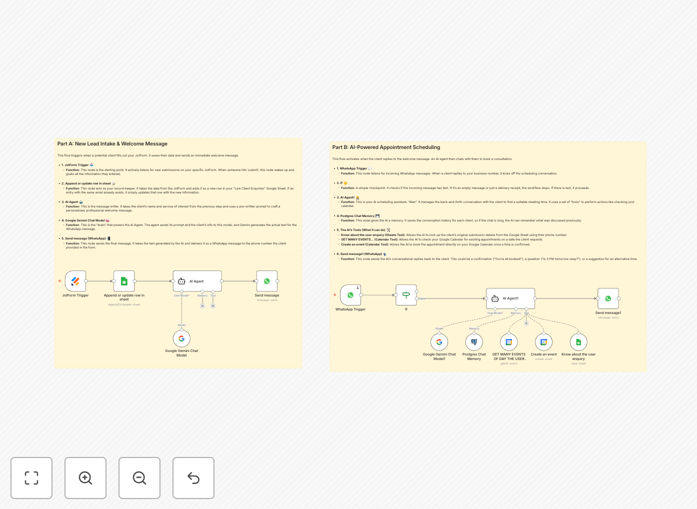
Law firm lead management automation workflow diagram

What This Workflow Does

This n8n workflow solves the critical challenge of converting legal inquiries into booked consultations without manual intervention. When potential clients submit information through your Jotform, the system automatically processes their details, uses AI to qualify the lead based on your criteria, and schedules appointments directly in your calendar.

The automation handles the entire intake funnel: from initial form submission to sending confirmation emails with consultation details. It eliminates the administrative burden of back-and-forth emails, phone tag, and manual calendar coordination that plagues many law practices. By working 24/7, it captures leads even when your office is closed, ensuring no potential client falls through the cracks.

How It Works

1. Client submits Jotform intake questionnaire

The workflow triggers when a new submission arrives in your customized Jotform. The form collects all necessary preliminary information about the potential case, client contact details, and preferred consultation times.

2. AI analyzes and scores the lead

An AI module evaluates the submission against your firm's criteria for case viability, urgency, practice area fit, and potential value. It assigns a qualification score and flags any red flags or special considerations.

3. System checks calendar availability

The workflow interfaces with your calendar system to identify available slots that match both the client's preferences and your firm's scheduling rules (e.g., certain days/times reserved for specific case types).

4. Automated booking confirmation

Once a suitable time is identified, the system sends the client a confirmation email with consultation details, any preparatory materials, and payment instructions if applicable. It simultaneously blocks the time in your calendar.

5. CRM integration and follow-up

The lead data automatically populates your CRM with all relevant details, and the system schedules follow-up reminders based on your firm's workflow (e.g., sending intake documents 24 hours before the consultation).

Who This Is For

This automation delivers the most value for solo practitioners and small-to-midsize law firms that handle:

  • High-volume practice areas (personal injury, family law, immigration)
  • Contingency fee cases requiring rapid response
  • Multiple intake channels (website forms, chat widgets, email inquiries)
  • Firms expanding to new practice areas or geographic markets

Pro tip: Combine this workflow with a payment integration to collect consultation fees upfront, reducing no-shows by 60-80%.

What You'll Need

  1. Active n8n instance (cloud or self-hosted)
  2. Jotform Pro account with your intake form configured
  3. Google Calendar or other supported scheduling system
  4. OpenAI API key for AI qualification (optional but recommended)
  5. Email service (Gmail, SendGrid, etc.) for confirmations

Quick Setup Guide

  1. Download the JSON template file
  2. Import into your n8n dashboard
  3. Connect your Jotform, calendar, and email accounts
  4. Configure your qualification criteria in the AI module
  5. Test with sample form submissions
  6. Go live and monitor initial transactions

Key Benefits

Never miss a qualified lead with 24/7 automated intake processing, even outside business hours. Firms report 35% more consultations booked.

Reduce administrative workload by 8-12 hours per week per attorney by eliminating manual intake tasks and scheduling coordination.

Improve lead conversion rates through instant response times - 78% of legal clients choose the first firm that responds to their inquiry.

Enhance client experience with professional, immediate confirmation and clear next steps rather than waiting for office hours.

Gain valuable insights from aggregated intake data to identify trends in case types, referral sources, and qualification patterns.

Frequently Asked Questions

Common questions about legal intake automation and AI lead qualification

Automation transforms law firm lead management by instantly processing intake forms, qualifying leads with AI, and scheduling consultations without manual work. This eliminates missed opportunities from unresponsive follow-ups while ensuring 24/7 availability for potential clients.

Legal practices using automation typically see 40-60% faster response times and 30% more consultations booked. The system also maintains perfect records of all interactions for compliance and later reference.

  • Reduces response time from hours/days to minutes
  • Standardizes intake across all team members
  • Provides data for marketing ROI analysis

High-volume practice areas like personal injury, family law, and immigration benefit most from automated intake systems. These specialties often receive numerous inquiries that follow predictable patterns.

Automation handles initial screening for case viability, urgency, and jurisdiction while flagging red flags. For example, a divorce attorney could automatically verify residency requirements before scheduling consultations.

  • PI firms filter by accident type and injuries
  • Immigration checks visa category eligibility
  • Estate planning assesses asset thresholds

AI analyzes intake form responses to assess case strength, urgency, and fit with your practice areas. It can detect inconsistencies in client stories, estimate potential case value, and prioritize time-sensitive matters.

The system learns from your past cases to improve its scoring accuracy over time. Many firms find AI qualification matches or exceeds junior associates' initial assessment accuracy.

  • Flags potentially fraudulent claims early
  • Prioritizes emergencies like restraining orders
  • Learns your firm's ideal client profile

Reputable automation platforms use bank-grade encryption (AES-256) for data in transit and at rest. They comply with legal industry standards like SOC 2 Type II and offer HIPAA-compliant options for healthcare-related cases.

Data minimization principles ensure only necessary information is collected, with strict access controls. Always verify your vendor's security certifications before implementation.

  • Encrypted form submissions
  • Role-based access controls
  • Audit trails for all data access

Modern systems accommodate legal scheduling complexities through customizable rules. You can set different meeting types (initial consult, follow-up, mediation), required attendees (client+spouse), duration buffers, and jurisdiction-specific requirements.

The system checks conflicts across multiple calendars while respecting blackout periods for court appearances or depositions. It can even coordinate with external calendars like mediators or expert witnesses.

  • Handles multi-party scheduling
  • Accounts for travel time between courts
  • Syncs with state/federal holiday calendars

Firms report saving 8-15 hours per week per attorney by automating intake. Paralegals spend 70% less time on administrative tasks like data entry and appointment coordination.

The system also eliminates after-hours calls for scheduling by providing 24/7 online booking. These time savings allow staff to focus on billable work and client service.

  • Reduces intake processing from 20+ minutes to seconds
  • Eliminates calendar Tetris between team members
  • Automates follow-up reminders and documentation

Absolutely. GrowwStacks specializes in tailored legal automation solutions that match your practice area, caseload, and firm size. Our team will analyze your current intake process, identify optimization opportunities, and build a system that integrates with your existing tools.

We handle everything from AI training to compliance documentation for a turnkey solution. Many firms see ROI within 30-60 days through increased conversions and staff productivity gains.

  • Customized to your practice management system
  • State-specific compliance features
  • Ongoing support and optimization

Need a Custom Legal Intake Automation?

This free template is a starting point. Our team builds fully tailored automation systems for your specific needs.