What This Workflow Does
Manual lead qualification is a bottleneck for sales teams. Prospects fill out a form, then wait hours—or days—for someone to review their submission, assign a score, update the CRM, and send a follow-up. This delay kills conversion rates and wastes sales time on administrative tasks.
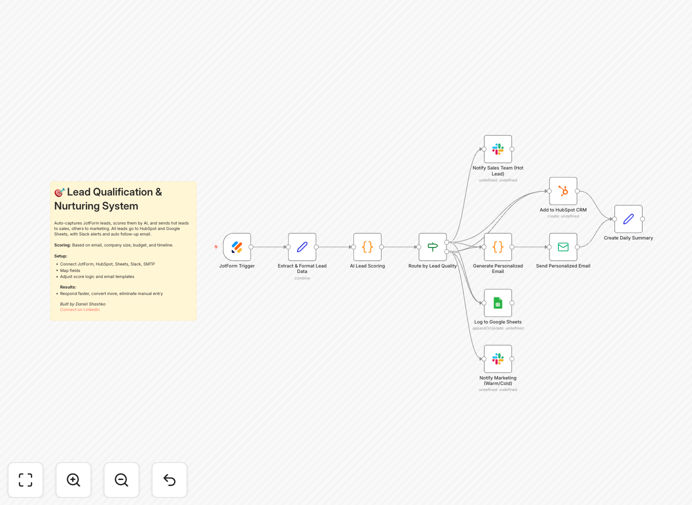
This automation solves that by turning a JotForm submission into a fully processed, scored, and nurtured lead in seconds. It captures the lead data, runs an intelligent scoring algorithm based on email domain, company size, budget, and timeline, categorizes the lead as Hot, Warm, or Cold, logs it to HubSpot and Google Sheets, alerts the sales team via Slack for hot leads, and sends a personalized follow-up email—all automatically.
The result: your sales team spends zero time on data entry, responds to hot leads instantly, and your marketing team automatically nurtures warm and cold leads with tailored content. You eliminate human error, ensure consistent follow-up, and convert more leads.
How It Works
Step 1: Capture Form Submission
The workflow starts when a prospect submits your JotForm lead capture form. It instantly pulls all submitted data—name, email, company, phone, company size, budget range, and timeline.
Step 2: AI Lead Scoring
An AI scoring node evaluates the lead based on predefined rules. Email domain quality (corporate vs. personal), company size, budget indication, and urgency each contribute points. The lead receives a score from 0–100.
Step 3: Route by Score
Based on the score, the workflow splits the lead into three paths: Hot (75+ points), Warm (50–74), or Cold (0–49). Hot leads trigger immediate sales alerts; warm and cold leads go to marketing nurture sequences.
Step 4: Update CRM & Spreadsheet
All leads, regardless of score, are simultaneously added to HubSpot CRM with custom properties (lead_score, lead_tier, etc.) and logged to a Google Sheets tracker for reporting and analysis.
Step 5: Notify & Follow Up
Hot leads generate a Slack notification to your sales channel with full details and notes. A personalized, urgent follow-up email is sent via SMTP. Warm and cold leads receive a different, educational email designed to move them up the qualification ladder over time.
Pro tip: Adjust the scoring thresholds in the workflow to match your ideal lead profile. If you prioritize budget over timeline, increase the budget point weight.
Who This Is For
This automation is perfect for sales and marketing teams at startups, SMBs, and agencies who rely on inbound leads but struggle with manual processing. It’s especially valuable for:
- Businesses using JotForm for lead generation wanting seamless CRM integration.
- Sales teams drowning in manual data entry and slow response times.
- Revenue operations professionals aiming to improve lead routing accuracy and speed.
- Companies with limited sales staff needing to automate prioritization and follow-up.
- Marketing teams looking to automatically nurture lower-scoring leads with tailored content.
What You'll Need
- A JotForm account with an active lead capture form collecting: Name, Email, Company, Phone, Company Size, Budget Range, Implementation Timeline.
- A HubSpot CRM account (or another CRM you can swap in).
- A Google account with a spreadsheet ready for tracking.
- A Slack workspace with channels for sales and marketing notifications.
- SMTP email credentials (Gmail, SendGrid, etc.) for sending automated follow-ups.
- An n8n instance (cloud or self-hosted) to run the workflow.
Quick Setup Guide
Import and configure this template in about 20–30 minutes:
- Download the template using the button above and import it into your n8n workspace.
- Connect your JotForm trigger by selecting your lead capture form and mapping field names.
- Review the AI scoring node and adjust point values for email domain (25), company size (30), budget (25), and timeline (20) to match your priorities.
- Set up HubSpot CRM node with your credentials and create custom properties: lead_score, lead_tier, budget_range, company_size, timeline.
- Connect Google Sheets and ensure column headers match the output data.
- Configure Slack notifications for your sales and marketing channels.
- Customize email templates in the “Generate Personalized Email” node—add your calendar links, case studies, and value propositions.
- Enter SMTP credentials and sender information in the Send Email node.
- Test the workflow with a dummy form submission to verify scoring, routing, CRM update, Slack alert, and email send.
Key Benefits
Reduce response time from hours to seconds. Hot leads get notified and emailed instantly, capturing prospects when they’re most engaged.
Eliminate manual data entry completely. No copying from forms to CRM or spreadsheets—everything updates automatically.
Ensure consistent, unbiased lead scoring. AI applies the same rules to every lead, removing human inconsistency and bias.
Automatically nurture lower-scoring leads. Warm and cold leads receive tailored educational emails, moving them toward hot status over time.
Gain full visibility with centralized tracking. All leads are logged in HubSpot and Google Sheets for easy reporting and analysis.