AI Automation CRM Integration Calendar Slack Sales

Automated Meeting Prep with AI Research & CRM Integration

Transform daily meeting preparation with AI-powered attendee research, CRM insights, and automated briefing documents delivered to Slack.

Download Template JSON · n8n compatible · Free
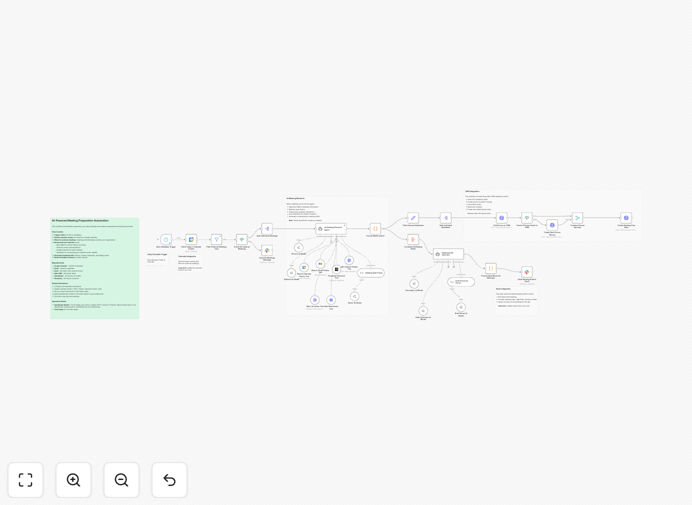
Visualization of automated meeting preparation workflow connecting calendar, AI research, CRM data, and Slack notifications

What This Workflow Does

Manual meeting preparation is a significant time drain for professionals, especially in sales, account management, and executive roles. Researching attendees, reviewing past interactions, and compiling relevant context can consume 15-30 minutes per meeting—time that adds up quickly across a busy week.

This automated workflow eliminates that manual work entirely. It connects to your calendar, identifies external meetings, researches each attendee using AI and your CRM data, and delivers comprehensive briefing documents directly to your Slack channel every morning. You start your day fully prepared for every meeting without spending a minute on research.

How It Works

1. Calendar Monitoring & Filtering

The workflow triggers automatically Monday through Friday at 6 AM, fetching your day's calendar events. It intelligently filters for meetings with external attendees, ignoring internal team meetings where extensive research isn't needed.

2. Multi-Source Attendee Research

For each external meeting, an AI agent researches attendees by pulling data from multiple sources: your CRM (Attio) for relationship history and deal context, Gmail for past email interactions, calendar for previous meeting notes, and external sources like Perplexity for company news and background.

3. Intelligent Brief Generation

The system synthesizes all gathered information into structured meeting briefs. These include attendee background, relationship context, key talking points identified from past communications, strategic objectives, and any recent company developments that might be relevant to the conversation.

4. Formatted Delivery to Slack

Finally, the workflow formats these briefs using Slack's Block Kit and delivers them as organized messages to your designated Slack channel. The formatting ensures easy readability with clear sections, bullet points, and actionable insights highlighted.

Pro tip: Configure the AI prompts to focus on your specific business context. Instead of generic research, train it to extract deal stage from CRM, identify negotiation points from email history, and highlight competitive intelligence relevant to your industry.

Who This Is For

This automation delivers the most value for professionals who regularly engage with external contacts and need to be thoroughly prepared for every interaction. Ideal users include:

  • Sales Teams: Account executives and sales development representatives who need to understand prospects' backgrounds, company context, and past interactions before discovery calls or demos.
  • Account Managers: Customer success professionals who manage multiple client relationships and need quick refreshers before check-in meetings or quarterly business reviews.
  • Executives & Founders: Leaders who have numerous external meetings with partners, investors, or potential clients and need concise, relevant context without preparation time.
  • Consultants & Agencies: Service providers who meet with various clients daily and need to quickly recall project details, past discussions, and action items.

What You'll Need

  1. Google Calendar with OAuth2 credentials configured in n8n
  2. Gmail with OAuth2 access for reviewing past email interactions
  3. Slack Workspace with bot token permissions and access to your target channel
  4. Attio CRM (or similar CRM) with API bearer token for accessing contact and deal information
  5. OpenRouter API Key (or alternative AI model access) for AI-powered research and synthesis
  6. Perplexity API Key for external company research and news gathering

Quick Setup Guide

  1. Import the template into your n8n instance using the downloaded JSON file.
  2. Configure credentials for all required services (Google Calendar, Gmail, Slack, Attio, OpenRouter, Perplexity) in your n8n credentials management.
  3. Update personal identifiers: Replace placeholder email addresses with your actual calendar email and update the Slack channel ID to your target channel.
  4. Adjust AI models in the OpenRouter nodes based on your preferences, budget, and specific model availability.
  5. Test manually with a day that contains external meetings to verify data flow and formatting.
  6. Activate the schedule trigger to run automatically Monday through Friday at your preferred morning time.

Implementation note: The template uses multiple AI models through OpenRouter for different processing stages—research versus formatting. This allows cost optimization by using appropriate models for each task rather than one expensive model for everything.

Key Benefits

Save 2-5 hours weekly per employee previously spent on manual meeting research and preparation. This time can be redirected toward higher-value activities like strategic planning or client engagement.

Improve meeting outcomes with consistently prepared attendees who have relevant context, identified talking points, and strategic objectives clearly defined before conversations begin.

Enhance CRM data utilization by automatically surfacing relevant relationship history, deal context, and past interactions that might otherwise be overlooked in manual preparation.

Scale preparation consistency across teams, ensuring every team member enters meetings with the same level of preparation regardless of experience level or time constraints.

Reduce preparation stress by eliminating the morning scramble to research attendees, creating a more organized and predictable start to each workday.

Frequently Asked Questions

Common questions about meeting preparation automation and AI integration

AI can transform meeting prep by automatically researching attendees, summarizing past interactions, and identifying key talking points from emails, CRM data, and public sources. This saves 2-3 hours per week per employee and ensures you enter every meeting with relevant, up-to-date context about the people and companies you're engaging with.

The system works while you sleep, processing information from multiple systems that would take humans much longer to compile manually. It also learns from your feedback—the more you use it, the better it becomes at highlighting the information that matters most to your specific role and industry.

Integrating your calendar with your CRM creates a seamless feedback loop. Meeting outcomes and notes automatically update contact records, ensuring your sales team has complete relationship history. This eliminates manual data entry, reduces errors, and helps identify follow-up opportunities immediately after meetings conclude.

For sales teams, this integration means deal stages can be updated automatically based on meeting outcomes, next steps are logged without manual input, and the entire team has visibility into prospect engagement. It turns meetings from isolated events into connected data points in your sales pipeline.

Most professionals spend 15-30 minutes researching each external meeting attendee. With automation, this time drops to zero. For someone with 10 external meetings weekly, that's 2.5-5 hours saved. The system works while you sleep, delivering comprehensive briefs to your Slack channel before your workday begins.

Beyond time savings, the quality of research often improves because automation can process more data sources simultaneously than a human could manually. It also ensures consistency—every meeting gets the same thorough preparation, not just the "important" ones you have time to research.

An effective automated meeting brief should include: attendee background and role, recent company news, past interaction history from your CRM, key discussion points from previous emails, mutual connections, and strategic objectives for the meeting. AI can synthesize this from multiple sources into a concise, actionable document.

The best briefs also include "conversation starters" based on the attendee's recent social media activity or company announcements, potential objections based on past interactions, and recommended next steps based on the meeting's purpose. This transforms the brief from an information dump into a strategic playbook for the conversation.

When implemented correctly with proper authentication and data handling protocols, AI meeting prep automation is secure. The workflow should only access necessary data (meeting titles, attendee emails), process it through secure API connections, and never store sensitive information externally. Self-hosted automation platforms provide additional control.

Best practices include using OAuth2 for authentication, limiting API permissions to read-only where possible, processing data within your infrastructure rather than sending it to external services, and regularly auditing what information is being accessed. Many enterprises use similar automations with strict compliance requirements successfully.

Customize the AI prompts to focus on your specific business context. Instead of generic research, configure it to extract deal stage from CRM, identify negotiation points from email history, and highlight competitive intelligence. The system learns from your feedback—initially review briefs and adjust prompts until they deliver precisely what your team needs.

Start with a pilot group that provides regular feedback on what's helpful versus what's noise. Use their input to refine the AI instructions, prioritize certain data sources over others, and adjust the formatting to match how your team actually consumes information. The goal is a brief that feels like it was prepared by your most organized colleague, not a generic template.

Yes, GrowwStacks specializes in building tailored meeting automation systems that integrate with your specific CRM, communication tools, and research sources. We'll design workflows that match your sales process, incorporate your competitive intelligence sources, and deliver briefs in your preferred format—whether Slack, email, or your internal wiki.

Our custom implementations typically include: integration with your existing tech stack, training for your team on maintaining and adjusting the system, ongoing optimization based on usage feedback, and scaling the automation across departments as you grow. We start with a free consultation to understand your specific needs and existing systems.

  • Integration with Salesforce, HubSpot, or your custom CRM
  • Custom AI prompts trained on your industry terminology
  • Multi-channel delivery (Slack, Teams, email, mobile push)
  • Advanced analytics on meeting preparation effectiveness

Need a Custom Meeting Preparation Automation?

This free template is a starting point. Our team builds fully tailored automation systems for your specific business needs.